Tools / Impact Wrenches
User Manual for Hilti SIW 4AT-22 Cordless Impact Wrench
Comprehensive user guide for the Hilti SIW 4AT-22 cordless impact wrench. Includes setup, operation, safety, maintenance, and troubleshooting instructions.
Quick answers from the manual
Quick answer
- The Hilti SIW 4AT-22 is a cordless impact wrench designed for tightening and loosening nuts, bolts, anchors, and wood screws. It features 3 torque settings and uses Hilti Nuron B 22 series batteries. p. 6, 10
Key actions
- Insert battery p. 12, 13
- Set torque p. 14
First start
- Charge the battery fully, then push it into the product until it engages with an audible click. p. 12, 13
Show 4 more answers Show less
Problems and fixes
Product does not work
Push the battery in until it engages with an audible click.
p. 15Maintenance and reset
- Clean air vents with a dry, soft brush. Use a slightly damp cloth for the housing. Do not use silicone-based cleaning agents. p. 14
Technical specifications
| Parameter | Value | Meaning | Pages |
|---|---|---|---|
| Rated voltage | 21.6 V | Operating voltage | p. 11 |
| Weight | 1 kg | Weight without battery | p. 11 |
Where to find it in the PDF
- Overview p. 10
- Technical data p. 11
Table of contents
Manual images
Click an image to enlargeQuick guide from the manual
The Hilti SIW 4AT-22 is a professional-grade cordless impact wrench designed for tightening and loosening nuts, bolts, anchors, and wood screws. Before using the tool, ensure the battery is fully charged and properly inserted. Always wear appropriate personal protective equipment, including eye and ear protection. The tool features three torque settings and an electronic speed control switch.
Description
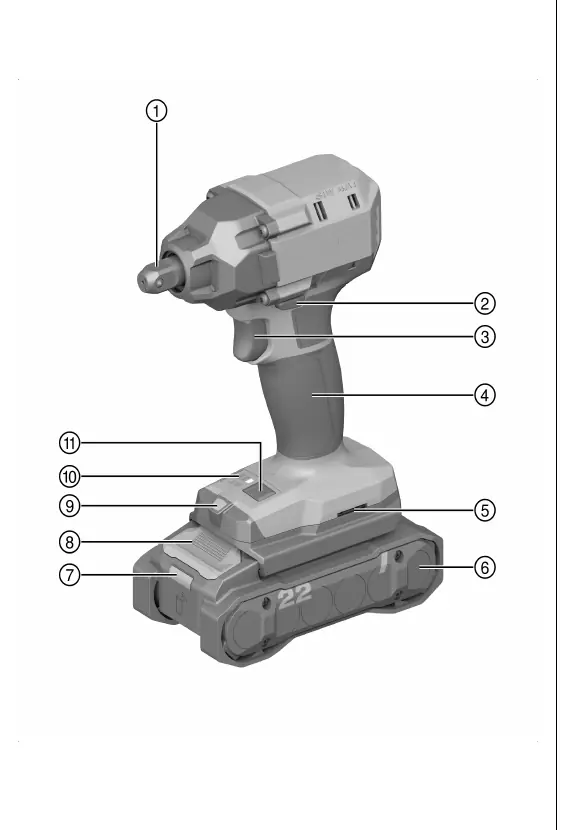
The SIW 4AT-22 is a hand-held cordless impact wrench. Key components include the chuck (square drive with half ball), forward/reverse switch with interlock, control switch with electronic speed control, and a mode selector for torque adjustment.
Intended use
This tool is designed for tightening and releasing nuts, bolts, anchors, and wood screws. It should only be used for applications that do not require a specific torque to avoid over-tightening or damaging the workpiece.
Preparation
- Charging: Use only approved Hilti chargers for the B 22 series batteries.
- Inserting Battery: Push the battery into the product until it engages with an audible click.
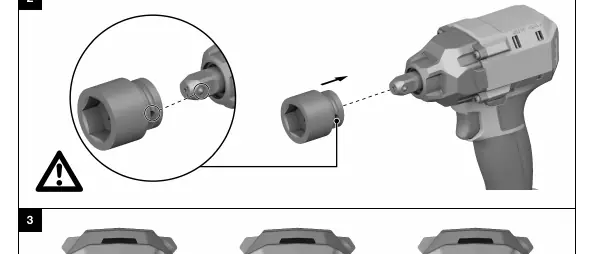
- Installing Accessory: Clean the connection end of the accessory tool, align the notch with the ball on the square drive, and push until it engages.
Operation
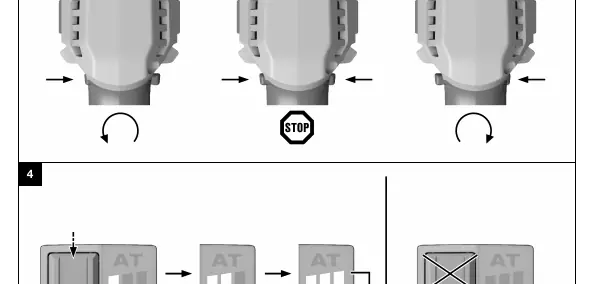

- Forward/Reverse: Use the forward/reverse switch to select the desired rotation direction. The switch is locked in the middle position.
- Torque Setting: Press the torque selector button repeatedly until the desired setting is displayed.
- Switching On/Off: Press the control switch to start; speed is controlled steplessly by the pressure applied. Release the switch to stop.
Care and maintenance
Always remove the battery before performing maintenance. Clean the housing with a slightly damp cloth and keep air vents clear. Do not use silicone-based cleaning agents. Regularly check all visible parts for damage and ensure controls function correctly.
Troubleshooting
If the tool does not work, check if the battery is fully inserted. If the control switch is locked, check the forward/reverse switch position. If the tool or battery gets very hot, switch off immediately and contact Hilti Service.
Manufacturer information
Hilti Corporation
Practical help
Common problems
Product does not work
Ensure the battery is fully inserted until it engages with an audible click.
Control switch is locked
Ensure the forward/reverse switch is not in the middle position.
Running speed drops suddenly
Battery is discharged; replace and charge the battery.
Product or battery gets very hot
Switch off immediately, remove battery, allow to cool, and contact Hilti Service.
Before use
- Charge the battery fully
- Check that the battery is securely seated
- Ensure the accessory tool is clean and properly installed
- Check for hidden electrical cables or pipes in the work area
- Wear appropriate personal protective equipment (eye, ear, head protection)
Show more Show less
Specs in practice
- Rated voltage
- 21.6 V
- Torque adjustment
- 3 settings
Images and diagrams
- Overview of the tool components (chuck, switches, battery, etc.)
- Accessory tool installation procedure
- Forward/reverse rotation switch settings
- Torque setting adjustment
Model compatibility
- Use only Hilti Nuron B 22 series batteries
- Use only approved Hilti chargers

Manual page author
Michael Turner
Technical manual editor