Tools / Grinding Tools
Hilti X-TB F3 Fastening Tool User Guide
Quick guide for the Hilti X-TB F3 fastening tool. Learn how to set up, operate, check status indicators, and troubleshoot error codes for optimal performance.
Quick answers from the manual
Quick answer
- The Hilti X-TB F3 is a fastening tool system. It must be operated between -15°C and +10°C. Ensure the FX 3-A power unit is correctly connected to the FX 3-HT tool before powering on. p. 1
Key actions
- Connect the FX 3-A power unit to the FX 3-HT tool. p. 1
- Check status indicators (rdY) before operation. p. 1
First start
- Ensure the tool is off, connect the power unit, and power on to check for the 'rdY' status. p. 1
Show 4 more answers Show less
Problems and fixes
H10 Error Code
Check system connections and power unit status.
p. 1Error codes
| Code | Meaning | Action | Pages |
|---|---|---|---|
| H10 | System error requiring attention. | Check connections and power unit. | p. 1 |
Technical specifications
| Parameter | Value | Meaning | Pages |
|---|---|---|---|
| Operating Temperature | -15°C to +10°C | Allowable ambient temperature range. | p. 1 |
| Charger C 53 Limit | > 0°C | Minimum temperature for charger operation. | p. 1 |
Where to find it in the PDF
- Operation and Setup Guide p. 1
Table of contents
Manual images
Click an image to enlargeQuick guide from the manual
This guide provides essential instructions for the Hilti X-TB F3 fastening tool. Always ensure the tool is used within the specified temperature range to maintain performance and safety.
Operating temperature limits
The tool is designed to operate within specific ambient temperature conditions:
- Operating range: -15°C to +10°C.
- Charger (C 53) usage: Only use the charger when the temperature is above 0°C.
Setup and connection

- Ensure the power unit (FX 3-A) is switched off.
- Connect the FX 3-A power unit to the FX 3-HT tool.
- Follow the connection sequence as indicated in the diagram to ensure proper seating of cables.
Operation and status indicators
Once connected, switch the unit on. Observe the status indicators on the control panel:

- rdY: Indicates the tool is ready for operation.
- HAC: Status indicator for system operation.
- noH: Status indicator for system operation.
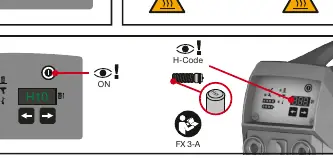
- H-Code: Displays specific system codes (e.g., H10) for diagnostics.
Troubleshooting
If the tool displays an error code, such as H10, refer to the H-Code section on the display. Ensure all connections are secure and the battery/power unit is properly attached. If the tool fails to reach the 'ready' state (rdY), check the power connection and ambient temperature.
Storage and transport
Always disconnect the tool and power unit before storage. Store the equipment in the provided carrying case to protect the components from damage and environmental factors.
Manufacturer information
Hilti Corporation
Practical help
Common problems
Tool not ready (rdY not displayed)
Check power connections and ensure ambient temperature is within the -15°C to +10°C range.
H10 Error Code
Indicates a system error. Check the connection between the FX 3-A and FX 3-HT units.
Before use
- Verify ambient temperature is between -15°C and +10°C.
- Ensure the FX 3-A power unit is switched off before connecting.
- Connect the FX 3-A to the FX 3-HT tool securely.
- If using the C 53 charger, ensure the temperature is above 0°C.
Show more Show less
Specs in practice
- Operating Temperature
- The tool must be used between -15°C and +10°C.
- C 53 Charger Limit
- Do not use the charger in temperatures at or below 0°C.
Images and diagrams
- Steps 1-3: Proper connection sequence of the power unit to the tool.
- Steps 4-5: Interpreting the control panel status lights and codes.
- Step 6: Correct usage conditions for the C 53 charger.
- Step 11: Identifying H-Code errors on the display.
Model compatibility
- Compatible with FX 3-A power unit.
- Compatible with FX 3-HT tool.
- Compatible with C 53 charger.

Manual page author
Emily Carter
User documentation editor