Tools / Saws
Hilti SCW 22-A Cordless Circular Saw User Manual
Quick guide for the Hilti SCW 22-A cordless circular saw. Includes setup, operation, maintenance, and troubleshooting steps.
PDF source: polski · summary: English
Quick answers from the manual
Quick answer
- The Hilti SCW 22-A is a cordless circular saw designed for sawing wood, plastics, drywall, and composite materials. p. 14, 28
Key actions
- Changing the saw blade p. 16, 30, 31
- Adjusting cutting depth p. 17, 31
First start
- Charge the battery fully before first use. p. 16, 30
Show 4 more answers Show less
Problems and fixes
LEDs indicate nothing
Insert battery, charge battery, or bring to correct temperature.
p. 19, 34Error codes
| Code | Meaning | Action | Pages |
|---|---|---|---|
| 1 LED blinks | Battery discharged | Charge the battery | p. 19, 34 |
| 4 LEDs blink | Overloaded or overheated | Release switch or allow to cool | p. 19, 34 |
Technical specifications
| Parameter | Value | Meaning | Pages |
|---|---|---|---|
| Rated voltage | 21.6 V | Operating voltage | p. 14, 29 |
Where to find it in the PDF
- Product Overview p. 2, 13, 28
- Troubleshooting p. 19, 34
Table of contents
Manual images
Click an image to enlargeQuick guide from the manual
The Hilti SCW 22-A is a cordless circular saw designed for professional use in sawing wood, wood-like materials, plastics, drywall, and composite materials. This manual provides essential instructions for safe operation, maintenance, and troubleshooting.
Product Overview
The saw features an auxiliary grip, switch-on interlock, on/off switch, and a pivoting guard. It includes a hose connector for dust removal and a parallel fence for precise cuts.
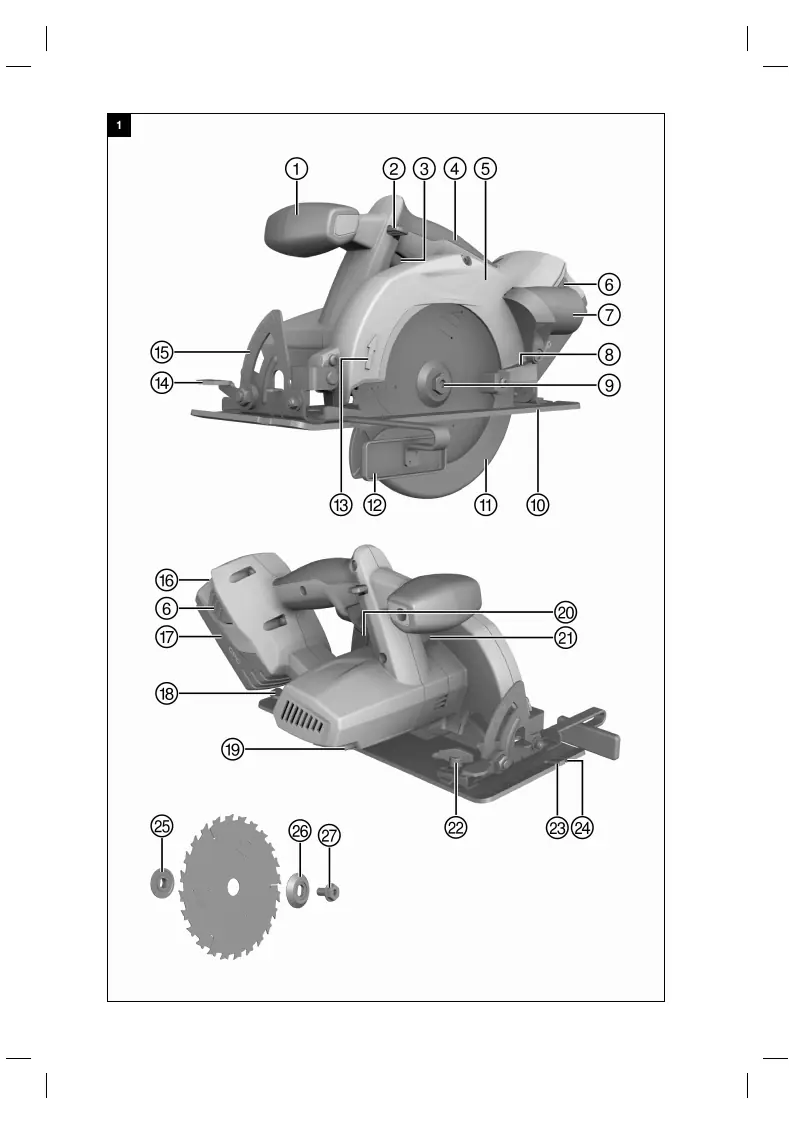
Operation
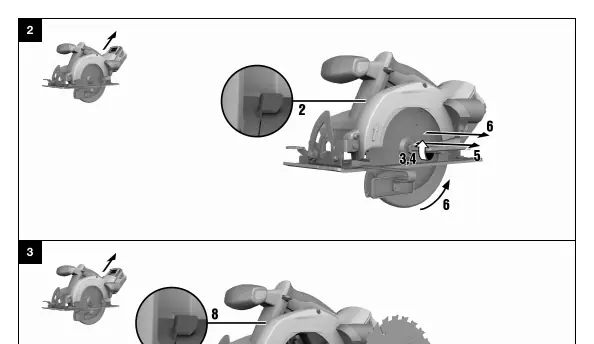
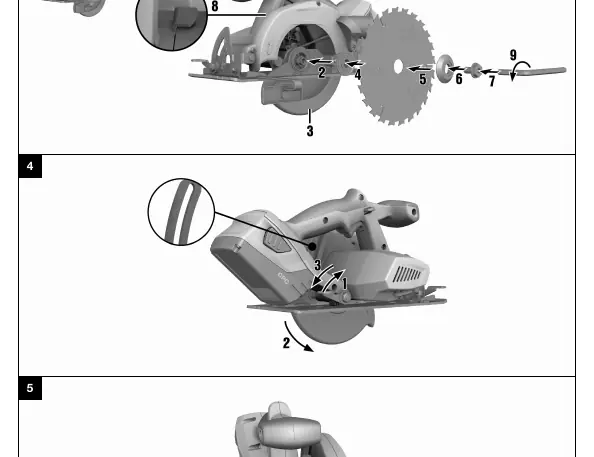
Charging and Inserting the Battery
Before first use, charge the battery fully using an approved Hilti charger. Ensure the battery contacts are clean and dry. Insert the battery into the holder until it clicks into place.
Changing the Saw Blade
- Remove the battery.
- Insert the hex key into the clamping screw.
- Press and hold the spindle lock button.
- Turn the clamping screw with the hex key until the spindle lock button engages.
- Loosen the screw in the direction of the rotation arrow and remove the outer flange.
- Open the pivoting guard and remove the blade.
- To fit a new blade, reverse the process, ensuring the blade is sharp and matches the technical requirements.
Adjustments
Cutting Depth: Release the depth adjustment lever, lift the saw, and set the desired depth. The depth should be 5-10 mm greater than the material thickness.
Cutting Angle: Release the angle adjustment lever, pivot the saw to the desired angle, and tighten the lever.
Maintenance
Regularly clean the air vents with a dry brush. Use a slightly damp cloth to clean the casing; do not use silicone-based cleaning agents. After maintenance, ensure all safety guards are fitted and functioning correctly.
Troubleshooting
If the saw fails to operate, check the battery charge status and ensure it is fully inserted. If the saw is overloaded, release the switch and try again. If the chip channel is blocked, clean it thoroughly.
Manufacturer information
Hilti Corporation
Practical help
Common problems
LEDs indicate nothing
Check if the battery is fully inserted, charged, or at the correct temperature.
Saw speed drops suddenly
Battery is discharged or advance pressure is too high.
No suction power
Clean the chip/dust channel.
Before use
- Charge battery fully
- Check contacts are clean and dry
- Ensure saw blade is sharp and correct size
- Check guard function
Show more Show less
Specs in practice
- Rated voltage
- 21.6 V
- Max. cutting depth
- 57 mm
Images and diagrams
- Overview of product components
- Blade removal/fitting sequence
- Depth and angle adjustment
- Fence installation
Model compatibility
- Use only Hilti Li-ion batteries of the B 22 series
- Use only Hilti battery chargers of the C4/36 series

Manual page author
Michael Turner
Technical manual editor