Tools / Drills
Operating instructions for Hilti SFD 22-A
Quick guide for the Hilti SFD 22-A cordless drill/driver. Includes setup, operation, maintenance, and troubleshooting steps.
PDF source: polski · summary: English
Quick answers from the manual
Quick answer
- The Hilti SFD 22-A is a cordless drill/driver designed for driving and removing screws and for drilling in steel, wood, and plastic. p. 20
Key actions
- Insert battery p. 22
- Select gear p. 22
First start
- Charge the battery fully before using it for the first time. p. 22
Show 4 more answers Show less
Problems and fixes
The power tool does not work.
Push the battery in until it engages with an audible double click or charge the battery.
p. 24Maintenance and reset
- Clean the air vents carefully with a dry brush. p. 23
Technical specifications
| Parameter | Value | Meaning | Pages |
|---|---|---|---|
| Rated voltage | 21.6 V | Operating voltage | p. 20 |
| Max Torque | 28 Nm | Maximum torque | p. 21 |
Where to find it in the PDF
- Product Overview p. 20
- Technical Data p. 20, 21
Table of contents
Manual images
Click an image to enlargeQuick guide from the manual
The Hilti SFD 22-A is a professional-grade, hand-held cordless drill/driver. It is designed for driving and removing screws and for drilling in steel, wood, and plastic. Before using the tool, ensure the battery is fully charged and the tool is in good working condition.
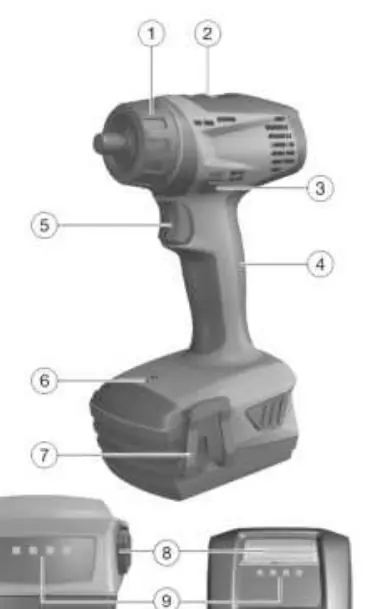
Product Overview
The tool features a hex socket with a locking sleeve, a torque and drilling mode selector ring, a gear selector switch, a forward/reverse selector switch with a safety lock, a control switch with electronic speed control, and an integrated lamp.
Operation
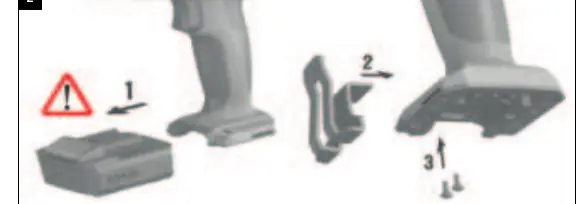
Inserting and Removing the Battery
Ensure the battery contacts and the tool contacts are free of foreign matter. Push the battery into the tool until it engages with an audible click. To remove, press the release buttons and pull the battery out.
Fitting the Accessory Tool
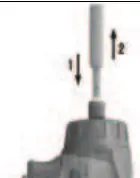
The tool has a 1/4" hex socket with a locking sleeve. To insert a tool: set the forward/reverse switch to the middle position, push the locking sleeve forward, insert the tool into the chuck as far as it will go, and release the locking sleeve.
Selecting Gear and Rotation
Use the gear selector switch to choose the appropriate gear. Use the forward/reverse selector switch to set the desired direction of rotation. The switch is locked when in the middle position.
Maintenance
Regularly clean the air vents with a dry brush. Use only a slightly damp cloth to clean the casing; do not use silicone-based cleaning agents as they may damage plastic parts. Keep the battery clean and free from oil and grease.
Troubleshooting
If the tool does not work, check if the battery is fully inserted or discharged. If the tool does not work and an LED flashes, the battery may be discharged or too hot/cold. If the switch is locked, ensure the forward/reverse switch is not in the middle position.
Manufacturer information
Hilti Corporation
Practical help
Common problems
Tool does not work
Ensure the battery is fully inserted and charged. If the problem persists, contact Hilti Service.
Tool does not work and one LED flashes
The battery is discharged or at an extreme temperature. Charge the battery or bring it to the recommended operating temperature.
On/off switch is locked
Ensure the forward/reverse switch is not in the middle position.
Battery does not engage with an audible click
Clean the retaining lugs on the battery.
Before use
- Charge the battery fully before first use
- Ensure battery contacts are clean and dry
- Check that the tool is switched off before inserting the battery
- Verify the belt hook is securely fitted (if used)
Show more Show less
Specs in practice
- Rated voltage
- 21.6 V
- Speed 1st gear
- 0-600 rpm
- Speed 2nd gear
- 0-1800 rpm
Images and diagrams
- 1: Hex socket with locking sleeve
- 2: Torque and drilling mode selector ring
- 3: Gear selector switch
- 4: Forward/reverse selector switch
- 6: Control switch
Model compatibility
- Use only Hilti Li-ion batteries of the B22 series
- Use only Hilti battery chargers of the C4/36 series

Manual page author
Michael Turner
Technical manual editor