Electronics / Televisions
User Manual for Hisense 120L5H Laser TV
Comprehensive user guide for the Hisense 120L5H Laser TV. Includes installation instructions, geometric image correction, remote control setup, maintenance tips, and troubleshooting.
Table of contents
Manual images
Click an image to enlargeQuick guide from the manual
This guide provides essential information for setting up and operating your Hisense 120L5H Laser TV. Before operating the device, ensure you have read the safety instructions, particularly regarding laser safety and ventilation requirements. The device requires a stable surface and proper clearance for airflow to prevent overheating.
Device Diagram
The Laser TV features a lens with a laser, eye protection sensor, power button, and power indicator on the front. The rear panel contains various ports, including HDMI, USB, LAN, Digital Audio Out, and antenna inputs. Always connect cables before positioning the device.
Installation and Ventilation
Proper installation is critical for performance and safety:
- Ventilation: Ensure at least 20 cm of free space on the sides and 5 cm on the back for air circulation. Do not block air vents.
- Mounting: Use only manufacturer-recommended cabinets or stands. Never place the unit on unstable surfaces.
- Power: Connect to a mains socket with a protective earthing connection. Ensure the power plug is easily accessible.
Adjusting the Projected Image
The Laser TV includes geometric correction features to align the image with your screen:
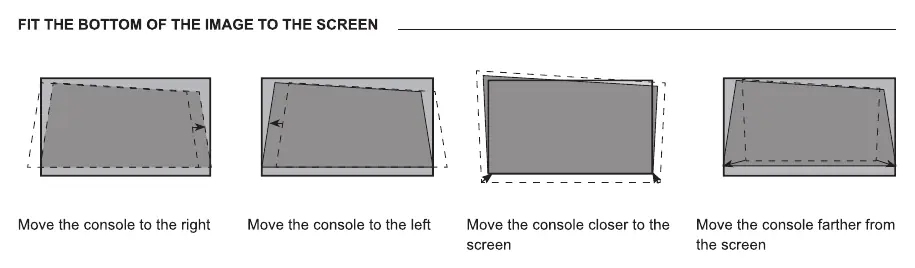
- Auto Geometric Correction: Use the mobile app to scan the QR code and follow on-screen instructions to align the grid.
- Manual Correction: Use the remote control to adjust focus and position points to fit the projected image into the screen frame.
- Levelling: Use the levelling feet to adjust the console height and angle until the image is parallel to the screen.
Remote Control Usage
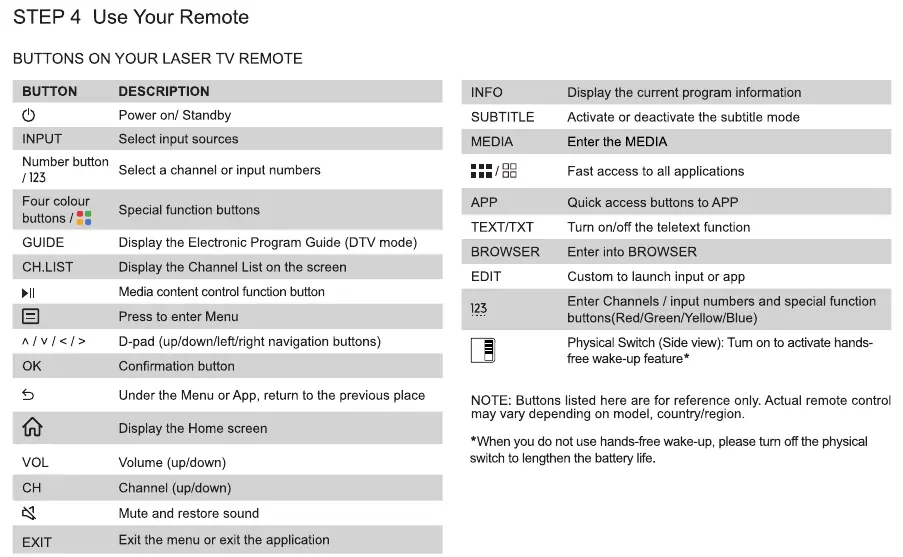
The remote control uses infrared for standard operation and Bluetooth for advanced features. To pair the remote, keep it within 3 meters of the Laser TV and press any button (except power and mic). If the remote is unresponsive, check the batteries and ensure they are installed correctly.
Maintenance and Troubleshooting
Maintenance: Clean the lens and exterior only with a soft, dry cloth. Do not use chemicals or solvents. Keep the device away from high humidity and dust.
Troubleshooting: If you experience issues, try turning the device off and on again. Check all cable connections, ensure the antenna is positioned correctly, and verify that the input source is selected properly. If the picture is black and white, unplug the device for 60 seconds and check color saturation settings.
Product Specifications
The Hisense 120L5H features a 120-inch screen size with 3840 x 2160 resolution. It consumes 350W of power and operates on 120-240V. It supports various digital receiving systems including DVB-T/T2, DVB-C, and DVB-S/S2.
Manufacturer information
Hisense
Practical help
Common problems
No sound or picture
Check if the power cord is plugged in, the unit is not in standby mode, and the external source is correctly connected and selected.
Sound but no picture or black and white picture
Unplug the device for 60 seconds, check color saturation settings, and try different channels.
Remote control does not work
Ensure the remote has power, batteries are correctly installed, and try re-pairing if using Bluetooth.
Sound and picture are blurry or distorted
Check antenna direction, position, and connection. Ensure no other electric appliances are causing interference.
Before use
- Ensure the surface is stable and can support the weight of the Laser TV.
- Verify that there is at least 20 cm of space on the sides and 5 cm at the back for ventilation.
- Connect all necessary cables (HDMI, Antenna, etc.) before positioning the device.
- Ensure the power outlet is grounded.
- Remove batteries from the remote if not in use for a long period.
Specs in practice
- Power Consumption
- 350W during operation; ensure your circuit can handle this load.
- Operating Temperature
- 5°C - 40°C (41°F - 104°F); do not operate outside this range.
Images and diagrams
- The rear panel diagram identifies ports for HDMI, USB, LAN, and antenna connections.
- The ventilation diagram illustrates the required clearance distances for proper airflow.
- The geometric correction diagrams show how to adjust the feet to align the image with the screen.
Model compatibility
- The device supports DVB-T/T2, DVB-C, and DVB-S/S2 receiving systems.
- Wireless network requires a router supporting DHCP; WPA, WEP, and WPA2 security systems are supported.
- USB ports support 5V; do not exceed 1A current consumption for connected devices.

Manual page author
David Miller
Documentation analyst
Organizes user manual content into clear summaries, with attention to model details, product context, and everyday usability.