Electronics / Televisions
User Manual for Hisense 100U7NQTUK Smart TV
Get started with your Hisense 100U7NQTUK 100-inch Mini LED 4K Smart TV. This guide covers stand and wall mount installation, connection instructions, remote control setup, and technical specifications.
Table of contents
Manual images
Click an image to enlargeQuick guide from the manual
This manual provides essential instructions for the safe installation and operation of your Hisense 100U7NQTUK television. Before using the device, ensure you have read the safety instructions, particularly regarding ventilation, stability, and power supply. The TV features an embedded E-Manual accessible via Settings > Support > E-Manual for on-screen help.
Installation
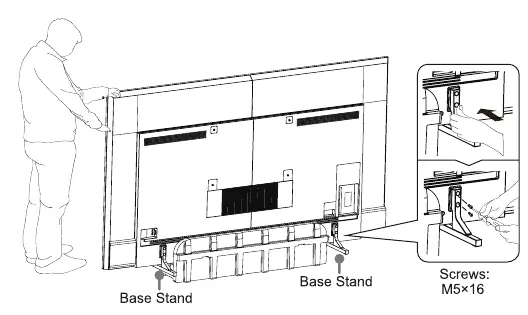
The TV can be installed on a stand or mounted on a wall. Ensure the TV is handled by two people during installation to prevent damage to the screen.
Installing the stand
Insert the base stands into the bottom slots of the TV. Secure each base stand tightly using the provided M5x16 screws. Ensure the TV is steady on a table before removing any protective film.
Wall mount installation
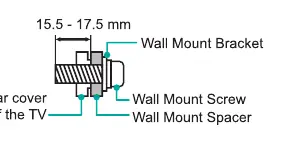
If wall mounting, ensure the bracket supports the weight of the TV. Use the specified 600 x 400 mm hole pattern and M8 screws. Place spacers between the TV and the bracket to ensure proper clearance.
Connections
The TV includes various ports for external devices:
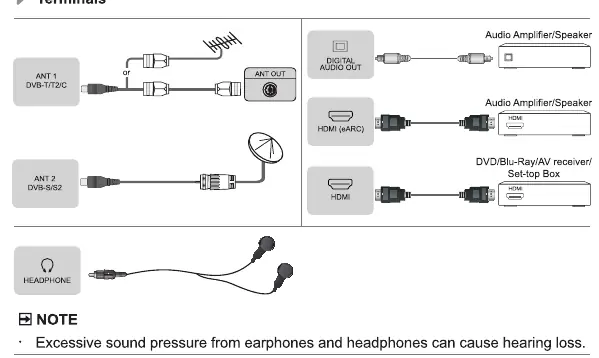
- Antenna/Cable: Connect to ANT 1 (DVB-T/T2/C) or ANT 2 (DVB-S/S2).
- HDMI: Use for audio/video devices, amplifiers, or set-top boxes.
- USB: Supports external storage. Note that USB 3.0 devices require 1A current; high-capacity drives may require external power.
- Network: Connect via LAN cable or built-in Wireless LAN (supports 2.4GHz, 5GHz, and 6GHz).
Remote Control
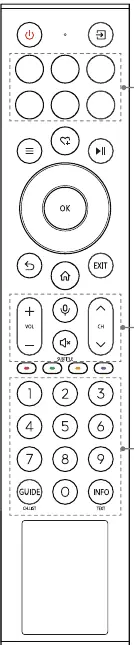
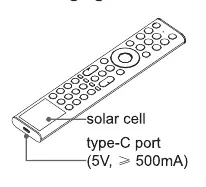
The remote control features a solar cell for charging and a USB-C port for manual charging. To pair the remote, keep it within 3 meters of the TV after powering on and press any button (except power and mic).
Safety and Maintenance
- Ventilation: Maintain at least 10 cm of space on the sides and 20 cm above the unit.
- Cleaning: Unplug the power cord before cleaning. Use a soft, clean, color-neutral cloth. Do not use chemicals or spray liquids directly on the screen.
- Environment: Avoid high humidity, dust, and direct heat sources.
- Image Burn-in: Avoid displaying static images for long periods to prevent permanent image retention.
Manufacturer information
Hisense
Practical help
Common problems
TV does not turn on
Check the power connection and ensure the outlet is live. Wait at least 5 seconds after powering off before turning it on again.
Remote control not working
Ensure the remote is paired (within 3 meters of the TV). If the battery is low, charge it using the solar cell (place face up in light) or a USB-C cable.
Image burn-in
Avoid displaying static images for long periods. If the aspect ratio is set to 4:3 for a long time, image burn may occur.
USB device not recognized or TV reboots
The TV may not support high-capacity mobile hard disks if the impulse current is greater than or equal to 1A.
Before use
- Ensure the stand or wall mount is securely attached.
- Check that the power outlet provides the correct voltage.
- Ensure at least 10cm of space on sides and 20cm above for ventilation.
- Connect antenna or external devices before powering on.
- Remove all protective film after installation.
Specs in practice
- Screen Resolution
- 3840 x 2160 (4K Ultra HD) for high-definition viewing.
- Wireless LAN
- Supports IEEE 802.11a/b/g/n/ac/ax protocols across 2.4GHz, 5GHz, and 6GHz bands.
- Wall Mount Pattern
- 600 x 400 mm VESA standard.
- Operating Temperature
- 41°F - 95°F (5°C - 35°C).
Images and diagrams
- Stand installation requires two people to hold the TV while securing the base stands with M5x16 screws.
- Remote control features a solar cell for charging and a USB-C port (5V, >= 500mA).
Model compatibility
- Wall mount bracket is optional and not included.
- USB 3.0 devices require 1A current; non-standard high-capacity drives may cause rebooting.
- Wireless network security: WPA, WEP, WPA2 are supported.

Manual page author
Emily Carter
User documentation editor
Prepares concise manual descriptions and highlights the most useful setup, operation, and maintenance information for readers.