Electronics / Televisions
User manual for Hisense 120L5H Laser TV
Quick setup guide for the Hisense 120L5H Laser TV. Includes installation steps, geometric correction, remote control pairing, connection diagrams, and troubleshooting tips.
Table of contents
Manual images
Click an image to enlargeQuick Setup Guide
This guide provides essential instructions for setting up your Hisense 120L5H Laser TV. Before beginning, ensure you have all packaged contents, including the Laser TV, remote control, batteries, power cord, and cleaning kit. The screen is not included in the package.
Safety Information
- Laser Safety: This device is a Class 1 Laser Product. Do not look directly at the lens when the device is on, as the laser light may damage your eyes.
- Eye Protection: The device features an eye protection sensor. If the sensor is triggered, the projector will shut down in 5 seconds.
- Handling: Always use two people to move the device. Protect the lens during handling.
- Environment: Keep air vents clear to prevent overheating. Do not place the device in narrow, enclosed, or poorly ventilated spaces.
Installation and Setup
Proper ventilation is critical for the longevity of the Laser TV. Ensure a minimum clearance of 20 cm on the sides and 5 cm on the top of the device. Position the Laser TV parallel to the screen surface. Connect all necessary cables (HDMI, Ethernet, Audio) before powering on the device.
Connections
The Laser TV features various ports for external devices:
- HDMI: Connect DVD players, VCRs, set-top boxes, or game consoles.
- USB: Supports USB memory sticks for media playback. Note: USB 2.0 max current is 500mA; USB 3.0 max current is 1A.
- Audio Out: Use the audio adapter or digital audio adapter for external speakers or amplifiers.
- Antenna/Cable: Connect outdoor VHF/UHF antennas or cable inputs.
Geometric Correction
To ensure the image fits the screen perfectly, use the geometric correction feature:
- Ensure the Laser TV is on a stable surface and the screen is vertically level.
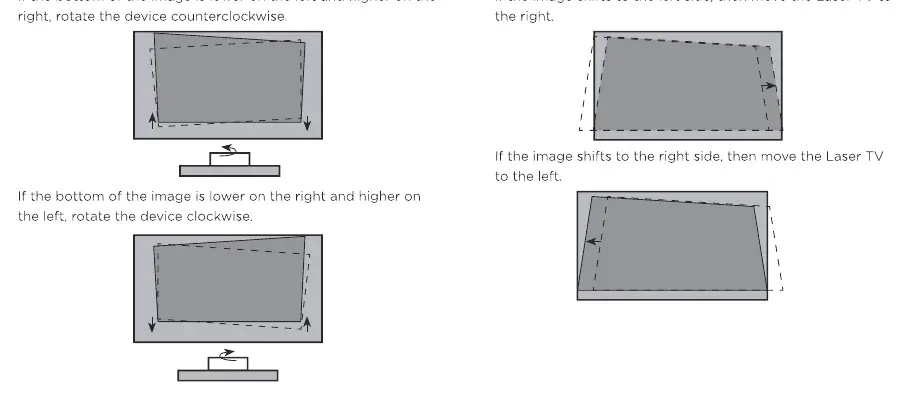
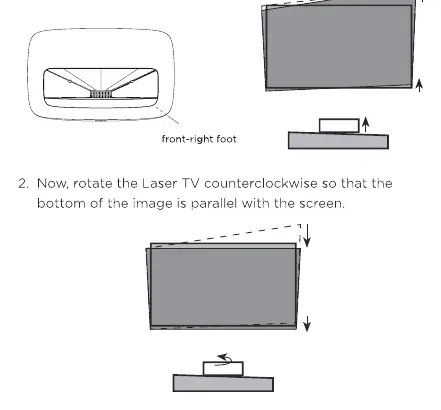
- Use the leveling feet to adjust the height and tilt of the projector.
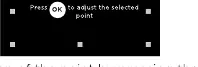
- Access the Screen Setup Menu to perform Automatic Geometric Correction using a mobile device, or perform manual adjustments by selecting points on the screen using the remote control.
- Adjust the corners and borders until the image is parallel with the screen edges.
Remote Control
To pair the remote:
- Power on the Laser TV.
- Keep the remote within 10 feet of the device.
- Press and hold the Back and Home buttons simultaneously for at least 3 seconds to start pairing.
Maintenance
- Do not touch the lens with your hands.
- Clean the lens periodically with a clean cloth or professional optical cleaning kit.
- Do not wipe the device with oil or harsh chemicals.
- If the device has been in a cold environment, allow condensation to evaporate before switching it on.
Troubleshooting
- No sound or picture: Check if the power cord is plugged in, the unit is not in standby mode, and the input source is correct.
- Distorted or wavy picture: Move nearby electric appliances away from the Laser TV or try a different power outlet.
- Remote not working: Check batteries and ensure the remote is paired correctly.
- Clicking sound: This is normal as the cabinet expands and contracts with temperature changes.
Specifications
- Model: 120L5H
- Screen Size: 120 inches
- Resolution: 3840 x 2160 (4K)
- Power Consumption: 350W
- Connectivity: Built-in Wireless (2x2 dual band)
- Operating Temperature: 5°C to 35°C (41°F to 95°F)
Manufacturer information
Hisense
Practical help
Common problems
No sound or picture
Check if the power cord is plugged into a powered AC outlet, press the Power button to exit standby mode, and verify the input source selection.
Distorted or wavy picture
Turn off nearby electric appliances and move them away from the Laser TV, or try plugging the device into a different power outlet.
Remote control does not work
Confirm the Laser TV has power, check if batteries are installed correctly, or re-pair the remote by holding the Back and Home buttons.
Clicking sound from cabinet
This is normal behavior caused by the cabinet expanding and contracting due to temperature changes.
Before use
- Ensure two people are available to move the device.
- Remove protective film from the lens.
- Ensure the device has at least 20 cm of clearance on the sides and 5 cm on top for ventilation.
- Install batteries in the remote control.
- Connect all external cables (HDMI, Antenna, etc.) before powering on.
- Ensure the screen is vertically level.
Specs in practice
- Screen Resolution
- 3840 x 2160 pixels, providing 4K Ultra HD image quality.
- Power Consumption
- 350W during operation; ensure the circuit can handle this load.
- USB Current Limits
- USB 2.0 port supports up to 500mA; USB 3.0 port supports up to 1A. Exceeding this may cause damage or reboots.
- Operating Temperature
- The device must be used between 5°C and 35°C (41°F to 95°F).
Images and diagrams
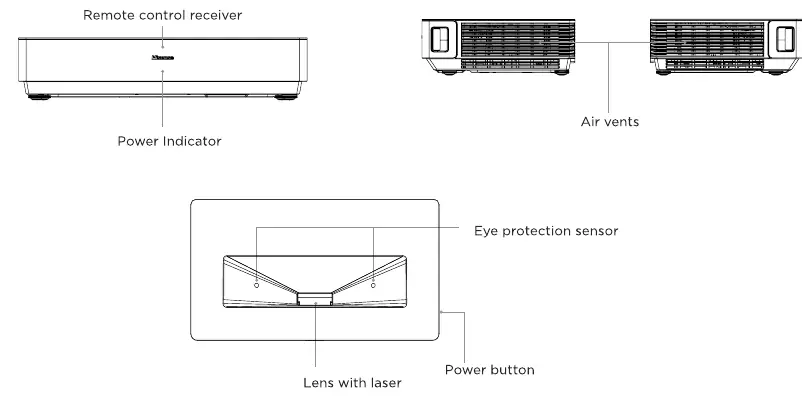
- The Laser TV Diagram identifies the remote receiver, power indicator, air vents, eye protection sensor, and lens.
- The Geometric Correction diagrams illustrate how to rotate the device feet to align the image borders with the screen.
Model compatibility
- Requires a router for internet connectivity.
- USB ports are for browsing photos, music, and movies; not intended for high-power charging.
- The device is compatible with external audio devices via Audio Out or Digital Audio Out.

Manual page author
Emily Carter
User documentation editor
Prepares concise manual descriptions and highlights the most useful setup, operation, and maintenance information for readers.