Home Appliances / Personal Care
Homedics 11" Drift Sandscape ST-200 User Manual
Quick guide for the Homedics 11" Drift Sandscape (ST-200). Includes setup instructions, button functions, maintenance tips, and troubleshooting FAQs.
Quick answers from the manual
Quick answer
- To set up your Homedics Drift Sandscape, remove protective materials, add the sand, place the metal ball in the center, attach the power adapter, and download the app to complete the configuration. p. 3
Key actions
- Power on/off and control p. 3
- Leveling the sand p. 3
First start
- Initial setup steps p. 3
Problems and fixes
Product is loud
Use below 50% speed.
p. 4
Ball not connecting
Use 'clean' design in app.
p. 4Maintenance and reset
- Restarting after 8 hours p. 3
Where to find it in the PDF
- Safety Instructions p. 2
- Setup and Buttons p. 3
- Warranty p. 6
Table of contents
Manual images
Click an image to enlargeQuick guide from the manual
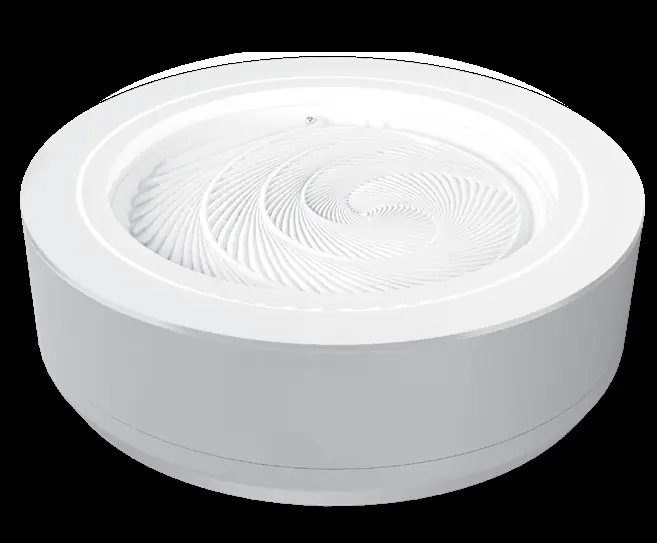
The Homedics 11" Drift Sandscape is a decorative sand table controlled via a mobile app. To begin, remove all protective materials, add the provided sand, place the metal ball in the center, and connect the power adapter. Download the drift Sandscape App to complete the setup and begin operation.
Important safety instructions
- Use this product only for its intended indoor, household use.
- Always place the unit on a firm, flat, level surface.
- Do not use attachments or accessories not recommended by Homedics.
- Use only the supplied AC adapter to avoid damage or risk of harm.
- Never operate if the cord, plug, or housing is damaged.
- Do not run the power cord under carpeting or in areas where it could be a tripping hazard.
- Always unplug the appliance before cleaning.
- Do not place objects on the glass top.
- This unit should not be used by children without adult supervision.
Parts included
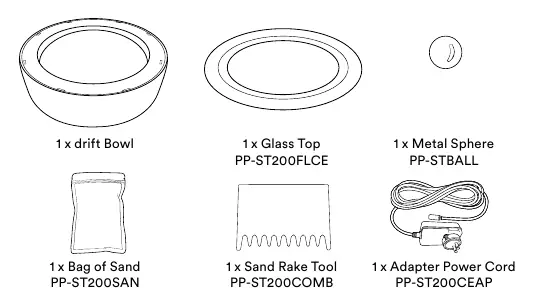
- 1 x Drift Bowl
- 1 x Glass Top
- 1 x Metal Sphere
- 1 x Bag of Sand
- 1 x Sand Rake Tool
- 1 x Adapter Power Cord
Buttons and controls
The unit features two main buttons:
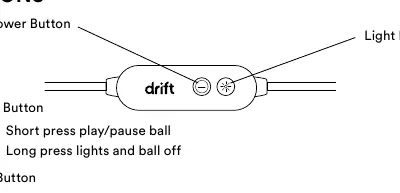
- Power Button: Short press to play/pause the ball. Long press to turn off both lights and the ball.
- Light Button: Short press to cycle through saved colors. Long press to turn lights on/off.
Setup procedure
- Remove all protective materials from the felt surface inside the bowl.
- Pour one bag of sand into the center and use the included rake to level it.
- Place the metal ball into the center of the table; it will automatically find the magnet.
- Place the glass top on the unit.
- Connect the power adapter to the back of the unit and plug it into an outlet.
- Download the drift Sandscape App from the app store and follow the in-app instructions.
Maintenance
- Sand leveling: Over time, sand may build up on the outside. Use the included rake or a flat card to redistribute the sand.
- Cleaning: The glass surface can be cleaned with any standard glass cleaner.
- Operation limit: The product is designed for 8 hours of continuous use. If it stops, restart it via the app or by pressing the power button on the back of the unit.
Troubleshooting
If you encounter issues, consider the following:
- Loudness: The product is louder at full speed. Use it below 50% speed for optimal silence.
- Slow movement: It is normal for the ball to move slowly in the center to maintain intricate designs.
- Sand bunching: Pause the product, remove the metal ball, and level the sand as needed.
- Connectivity: Ensure both the device and your phone are on the same Wi-Fi network (with a password) during initial pairing.
- Ball connection: If the ball is not connecting to the magnet, place it in the middle of the table and select the "clean" design in the app.
Manufacturer information
HoMedics
Practical help
Common problems
Product is loud at full speed
Use the product below 50% speed for optimal silence.
Sand bunching up around the outside
Pause the product, remove the metal ball, and use the rake or a flat card to level the sand.
Ball not connecting to magnet
Place the ball in the middle of the table and choose the "clean" design in the app.
Connectivity issues
Ensure both the device and phone are on the same Wi-Fi network (with a password) during initial pairing.
Before use
- Remove protective materials from the felt surface
- Place on a firm, flat, level surface
- Ensure you are using the supplied AC adapter
- Download the drift Sandscape App
Specs in practice
- Continuous use limit
- The unit is designed for 8 hours of continuous use before needing a restart.
Images and diagrams
- The control panel features a Power Button and a Light Button.
- The parts list includes the bowl, glass top, metal sphere, sand bag, rake, and power adapter.
Model compatibility
- Only use the drift sand included with the sandscape.
- Requires Wi-Fi network with a password for initial pairing.

Manual page author
Emily Carter
User documentation editor
Prepares concise manual descriptions and highlights the most useful setup, operation, and maintenance information for readers.