Furniture / Tables Desks
Famisky Standing Desk Assembly and Operation Guide
Comprehensive assembly and operation guide for the Famisky standing desk, including initialization, memory settings, stroke limit configuration, and troubleshooting error codes.
Table of contents
Manual images
Jump to the sectionQuick guide from the manual
This document provides assembly instructions and operational procedures for the Famisky electric height-adjustable desk. Key requirements include performing a manual reset after initial installation or power loss, ensuring the desk is not touching walls, and maintaining a clear path for movement (at least 20 inches of clearance below). For assembly assistance, contact [email protected].
Safety Precautions
- Keep children and pets away during operation.
- Unplug the power cord during thunderstorms or long periods of inactivity.
- Ensure no obstacles are in the desk's path.
- Operating temperature: 0-40°C.
- Do not disassemble the product privately.
- Anti-collision is not enabled during reset procedures.
Assembly
The assembly process involves connecting the columns to the beams, attaching the feet, mounting the tabletop, and installing the control box and handset. Ensure you distinguish between the left and right short beams. Avoid excessive tightening of screws during assembly. The desk requires an electric drill and a Phillips screwdriver (not included).
Digital Handset Operation
Initialization: Must be performed before the first use or after replacing parts. Press and hold the up and down arrows simultaneously for more than 6 seconds until the legs move down to the lowest position, rebound 2-5 mm, and stop.
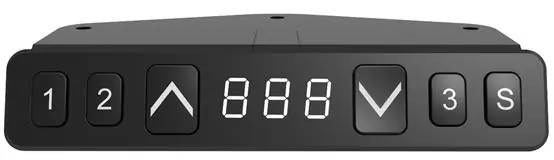
Memory Positions: To save a position, move the desk to the desired height, click the 'S' button, then click button 1, 2, or 3 within 6 seconds.
Settings: You can toggle between centimeters and inches by holding 'S' and the down arrow for 6 seconds. Stroke limits (top and bottom) can be locked by moving to the desired position, holding 'S' and the corresponding button (1 for bottom, 3 for top) for 6 seconds.
Troubleshooting
If an error code appears, refer to these common issues:
- E01: Column failure. Check connections between the column and control box.
- E02: Overuse. The desk ran for more than 2 minutes; wait 18 minutes.
- E04: Initialization anomaly. Re-initialize the desk.
- E05: Key stuck. Check if the handset button is held down.
- E06: Communication interruption. Check the connection between the handset and control box.
Manufacturer information
Famisky
Practical help
Common problems
Desk does not move or shows E01
Check the connection between the column and the control box; ensure it is secure.
Desk stops moving after 2 minutes (E02)
The desk has a duty cycle limit. Wait 18 minutes for the system to reset.
Initialization fails (E04)
Ensure the desk is level and not tilted; restart the initialization process.
Handset buttons unresponsive (E05)
Check if any button is physically stuck or held down by an object.
Before use
- Ensure the desk is not touching the wall.
- Verify there are no obstacles above or within 20 inches below the desk.
- Perform a manual reset (initialization) after assembly.
- Check that all screws are tightened (but not excessively).
- Ensure the environment temperature is between 0-40°C.
Specs in practice
- Initialization
- Required calibration process to sync the legs and set the zero point.
- Anti-collision
- Safety feature that stops movement if an obstacle is detected; disabled during resets.
- Stroke Limit
- Customizable minimum and maximum height boundaries for the desk.
Images and diagrams
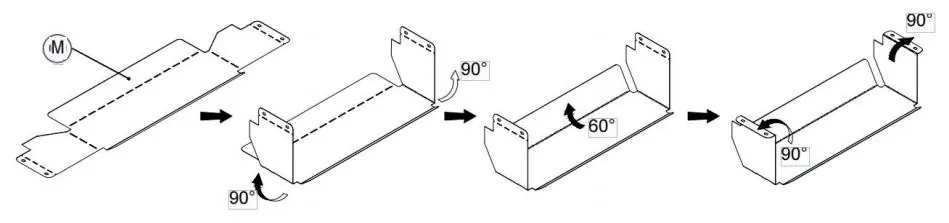
- Step 11 shows the folding and assembly of the cable management bracket.
- Page 12 illustrates the digital handset layout with memory buttons 1, 2, 3, and the 'S' set button.
Model compatibility
- Designed for use with Famisky desktops 48 inches and larger.

Manual page author
Emily Carter
User documentation editor
Prepares concise manual descriptions and highlights the most useful setup, operation, and maintenance information for readers.