General / Other Manuals
Horizon Apprentice S2 1.2m Binding Procedure Addendum
Official binding instructions for the Horizon Apprentice S2 1.2m aircraft, detailing the process to link the receiver to your transmitter using the integrated bind port extension.
Table of contents
Understanding the Binding Process
Binding is the essential process of teaching your aircraft's receiver to recognize and connect exclusively to your specific transmitter. This ensures a secure and reliable link between the controller and the model. While the RTF (Ready-To-Fly) transmitter included with your Apprentice S2 1.2m is factory-bound to the aircraft, you may need to perform this procedure again if you switch transmitters or experience connectivity issues.
Convenient Access for Binding
The Apprentice S2 1.2m is designed for user convenience. An extension is pre-installed in the flight controller's bind port, which is routed to the battery compartment. This allows you to initiate the binding process through the battery door located on the bottom of the aircraft, eliminating the need to remove the wing assembly for access.
Step-by-Step Binding Procedure
To successfully bind your receiver to your transmitter, follow these steps carefully:
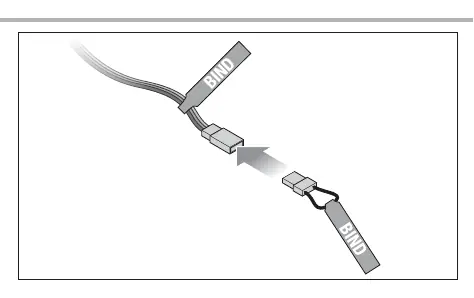
- Ensure the bind plug is inserted into the open end of the bind port extension marked with the label BIND.
- Connect the flight battery to the Electronic Speed Controller (ESC). The orange LED on the receiver will begin to flash continuously, which indicates that the receiver has successfully entered bind mode.
- Power on your transmitter while simultaneously holding down the transmitter's bind button or switch. Please refer to your specific transmitter's manual for detailed instructions on how to activate the bind function on your controller.
- Wait for the binding process to complete. You will know the process is successful when the orange LED on the receiver stops flashing and remains solid.
- Once the connection is confirmed, remove the bind plug from the bind port extension to prevent the receiver from re-entering bind mode during future power cycles.
Always ensure your transmitter is within a reasonable range during the binding process and that no other transmitters are active nearby to avoid interference. If the receiver LED does not turn solid, verify that the battery is fully charged and that the bind plug is securely seated in the extension port. If issues persist, consult the manual provided with your specific transmitter for additional troubleshooting steps related to signal protocols.
Manufacturer information
Horizon Hobby
Practical help
Common problems
Receiver LED does not flash after connecting battery
Ensure the bind plug is fully inserted into the extension port and that the battery is properly connected to the ESC.
Receiver LED does not turn solid
Ensure you are holding the bind button/switch on the transmitter during power-up and that you are using a compatible transmitter protocol.
Before use
- Ensure the transmitter is powered off before starting.
- Verify the bind plug is available.
- Ensure the flight battery is charged.
- Check that the bind port extension is accessible through the battery door.
Images and diagrams
- The diagram illustrates the connection of the bind plug into the extension cable.
- It highlights that the extension is accessible via the battery compartment.
Model compatibility
- The procedure applies to RTF versions of the Apprentice S2 1.2m.
- Refer to your specific transmitter manual for its unique binding button operation.

Manual page author
David Miller
Documentation analyst
Organizes user manual content into clear summaries, with attention to model details, product context, and everyday usability.