Power / Solar Inverters
Huawei MRGF-X Laptop Quick Start Guide
Quick start guide for the Huawei MRGF-X laptop. Learn how to power on, charge, and safely operate your device with this essential manual.
Table of contents
Quick guide from the manual
This guide provides essential instructions for setting up and using your Huawei MRGF-X laptop. Please follow these steps for initial setup and daily operation.
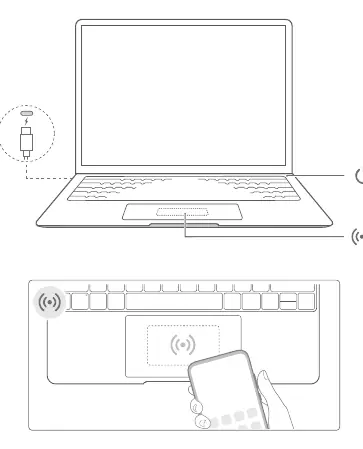
Powering on and charging
- First-time use: Plug the computer into a power supply, and it will turn on automatically.
- Subsequent use: Press and hold the power button until the keyboard lights up.
- Charging: Use the provided adapter and charging cable. The indicator light will blink white while the device is charging.
- Force shutdown: If the system becomes unresponsive, press and hold the power button for more than 10 seconds. Note that this will result in the loss of any unsaved data.
Safety Information
To ensure safe operation and longevity of your device, please adhere to the following guidelines:
- Operating Environment: Use the device in a clean, dry environment. Avoid dusty, damp, or dirty places, and keep away from strong magnetic fields.
- Temperature Limits: The ideal operating temperature is 0°C to 35°C. The storage temperature range is -10°C to +45°C.
- Ventilation: Do not place the device on soft surfaces such as blankets, pillows, or sofas while in use, as this may block air vents and cause overheating.
- Battery Safety: Do not attempt to replace the built-in battery yourself. Keep the battery away from fire, excessive heat, and direct sunlight. Do not disassemble, modify, or crush the battery.
- Hearing Protection: To prevent potential hearing damage, avoid listening at high volume levels for extended periods.
Technical Specifications and Ports
The device features specific power output capabilities for its ports:
- Thunderbolt 4 Port: Can provide up to 5V DC/3A power to other devices.
- USB-C Port: Can provide up to 5V DC/2A power to other devices.
Regulatory and Disposal Information
Please dispose of the product, battery, and packaging according to local waste collection regulations. This device complies with various international standards, including RED 2014/53/EU, RoHS 2011/65/EU, and ErP 2009/125/EC. The 5150 to 5350 MHz frequency range is restricted to indoor use in many regions.
Manufacturer information
Huawei Technologies Co., Ltd.
Practical help
Common problems
Device does not turn on
Plug the device into a power supply for the first time. For subsequent startups, press and hold the power button until the keyboard lights up.
System unresponsive
Perform a force shutdown by pressing and holding the power button for more than 10 seconds.
Device overheating
Ensure the device is not placed on soft surfaces like blankets or sofas, which can block air vents.
Before use
- Ensure the power adapter is connected to a nearby, accessible socket.
- Check that the device is not placed on soft surfaces during use.
- Verify the environment is not dusty, damp, or near magnetic fields.
- Ensure the power adapter meets IEC/EN 62368-1 requirements.
Specs in practice
- Operating Temperature
- 0°C to 35°C
- Storage Temperature
- -10°C to +45°C
- Thunderbolt 4 Port
- Provides up to 5V DC/3A power to other devices.
Images and diagrams
- The diagram shows the laptop with a power cable connection and the power button location.
- The diagram illustrates the wireless connectivity area on the touchpad.
Model compatibility
- The 5150 to 5350 MHz frequency range is restricted to indoor use in: AT, BE, BG, CH, CY, CZ, DE, DK, EE, EL, ES, FI, FR, HR, HU, IE, IS, IT, LI, LT, LU, LV, MT, NL, NO, PL, PT, RO, SE, SI, SK, TR, UK(NI).

Manual page author
Michael Turner
Technical manual editor
Reviews PDF manuals for structure, safety notes, and practical product details so readers can find the right information quickly.