Power / Solar Inverters
User Manual for Huawei SUN2000-100KTL/110KTL/115KTL-M2 Solar Inverter
Comprehensive user manual for the Huawei SUN2000-100KTL, 110KTL, and 115KTL-M2 solar inverters. Includes installation, electrical connection, commissioning, maintenance, and troubleshooting guides.
Table of contents
Manual images
Click an image to enlargeQuick guide from the manual
This manual provides essential information for the installation, electrical connection, commissioning, maintenance, and troubleshooting of the Huawei SUN2000-100KTL, 110KTL, and 115KTL-M2 solar inverters. Before operating the equipment, ensure you are familiar with all safety precautions and features described in this document.
Safety Information
Personal Safety: Ensure power is off during installation. Wear personal protective equipment (PPE) such as insulated gloves, safety goggles, and safety helmets. Do not touch energized equipment or running fans.
Electrical Safety: Ensure the equipment is intact before connecting cables. Install the ground cable first and remove it last. Do not route cables near air intake or exhaust vents.
Environment Requirements: Install in a well-ventilated area, away from flammable or explosive materials, and avoid areas with high magnetic field strength or salt-affected regions.
Installation
Check Before Installation: Inspect outer packing for damage and verify the model. Ensure the installation surface is solid and fire-resistant.
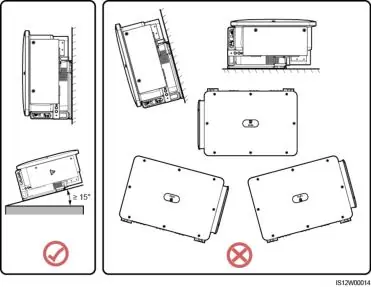
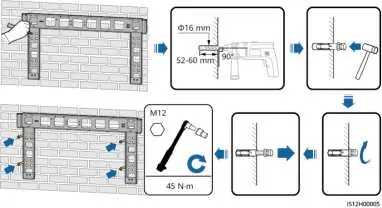
Mounting: The inverter can be support-mounted or wall-mounted. Maintain the recommended clearance (at least 600 mm at the bottom) for maintenance and heat dissipation. Install vertically or at a maximum back tilt of 75 degrees.
Electrical Connections
Precautions: Ensure all DC switches are OFF before connecting cables. Use dedicated insulated tools.
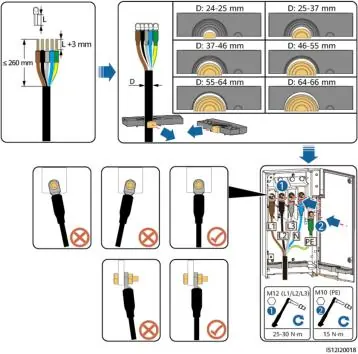
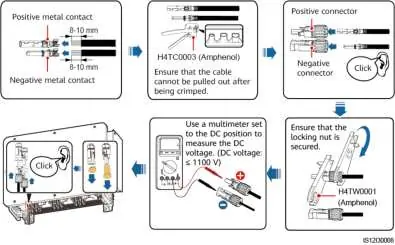
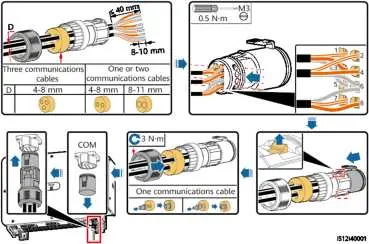
Cabling: Follow local standards for cable selection. Connect the PE cable to the PE point on the enclosure. Open the maintenance compartment door to access terminals for AC output and DC input cables.
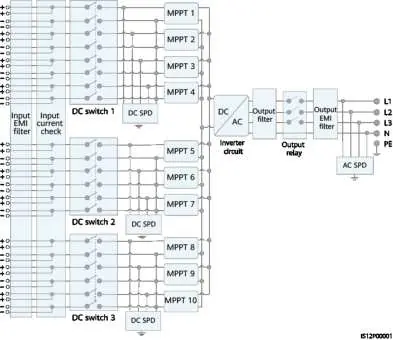
DC Input: The inverter has 20 DC input terminals controlled by three DC switches. Evenly distribute DC input cables across the terminals.
Communications: Connect RS485 communications cables to the COM port. Ensure shield layers are connected to the PE point.
Commissioning
Check Before Power-on: Verify that the inverter is securely installed, all cables are connected correctly, and unused ports are sealed with watertight caps.
Powering On: Turn on the AC switch first, then set the DC switches to ON. Observe LED indicators to verify the operating status.
Man-Machine Interactions
App Operations: Use the FusionSolar or SUN2000 app to query alarms, set parameters, and perform maintenance. Connect via WLAN module, Bluetooth module, Smart Dongle, or USB data cable.
Setting Parameters: Configure grid parameters (Grid Code, Isolation, Output mode) and protection parameters (overvoltage/undervoltage thresholds) based on local requirements.
Maintenance and Troubleshooting
Routine Maintenance: Regularly clean air intake/exhaust vents and check cable connections and grounding reliability.
Troubleshooting: Refer to the alarm ID in the app. Common alarms include High String Input Voltage, DC arc fault, and Grid Loss. Follow the specific suggestion for each alarm ID provided in the manual.
Fan Replacement: If a fan is faulty, power off the inverter, remove the fan tray, disconnect cables, replace the fan, and re-bind cables.
Technical Specifications
The SUN2000-M2 series supports a maximum input voltage of 1100 V and operates in temperatures from -25°C to +60°C. It features IP66 protection and intelligent air cooling.
Manufacturer information
Huawei Technologies Co., Ltd.
Practical help
Common problems
High String Input Voltage (Alarm 2001)
Reduce the number of PV modules connected in series in the PV string until the open-circuit voltage is within the maximum operating voltage.
DC arc fault (Alarm 2003)
Check whether the PV string cables are arcing or in poor contact.
Grid Loss (Alarm 2032)
Check the AC voltage and ensure the AC circuit is not disconnected and the AC switch is ON.
External Fan Abnormal (Alarm 2086)
Shut down the fan, check for damaged blades or foreign matter, and clear it. If the fault persists, replace the external fan.
Before use
- Inspect outer packing for damage.
- Verify the solar inverter model.
- Ensure all necessary tools are ready and inspected.
- Verify the installation surface is solid and fire-resistant.
- Ensure all DC switches and the downstream AC switch are OFF.
- Verify that the maintenance compartment door is closed and screws are secured.
Specs in practice
- Maximum input voltage
- 1100 V DC; exceeding this may damage the inverter.
- Operating temperature
- -25°C to +60°C.
- Cooling mode
- Intelligent air cooling.
Images and diagrams
- Figure 5-1 to 5-4: Networking diagrams for RS485 and MBUS communication.
- Figure 5-15/5-16: Multi-core and single-core cable connection diagrams.
- Figure 8-1: Power-off procedure for maintenance.
- Figure 8-3 to 8-16: Step-by-step fan replacement and cable binding.
Model compatibility
- MBUS communication is applicable to medium-voltage grid connection scenarios and non-low-voltage public grid connection scenarios.
- PV connectors of different models (Amphenol Helios H4 and Staubli MC4) cannot be used together.
- The SUN2000-110KTL-M2 is applicable only to the Chinese mainland.

Manual page author
Michael Turner
Technical manual editor
Reviews PDF manuals for structure, safety notes, and practical product details so readers can find the right information quickly.