Power / Solar Inverters
User Manual for GoodWe ETC & BTC Series Inverter
Quick guide for GoodWe ETC & BTC Series 50kW-100kW hybrid and AC-coupled inverters. Includes installation, wiring diagrams, commissioning, and system configuration.
Table of contents
Manual images
Click an image to enlargeQuick guide from the manual
This document serves as a quick guide for the GoodWe ETC & BTC Series (50kW - 100kW) hybrid and AC-coupled inverters. It covers networking, installation, wiring, and commissioning. Note that this guide does not replace the full user manual or safety precautions. Always refer to the product labels and the complete user manual for detailed safety information.
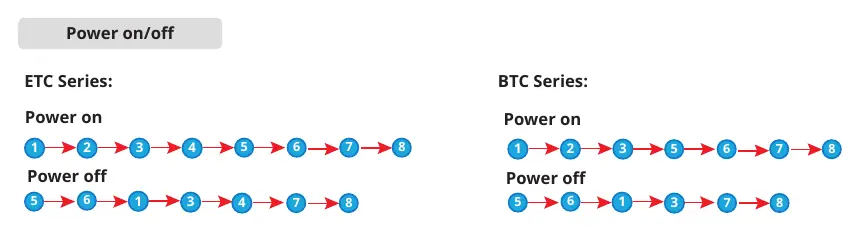
Networking and Parallel Connections
The system supports parallel connections for increased capacity:
- Inverters: A maximum of 4 inverters can be connected in a parallel system. Inverters of different power or series (ETC & BTC) can be mixed.
- Firmware: All inverters in a parallel system must have consistent firmware versions (ARM version 02.94 or above; DSP version 02.553 or above).
- Battery System: A maximum of 8 battery systems (Lynx C Series) can be clustered. Do not mix different battery versions.
Installation
The installation process involves several key steps:
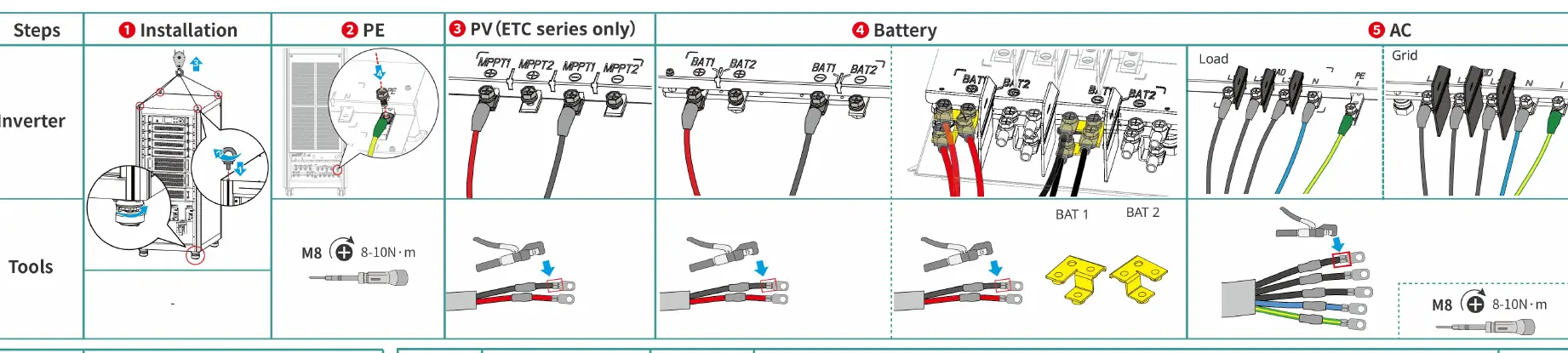
- Inverter Installation: Mount the inverter securely.
- PE Connection: Ensure proper grounding.
- PV/Battery/AC Connections: Connect PV strings, battery cables, and AC grid/load cables according to the provided wiring diagrams.
- Communication (COM): Connect communication cables for monitoring and control.
- Smart Meter: Install the GM330 or GM3000C smart meter. If using GM330, order the CT (Current Transformer) with a ratio of nA/5A (n ranges from 200 to 5000).
Equipment Commissioning
To configure the inverter, use the LCD screen on the unit:

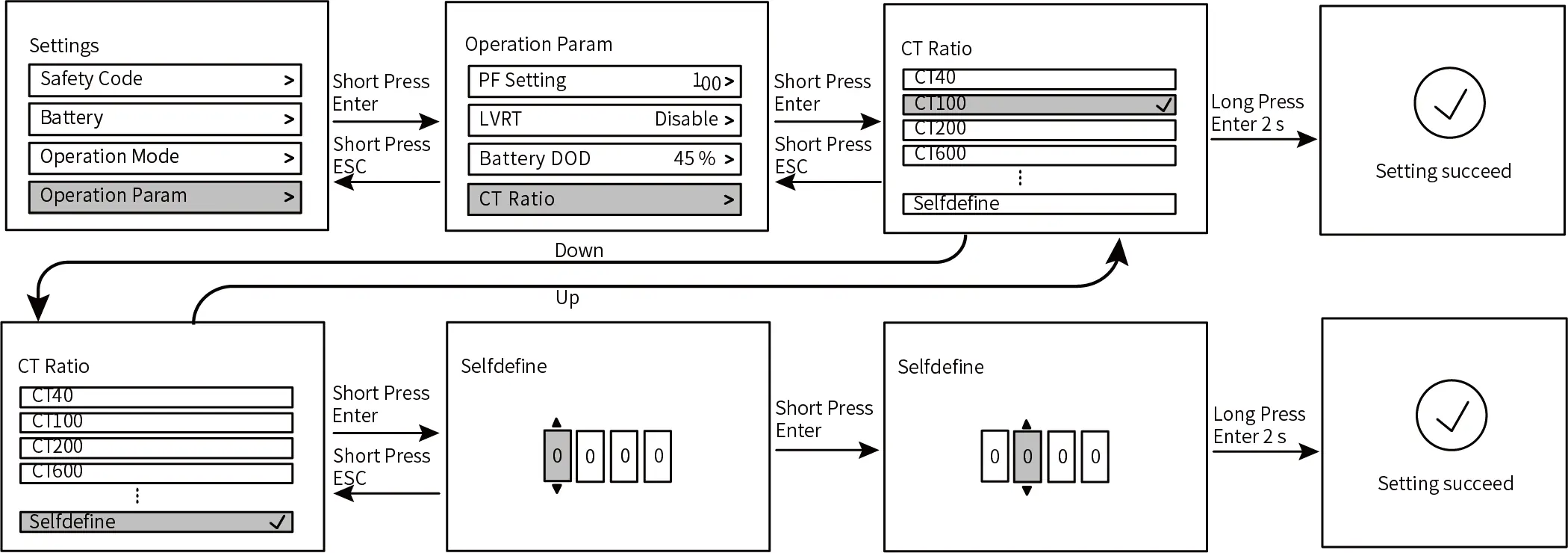
- Buttons: Use the Direction button to navigate/adjust, Enter button to select/confirm, and Exit button to return.
- Settings: Access the settings menu to configure Safety Code, Battery Type, Operation Mode, and Operation Parameters.
- Password: A password is required to access the settings page. Contact the after-sales service center to obtain it.
Working Modes
The inverter supports several working modes configurable via the LCD menu:
- Self-use: Optimizes energy usage for self-consumption.
- Peak Shaving: Reduces peak power demand.
- Backup Mode: Ensures power availability during grid outages.
App Configuration
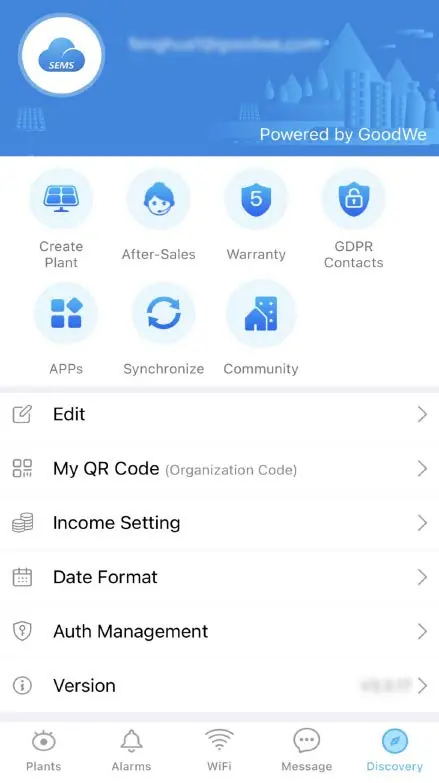
Use the SolarGo App for local configuration and the SEMS Portal App for creating power plants and monitoring equipment. You can scan QR codes to add new equipment and enter plant information based on your actual setup.
Manufacturer information
GoodWe Technologies Co., Ltd.
Practical help
Common problems
Accessing settings menu
A password is required. Contact the GoodWe after-sales service center to obtain the necessary password.
Parallel system communication errors
Ensure all inverters have consistent firmware versions (ARM 02.94+ and DSP 02.553+).
Battery system errors
Do not mix connect battery systems of different versions. Ensure a maximum of 8 battery systems are clustered.
Before use
- Verify firmware versions for all inverters in a parallel system.
- Ensure the CT ratio is correctly set for the GM330/GM3000C meter.
- Check that all cable connections (PE, PV, Battery, AC) are secure and correctly wired.
- Obtain the settings password from the service center.
- Ensure the battery system version is compatible.
Specs in practice
- Parallel Capacity
- Maximum of 4 inverters can be connected in parallel.
- Battery Clustering
- Maximum of 8 battery systems can be clustered in one system.
Images and diagrams
- Wiring diagrams illustrate connections for single and multiple inverters combined with GM330 or GM3000C smart meters.
- LCD flowcharts show the navigation path for setting the Safety Code, Battery Type, and Operation Parameters.
Model compatibility
- Compatible with Lynx C Series batteries (LX C101-10, LX C120-10, LX C138-10, LX C156-10).
- Compatible with GM3000C and GM330 smart meters.

Manual page author
Michael Turner
Technical manual editor
Reviews PDF manuals for structure, safety notes, and practical product details so readers can find the right information quickly.