Power / Batteries & Chargers
User Manual for Husqvarna 100-B380X/100-B750X Battery Charger
Quick guide for the Husqvarna 100-B380X and 100-B750X battery charger. Learn how to charge, troubleshoot LED indicators, and safely store your batteries.
Table of contents
Manual images
Click an image to enlargeQuick guide from the manual
This manual provides essential instructions for the Husqvarna 100-B380X and 100-B750X batteries and their associated charging process. Always use the Husqvarna 100-C900X battery charger. Ensure the ambient temperature is between 5°C and 40°C when charging. Do not attempt to disassemble or repair the battery yourself; all repairs must be handled by an approved dealer.
Product Overview
The system consists of the battery (100-B380X or 100-B750X) and the battery charger. Key components include:
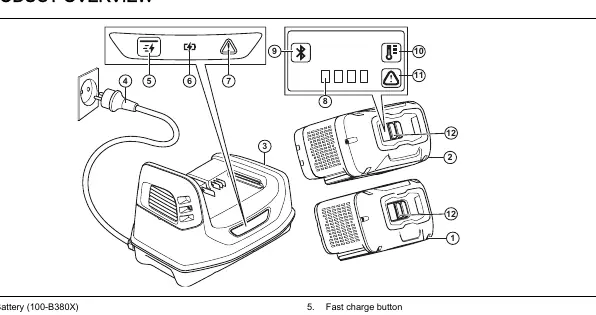
- Fast charge button: Used to initiate fast charging.
- Charging LED: Indicates the battery is connected correctly.
- Error LED on charger: Indicates a fault in the charging process.
- LED indicator for state of charge: Displays the current battery level.
- Wake up button: Used to activate the battery.
Operation
Charging the battery:
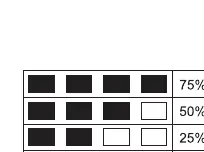
- Insert the battery into the battery charger. The charging LED will turn on when connected correctly.
- The battery is fully charged when all LEDs on the battery indicator are lit.
- Remove the battery from the charger.
Fast charging:
- Insert the battery into the charger.
- Press the fast charge button.
- To stop fast charging, press the fast charge button again.
Safety Instructions
- Only use the 100-C900X battery charger.
- Do not use the battery as a power supply for other devices.
- Keep the battery away from sunlight, heat, open flames, and children.
- Do not short circuit, mechanically shock, or submerge the battery in water.
- If battery acid touches your skin, wash with plenty of water and soap. If it gets in your eyes, flush with water for at least 15 minutes and seek medical aid.
Troubleshooting
If you encounter issues, check the following:
- Battery temperature and error LED flash: The battery is too hot or cold. Let it cool down or move to a warmer environment (above 10°C) for at least 15 minutes.
- Error LED flashes: Temporary error. Press the ON/OFF button for 3 seconds, wait 10 seconds, then restart.
- Error LED constant light: Permanent error. Contact your dealer.
- Battery LEDs flash and battery does not start: FOTA update failed. Press the ON/OFF button for at least 5 seconds to restart the battery.
Transportation and Storage
- Store the battery in a dry, frost-free, and clean space away from sunlight.
- Maintain storage temperature between 5°C and 25°C.
- Keep away from metal objects like nails, screws, or jewelry.
- Charge the battery to 30%-50% before long-term storage.
- Clean the battery before storing.
Manufacturer information
Husqvarna
Practical help
Common problems
Battery temperature and error LED flash
The battery is too hot or cold. Let it cool down or move to a warmer environment (above 10°C) for at least 15 minutes.
Error LED flashes
Temporary error. Press the ON/OFF button for 3 seconds, wait 10 seconds, then restart.
Error LED constant light
Permanent error. Contact your dealer.
Battery LEDs flash and battery does not start
FOTA update failed. Press the ON/OFF button for at least 5 seconds to restart the battery.
Before use
- Ensure ambient temperature is between -5°C and 40°C for operation.
- Ensure ambient temperature is between 5°C and 40°C for charging.
- Use only the Husqvarna 100-C900X battery charger.
- Check that the battery is clean and dry.
- Do not charge if battery temperature is above 60°C.
Specs in practice
- Operating Temperature
- -5°C to 40°C
- Charging Temperature
- 5°C to 40°C
- Storage Temperature
- 5°C to 25°C
Images and diagrams
- 1-2: Batteries (100-B380X/100-B750X)
- 3: Battery charger
- 5: Fast charge button
- 6: Charging LED
- 7: Error LED on charger
Model compatibility
- Only use Husqvarna 100-C900X battery chargers.
- Batteries are software encrypted.
- Use batteries only for related Husqvarna products.

Manual page author
Emily Carter
User documentation editor
Prepares concise manual descriptions and highlights the most useful setup, operation, and maintenance information for readers.