Power / Batteries & Chargers
Husqvarna 100-C900X Battery Charger User Manual
Quick guide for the Husqvarna 100-C900X battery charger. Includes charging instructions, fast charging, troubleshooting, and safety guidelines.
Table of contents
Quick guide from the manual
This manual provides essential instructions for operating the Husqvarna 100-C900X battery charger. Always ensure the charger is used in a well-ventilated area and within the specified ambient temperature range of 5°C to 40°C (41°F to 104°F).
Product Overview
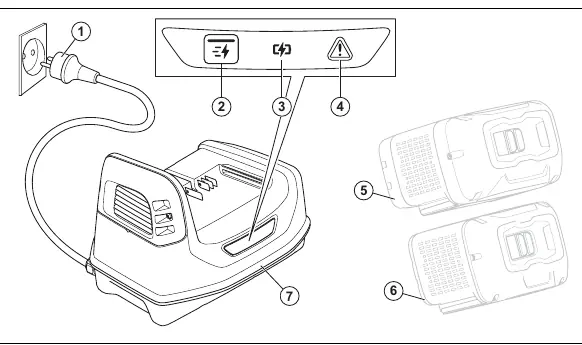
The charger features a power plug, a fast charge button, a charging LED indicator, and an error LED indicator. It is designed for use with Husqvarna PACE batteries.
Safety Instructions
- Only charge original Husqvarna PACE batteries.
- Do not disassemble or repair the product; all repairs must be performed by an approved dealer.
- Do not expose the product to mechanical shock.
- Keep the product away from children.
- Do not leave the battery in the charger when fully charged.
- Do not use the product if there is a risk of lightning.
- If the supply cord is damaged, it must be replaced by the manufacturer or a qualified service agent.
Operation
Charging the Battery
- Connect the battery charger to a grounded power outlet. The charging LED will turn on.
- Insert the battery into the charger. When the charging LED on the charger turns on, the battery is correctly connected.
- The battery is fully charged when all LEDs on the battery indicator are lit.
- Remove the battery from the charger.
Fast Charging
- Insert the battery into the charger.
- Press the fast charge button.
- To stop fast charging, press the fast charge button again.
Troubleshooting
If an error occurs, the error LED on the charger will indicate the issue:
- Error LED and temperature symbol flash: Temperature deviation. Let the battery cool down or warm up to the 5°C–40°C range.
- Error LED flashes, battery shows full: Battery overcharged. Remove the battery, wait 15 minutes, and check the charge state.
- Error LED flashes, battery shows low: Battery discharged. Remove the battery, wait 15 minutes, and check the charge state.
- Error LED is red: Permanent charger error. Contact your dealer.
- Error LED flashes red, battery error LED is red: Defective battery. Contact your dealer.
Transportation and Storage
Store the product in a dry, clean, and frost-free space. Keep away from metal objects like nails or screws. Clean the product before storage and do not store it in direct sunlight. Do not leave the battery in the charger during storage.
Disposal
Husqvarna products are not domestic waste. Recycle the charger and packaging at an appropriate disposal location. Contact your local Husqvarna dealer for recycling information.
Manufacturer information
Husqvarna
Practical help
Common problems
Error LED and temperature symbol flash
Temperature deviation. Use the charger in ambient temperatures between 5°C (41°F) and 40°C (104°F). Let the battery cool down.
Error LED flashes, battery shows full
Battery overcharged. Remove the battery, wait 15 minutes, and check the charge state.
Error LED flashes, battery shows low
Battery discharged. Remove the battery, wait 15 minutes, and check the charge state.
Error LED is red
Permanent battery charger error. Contact your dealer.
Error LED flashes red, battery error LED is red
Defective battery. Contact your dealer.
Before use
- Check that the power outlet is grounded.
- Ensure the ambient temperature is between 5°C and 40°C.
- Verify the power cord is not damaged.
- Ensure the area is well-ventilated.
- Check that the battery is a compatible Husqvarna PACE battery.
Images and diagrams
- 1: Power plug
- 2: Fast charge button
- 3: Charging LED
- 5/6: Battery slots
- 7: Battery charger
Model compatibility
- Only charge Husqvarna original PACE batteries.

Manual page author
David Miller
Documentation analyst
Organizes user manual content into clear summaries, with attention to model details, product context, and everyday usability.