Garden / Brushcutters & Trimmers
Operator's Manual for Husqvarna 215iL-TC Battery Grass Trimmer
Quick guide for the Husqvarna 215iL-TC battery grass trimmer. Includes assembly, operation, maintenance, troubleshooting, and safety instructions.
Quick answers from the manual
Quick answer
- The Husqvarna 215iL-TC is a battery-powered grass trimmer. It is designed for cutting weeds, grass, or similar soft vegetation using non-metallic plastic blades or a trimmer line. p. 8
Key actions
- To start the product, press and hold the start/stop button until the green LED comes on, then push the power trigger lockout and the power trigger. p. 17
First start
- Fully charge the battery before first use. Push the battery into the battery holder until it clicks into position. p. 16, 17
Show 5 more answers Show less
Problems and fixes
Overload (Error LED flashes)
The cutting attachment cannot move freely. Release the cutting attachment.
p. 19Error codes
| Code | Meaning | Action | Pages |
|---|---|---|---|
| Error LED flashes | Overload or Temperature deviation | Release cutting attachment or let product cool down | p. 19 |
Maintenance and reset
- Clean the product with a dry cloth after use. Keep the battery guide tracks clean. p. 19
Technical specifications
| Parameter | Value | Meaning | Pages |
|---|---|---|---|
| Motor type | BLDC | Brushless DC motor | p. 20 |
Where to find it in the PDF
- Introduction p. 8
- Assembly p. 15
- Operation p. 16
- Maintenance p. 18
- Troubleshooting p. 19
Table of contents
Manual images
Click an image to enlargeQuick guide from the manual
The Husqvarna 215iL-TC is a battery-powered grass trimmer designed for cutting weeds, grass, or similar soft vegetation. Always ensure the battery is fully charged before use and that the cutting attachment is correctly installed.
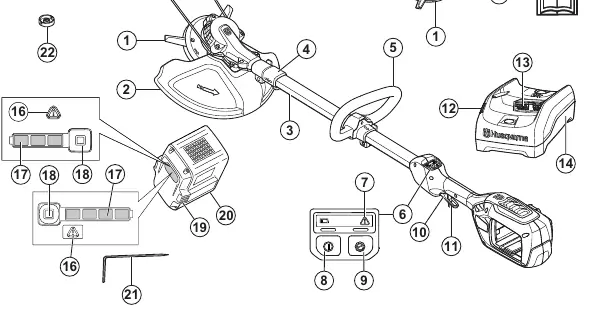
Product description
The Husqvarna 215iL-TC is a battery grass trimmer with an electrical motor. It is designed for use with non-metallic plastic blades or a trimmer line.
Safety
WARNING: This product can be dangerous and cause serious injury or death to the operator or others. Read the operator's manual carefully and make sure you understand the instructions before use. Always wear eye and ear protection. Do not expose the product to rain.
Assembly
Follow these steps to assemble your trimmer:
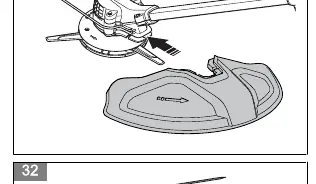
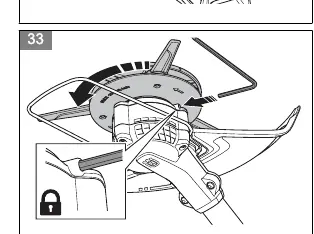
- Cutting attachment guard: Place the guard against the motor housing and tighten the bolt using a combination wrench.
- Plant guard: Install into the holes on the motor housing.
- Loop handle: Install the screw into the handle, attach to the shaft, and tighten the screws.
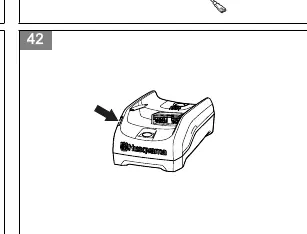
- Battery charger: Install on the wall using two screws and wall plugs if necessary.
Operation
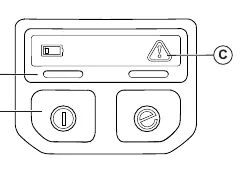
To start the product, press and hold the start/stop button until the green LED comes on. Then, push the power trigger lockout and the power trigger. To stop, release the power trigger and push the start/stop button until the green LED goes off.
Maintenance
Regular maintenance is essential for product safety and performance. Clean the external parts with a dry cloth after use. Do not use water. Check the cutting attachment and guard for damage or cracks regularly.
Troubleshooting
If the product does not start, ensure the battery is charged and correctly installed. If the error LED flashes, check for overload or temperature issues. If the error LED is red, contact your service dealer.
Technical data
The Husqvarna 215iL-TC features a BLDC motor, a cutting width of 255 mm, and a weight of 2.9 kg without the battery.
Manufacturer information
Husqvarna
Practical help
Common problems
Product does not start
Press the power trigger and the start button at the same time.
Error LED flashes (Overload)
The cutting attachment cannot move freely. Release the cutting attachment.
Error LED flashes (Temperature deviation)
Let the product cool down.
Before use
- Fully charge the battery.
- Inspect the work area for obstacles like stones, branches, and ditches.
- Check the motor for dirt and cracks.
- Ensure the trimmer head is completely attached.
- Check that all nuts and screws are tight.
Show more Show less
Specs in practice
- Cutting width
- 255 mm
- Weight without battery
- 2.9 kg
Images and diagrams
- Fig 1: Product overview with numbered parts.
- Fig 24: Keypad check.
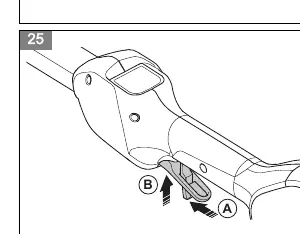
- Fig 25-28: Power trigger lockout check.
- Fig 30-32: Attaching the cutting attachment guard.
- Fig 33-36: Changing the cutting attachment.
Model compatibility
- Only use BLi series and 40-B series batteries.
- Only use QC80 and 40-C80 chargers.

Manual page author
David Miller
Documentation analyst