Power / USB Chargers
User Manual for HyperJuice 140W USB-C Charger
Quick guide for the HyperJuice 140W USB-C Charger. Learn about port power distribution, safety instructions, and technical support.
Table of contents
Quick Guide
The HyperJuice 140W USB-C Charger is a slim, portable power adapter featuring foldable wall plugs. It is designed to charge up to 3 devices simultaneously, supporting 140W PD 3.1 charging.
Package Contents
- 140W USB-C Charger
- 2m USB-C 140W Charging Cable
- International Adapters (included with HJG140WW model only)
- User Guide
Port Overview
The charger is equipped with three output ports, each with specific power capabilities:
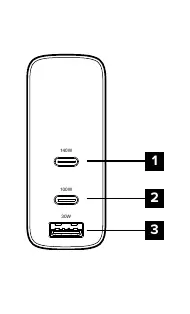
- 1. USB-C Port 140W: Connects to USB-C devices and charges up to 140W.
- 2. USB-C Port 100W: Connects to USB-C devices and charges up to 100W.
- 3. USB-A Port 30W: Connects to USB-A devices and charges up to 30W.
Power Distribution
The charger dynamically distributes power depending on how many devices are connected. Please note that 140W charging for the 2021 MacBook Pro requires the use of the Apple Original USB-C to MagSafe cable.
When using multiple ports simultaneously, the total power output is shared. Refer to the power distribution table in the manual for specific wattage combinations when using ports 1, 2, and 3 together.
Safety Instructions
To ensure safe operation, please follow these guidelines:
- Do not expose the charger to moisture or submerge it in liquid.
- Store in a cool, dry place. Recommended storage temperature is -20°C to 80°C (-4°F to 176°F).
- Operating temperature should be between 0°C and 25°C (32°F to 77°F).
- Do not disassemble, modify, or attempt to re-purpose the product.
- Stop using the device immediately if it becomes excessively hot, emits an odor, is deformed, or shows other abnormalities.
- Keep the product away from children under 3 years old.
- Avoid dropping, bumping, or subjecting the product to heavy impact or vibration.
- Do not clean with harmful chemicals or detergents.
Technical Support
For technical questions or warranty details, please visit www.HyperShop.com. You can also contact support via email at [email protected] or by phone at 1-888-202-1888 (USA) or +1-408-737-7878 (non-USA).
Official resources from the manual
Manufacturer information
Hyper Bicycles, Inc.
Practical help
Common problems
Device not charging at 140W
Ensure you are using the Apple Original USB-C to MagSafe cable when charging a 2021 MacBook Pro.
Charger is excessively hot or emitting odor
Stop using the product immediately and contact the manufacturer.
Before use
- Verify you have the correct international adapter if using the HJG140WW model.
- Ensure the environment is dry and free from moisture.
- Check that the ambient temperature is within the operating range of 0°C to 25°C.
- Inspect the charger for any physical damage or debris in the ports.
Specs in practice
- 140W USB-C Port
- High-power output port suitable for laptops and high-demand devices.
- 100W USB-C Port
- High-speed charging port for laptops, tablets, and phones.
- 30W USB-A Port
- Standard charging port for smaller USB-A compatible devices.
Images and diagrams
- The port overview diagram identifies the three output ports: 140W USB-C (top), 100W USB-C (middle), and 30W USB-A (bottom).
Model compatibility
- 140W charging for 2021 MacBook Pro requires the Apple Original USB-C to MagSafe cable.

Manual page author
David Miller
Documentation analyst
Organizes user manual content into clear summaries, with attention to model details, product context, and everyday usability.