Plumbing / Showers & Tubs
Insignia 140W Wall Charger NS-PW3X4AC2W22B
Quick setup guide for the Insignia 140W Wall Charger (NS-PW3X4AC2W22B). Learn how to use the folding blades, power cord, and stacking feature, plus view power distribution specs and troubleshooting tips.
Table of contents
Manual images
Click an image to enlargeQuick Guide
The Insignia 140W Wall Charger is a versatile power adapter designed for laptops, tablets, smartphones, and other USB-powered devices. It features two USB-C ports and two USB-A ports, with flexible power distribution depending on how many devices are connected.
Power Distribution
The charger automatically adjusts power output based on the number of devices connected:
- One Port: Each USB-C port provides up to 140W when used alone.
- Two Ports: The two USB-C ports provide 100W and 30W respectively when used together.
- Three Ports: The two USB-C ports provide 100W and 30W, while the USB-A port provides up to 12W.
- Four Ports: The two USB-C ports provide 100W and 30W, while the two USB-A ports share 15W.
Powering Your Charger
You can power the charger in two ways:
- Using the folding blades: Flip out the folding blades on the back of the unit and plug it directly into a standard wall outlet.
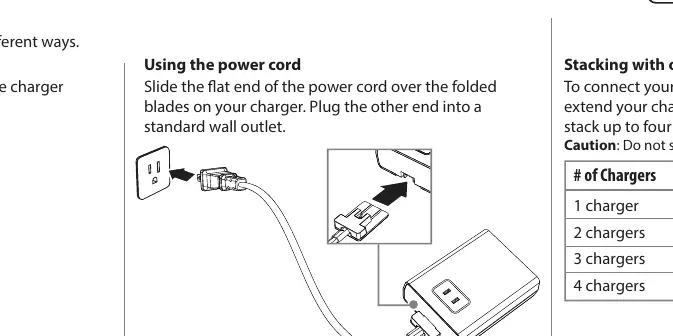
- Using the power cord: Slide the flat end of the included power cord over the folded blades, then plug the other end into a standard wall outlet.
Stacking Chargers
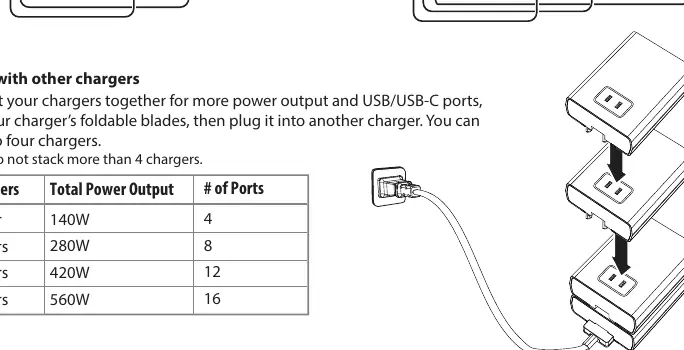
You can connect multiple chargers together to increase power output and the number of available ports. To do this, extend the charger's foldable blades and plug it into another charger. Caution: Do not stack more than 4 chargers.
Safety Information
- This product is not a voltage converter. Ensure the power outlet voltage is within the range of your device's voltage.
- Do not disassemble the product.
- Do not expose to high temperatures, humidity, or liquid.
- Avoid external shocks.
- Do not operate with wet hands.
- Keep out of reach of children.
- For indoor use only.
Troubleshooting
If you experience issues, check the following:
- Device not charging: Ensure the charger is securely connected to the wall plug and the device is securely connected to the charger.
- Slow charging: Verify that the device's power requirements match the charger's output. Stop using the device while it is charging and close background apps. Note that devices may charge slower as they age.
Specifications
- Input: 100-240V ~ 50/60Hz
- Dimensions: 4.3 x 3.3 x 1.4 in. (110 x 85 x 34.6 mm)
- Weight: 12.7 oz. (360 g)
- Package Contents: Wall Charger, 6 ft. 10A power cord, Quick Setup Guide
Practical help
Common problems
Device is not charging
Ensure the charger is securely connected to the wall outlet and the device is securely connected to the charger.
Device is charging slowly
Verify that the device's power requirements match the charger's output. Stop using the device while charging and close background apps.
Before use
- Ensure the wall outlet voltage is compatible with your device (this is not a voltage converter).
- Check that your hands are dry before handling the adapter.
- Ensure the charger is not exposed to high temperatures or humidity.
- Verify you are using the correct cable for your device.
Images and diagrams
- Folding blades: Flip out to plug directly into a wall outlet.
- Power cord: Slide over folded blades to use as a desktop charger.
- Stacking: Extend blades and plug into another charger to increase power/ports.
Model compatibility
- USB-C ports are suitable for laptops and tablets.
- USB-A ports are suitable for smartphones, smartwatches, and earbuds.

Manual page author
Emily Carter
User documentation editor
Prepares concise manual descriptions and highlights the most useful setup, operation, and maintenance information for readers.