Power / USB Chargers
User Manual for HyperJuice 145W USB-C GaN Travel Charger HJ1001
Quick guide for the HyperJuice 145W USB-C GaN Travel Charger (HJ1001). Learn how to change AC plugs, understand power distribution, and view technical specifications.
Table of contents
Quick guide from the manual
The HyperJuice 145W USB-C GaN Travel Charger is a high-power wall adapter capable of charging multiple devices simultaneously, including laptops, tablets, and smartphones. It features 3 USB-C ports and 1 USB-A port, with support for PD 3.1 charging speeds on the top two USB-C ports. The device comes with interchangeable AC plugs for global travel.
Package Contents
- HyperJuice 145W USB-C GaN Travel Charger
- Interchangeable AC plugs: US, EU, UK, AU, and C8 adapter
- User Guide
Port Overview
The charger features the following components:
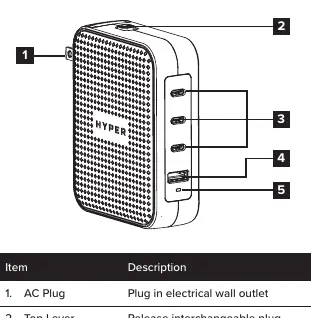
- AC Plug: Connects to the electrical wall outlet.
- Top Lever: Used to release and swap the interchangeable AC plugs.
- USB-C Ports (C1, C2, C3): Three ports for connecting USB-C devices.
- USB-A Port (A): One port for connecting USB-A devices.
- LED Power Indicator: Indicates the charger is powered on and ready for use.
Operation Instructions
To change the AC plug:
- Select the appropriate plug for your destination country.
- Slide the top lever forward to release the currently attached plug.
- Remove the old plug and slide in the new one until it clicks into place.
Caution: Keep adapters out of reach of children.
Power Distribution
The charger provides a total output of 145W. The power delivered to each port changes dynamically based on the number and type of devices connected. For example, using a single USB-C port (C1 or C2) can provide up to 140W. When multiple devices are connected, the charger intelligently distributes power. Refer to the power distribution table in the manual for specific output combinations.
Safety Instructions
- Do not expose the charger to moisture or submerge it in liquid.
- Store in a cool, dry place. Recommended storage temperature: -20°C to 85°C.
- Operating temperature: 0°C to 25°C.
- Do not disassemble, modify, or attempt to re-purpose the product.
- Stop using the device immediately if it becomes excessively hot, emits an odor, is deformed, or shows other abnormalities.
- Avoid strenuous vibration, impact, or exposure to intense sunlight and rain.
- Do not clean with harmful chemicals or detergents.
Technical Support
For technical questions, you can contact Hyper support via email at [email protected] or by phone at 1-888-202-1888 (USA) or +1-408-737-7878 (non-USA). Additional regional support contacts are available in the manual.
Manufacturer information
Hyper Bicycles, Inc.
Practical help
Common problems
Charger is excessively hot or emitting an odor
Stop using the product immediately and contact the manufacturer.
Device not charging
Ensure the AC plug is securely connected to the wall outlet and the charger, and verify the LED indicator is lit.
Before use
- Select the correct AC plug for your region.
- Ensure the plug is securely locked into the charger.
- Verify your device is compatible with USB-C or USB-A charging.
- Check that the total power demand of your devices does not exceed 145W for optimal performance.
Images and diagrams
- The top lever is used to release and swap the interchangeable AC plugs.
- The LED indicator confirms the charger is powered on.
Model compatibility
- Compatible with Windows PC, Mac, iPad (USB-C), iPhone (USB-C), Chromebook, and other USB-C/USB-A devices.

Manual page author
David Miller
Documentation analyst
Organizes user manual content into clear summaries, with attention to model details, product context, and everyday usability.