Electronics / Wireless Receivers
Installation and User Manual for Hytronik HBTD8200T/F Bluetooth Receiver Node
Quick guide for the Hytronik HBTD8200T/F Bluetooth Receiver Node. Includes installation steps, wiring diagrams, technical specifications, and Switch-Dim interface operation instructions.
Table of contents
Manual images
Click an image to enlargeQuick Guide from the Manual
The Hytronik HBTD8200T/F is a Bluetooth 5.0 SIG Mesh receiver node designed for dimming control. It operates on 230VAC and supports non-latching (momentary) wall switches via the Switch-Dim interface. Configuration and commissioning are performed via the Koolmesh app.
Technical Specifications
- Mains voltage: 230VAC 50Hz
- Load: 1-150VA (Capacitive) / 1-150W (Resistive)
- Operation frequency: 2.4 GHz - 2.483 GHz
- Transmission power: 4 dBm
- Range: 10 ~ 30m (Typical)
- Operation temperature: -20°C ~ +45°C
- IP rating: IP20
- Protocol: Bluetooth 5.0 SIG Mesh
Installation
Warnings:
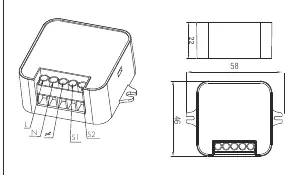
- Installation must be carried out by a qualified engineer in accordance with local regulations.
- Disconnect power supply before installing.
- Ensure environmental conditions are suitable for electronic equipment.
Wire Preparation:
Use a rising clamp terminal. Strip wires to 8mm. Compatible wire size is 0.75 - 4mm.
Wiring Diagram
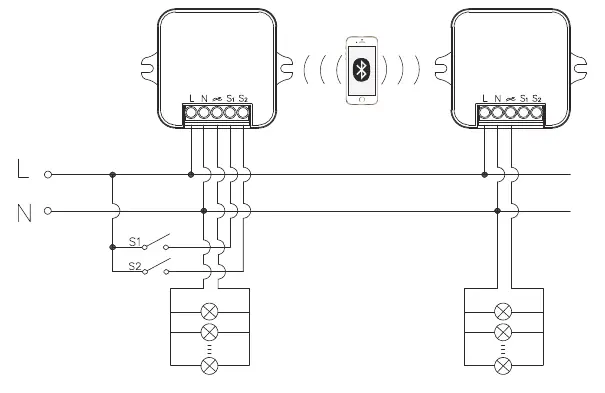
The device connects to Live (L) and Neutral (N) lines. The Switch-Dim interface (S1, S2) connects to the momentary wall switches. Refer to the wiring diagram for the specific connection layout between the receiver, power supply, and switches.
Dimming Interface Operation
The Switch-Dim interface allows for dimming using standard non-latching wall switches. Note that short presses must be longer than 0.1s to be valid.
- Short press ( Turn on/off, turn on only, turn off only, recall a scene, exit manual mode, or do nothing.
- Double push: Turn on only, turn off only, recall a scene, exit manual mode, or do nothing.
- Long press (≥1 second): Dimming, colour tuning, or do nothing.
- Simulate sensor: Upgrade a normal on/off motion sensor to a Bluetooth controlled motion sensor.
App Configuration
Download the Koolmesh app for set-up and commissioning. The app is available for iOS 10.0+ and Android 5.0+. A web platform is also available at iot.koolmesh.com.
Official resources from the manual
Practical help
Common problems
Switch-Dim commands not registering
Ensure short presses are longer than 0.1s. If the press is too short, it will be invalid.
Installation safety
Always disconnect the power supply before beginning installation.
Before use
- Verify mains voltage is 230VAC 50Hz.
- Ensure the connected load is within 1-150VA (Capacitive) or 1-150W (Resistive).
- Check that environmental conditions are suitable for electronic equipment.
- Prepare wires by stripping 8mm of insulation (0.75 - 4mm wire size).
- Ensure a qualified engineer performs the installation.
Images and diagrams
- The wiring diagram illustrates the connection of L (Live) and N (Neutral) to the receiver node.
- S1 and S2 terminals are used for connecting external non-latching wall switches.
Model compatibility
- Requires Koolmesh app (iOS 10.0 or later, Android 5.0 or later).
- Compatible with non-latching (momentary) wall switches.

Manual page author
David Miller
Documentation analyst
Organizes user manual content into clear summaries, with attention to model details, product context, and everyday usability.