Electronics / Audio
User Guide for Behringer UL 1000G2-R UHF Wireless Belt-Pack Receiver
Quick start guide for the Behringer UL 1000G2-R UHF wireless belt-pack receiver. Includes setup instructions, control descriptions, wiring diagrams, and technical specifications.
Table of contents
Manual images
Click an image to enlargeQuick guide from the manual
The UL 1000G2-R is a wireless belt-pack receiver designed exclusively for the Behringer UL 1000G2 in-ear monitoring system. It supports stereo/mono monitoring, features an integrated display for channel frequency, squelch, and gain control, and has a working distance of up to 60 meters (200 feet).
Safety Instructions
- Read and follow all instructions.
- Keep the apparatus away from water.
- Clean only with a dry cloth.
- Do not block ventilation openings.
- Do not install near heat sources.
- Use only specified attachments/accessories.
- Use caution when moving the apparatus to prevent tip-over.
- Avoid installing in confined spaces.
- Do not place naked flame sources on the device.
- Operating temperature range: 5° to 35°C (41° to 95°F).
- Warning: To prevent hearing damage, do not listen at high volume levels for long periods.
- Battery Safety: Keep small batteries away from children. Replace all batteries in a set at the same time. Ensure correct polarity. Remove batteries if the product is unused for a long time.
Hook-up
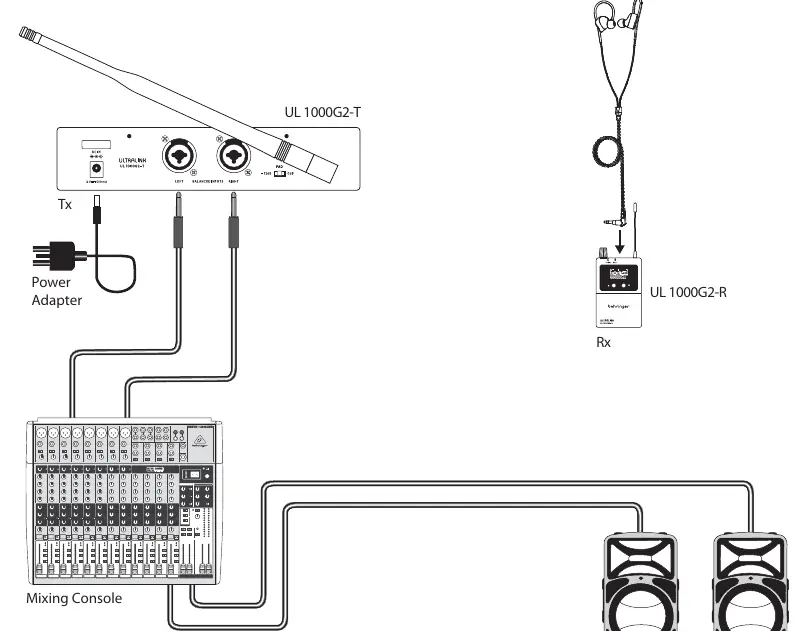
Connect the transmitter (Tx) to your mixing console using the balanced inputs. The receiver (Rx) connects to the supplied earphones via the 3.5 mm stereo output.
Controls
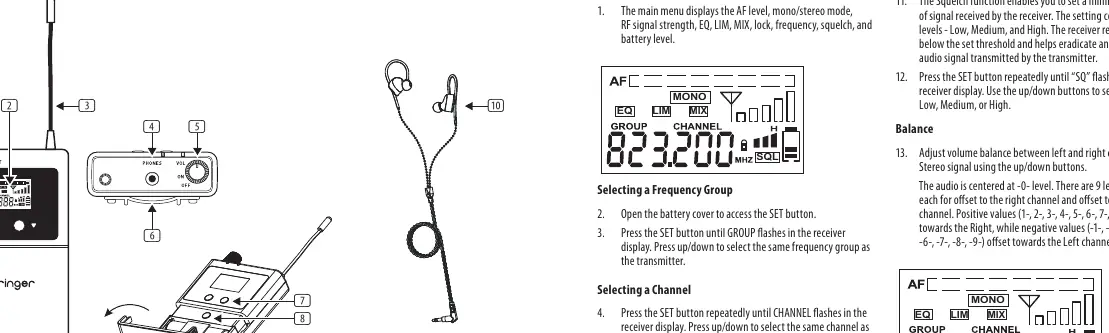
- LEDS: Indicate audio received and battery status.
- LCD: Displays receiver details and menu.
- ANTENNA: Receive antenna.
- PHONES: 3.5 mm stereo output for earphones.
- VOLUME: Adjusts earphone volume and turns the receiver OFF.
- BELT CLIP: Attaches receiver to belt.
- MENU UP/DOWN: Navigates the display menu.
- SET: Selects receiver menu items (access inside battery compartment).
- BATTERY COMPARTMENT: Holds 2x AA batteries.
Getting Started
Receiver Setup
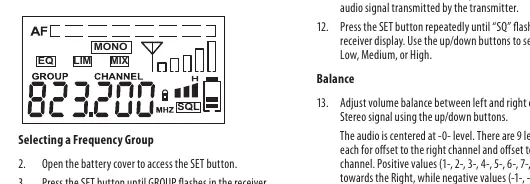
The main menu displays AF level, mono/stereo mode, RF signal strength, EQ, LIM, MIX, lock, frequency, squelch, and battery level.
- Selecting a Frequency Group: Open the battery cover, press SET until GROUP flashes, and use up/down buttons to match the transmitter.
- Selecting a Channel: Press SET until CHANNEL flashes, and use up/down buttons to match the transmitter.
- Equalizer (EQ): Press SET until EQ flashes. Use up/down to enable (EQ ON) or disable (EQ OFF). Treble at 10 kHz is enhanced by 6 dB when enabled.
- Limiter (LIM): Press SET until LIM flashes. Use up/down to enable (LIM ON) or disable (LIM OFF). Limits audio signal to 400mV to protect hearing.
- Mixer (MIX): Press SET until MIX flashes. Use up/down to enable (MIX ON) or disable (MIX OFF). Allows monitoring of two mono signals.
- Squelch (SQ): Press SET until SQ flashes. Use up/down to set to Low, Medium, or High. Rejects signals below the set threshold.
- Balance: Use up/down buttons to adjust volume balance between left and right channels.
- Locking: Press SET until the LOCK icon flashes. Use up/down to select LOCK ON or LOCK OFF. LOCK ON disables buttons to prevent accidental changes.
Specifications
- RF Frequency range: 584-608 MHz / 823-832 MHz / 863-865 MHz
- Maximum channel number: 96 (EU) / 120 (US)
- Switching bandwidth: 24 MHz
- Sensitivity:<-92 dBm for 30 dB S/N ratio
- Audio Frequency range: 70 Hz - 13.5 kHz (+/- 3 dB)
- Operating time: >6 hours/1300 mAH
- Dimensions: 64 x 98 x 22 mm
Important Information
Register your new MusicTribe equipment at musictribe.com. If you experience malfunctions, contact your local MusicTribe Authorized Fulfiller or use the Online Support section on the website.
Official resources from the manual
Manufacturer information
Behringer
Practical help
Common problems
No audio received
Ensure transmitter and receiver are on the same frequency group and channel. Check volume level and battery status.
Battery low
If no bars are visible on the battery symbol and the BATT LED turns red, replace batteries immediately.
Unwanted audio signals
Adjust the Squelch (SQ) setting to a higher threshold (Low, Medium, or High).
Before use
- Ensure batteries are installed with correct polarity (+ and -).
- Check that transmitter and receiver are on the same frequency group and channel.
- Ensure volume is turned down before putting on earphones.
- Verify transmitter is set to stereo mode if stereo transmission is required.
- Clean battery contacts before installation.
Specs in practice
- Working distance
- Up to 60 m (200 ft) under optimal conditions.
Images and diagrams
- Wiring diagram shows connection from mixing console to transmitter (Tx) and receiver (Rx) with earphones.
- Controls diagram identifies LEDs, LCD, antenna, phones output, volume, belt clip, menu buttons, and battery compartment.
Model compatibility
- Designed to work only with the Behringer UL 1000G2 in-ear monitoring system.

Manual page author
David Miller
Documentation analyst
Organizes user manual content into clear summaries, with attention to model details, product context, and everyday usability.