Electronics / Audio
JBL Quantum 100X Console Headset Quick Start Guide
Quick start guide for the JBL Quantum 100X Console gaming headset, covering setup, controls, and technical specifications.
Table of contents
Manual images
Jump to the sectionProduct Overview
The JBL Quantum 100X Console is a high-quality gaming headset designed for immersive audio experiences across various platforms. It features a lightweight, ergonomic design with flat-fold ear cups for easy storage and comfort during extended gaming sessions.
What's in the Box
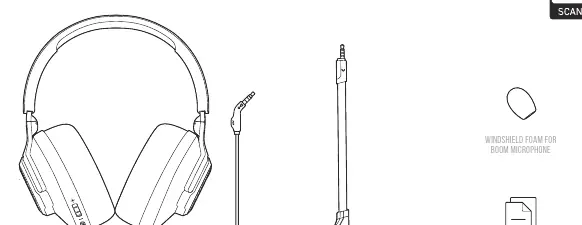
Inside the package, you will find the JBL Quantum 100X Console headset, a removable boom microphone, a windshield foam cover for the microphone, and essential documentation including a quick start guide, warranty card, and warning card.
Controls and Features
The headset is equipped with intuitive controls located directly on the ear cup for quick adjustments during gameplay:
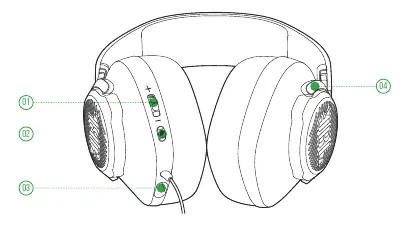
- Volume Control: Easily adjust the audio output level.
- Microphone Mute/Unmute: Quickly toggle your microphone status.
- 2.5mm Jack: Dedicated port for connecting the removable boom microphone.
- Flat-fold Ear Cups: Allows for convenient storage and portability.
Setup and Compatibility
The JBL Quantum 100X Console is designed for versatile use. It is compatible with a wide range of devices, including PC, Xbox, PlayStation, Nintendo Switch, mobile devices, Mac, and VR systems. Simply connect the headset to your device's audio port to begin.
Technical Specifications
The headset delivers high-fidelity sound through 40mm dynamic drivers. Key technical details include a frequency response of 20 Hz to 20 kHz, an impedance of 32 ohms, and a sensitivity of 96 dB. The detachable directional boom microphone features a frequency response of 100 Hz to 10 kHz and a sensitivity of -42 dBV, ensuring clear voice communication during multiplayer gaming.
Safety and Maintenance
To ensure the longevity of your headset, avoid exposing it to extreme temperatures, prolonged moisture, or strong magnetic fields. Do not attempt to open the housing or perform unauthorized repairs. If you encounter any defects, please refer to the warranty information provided in the documentation.
Manufacturer information
JBL
Practical help
Common problems
No sound or microphone not working
Ensure the 2.5mm microphone is securely connected and check that the microphone is not muted using the physical mute button on the ear cup.
Before use
- Check that all items are present in the box
- Attach the removable boom microphone to the 2.5mm jack
- Install the windshield foam on the boom microphone
- Ensure your gaming device is powered on
- Connect the headset to the device's audio port
Specs in practice
- Frequency response
- The range of audio frequencies the headset can reproduce (20 Hz - 20 kHz).
- Microphone pickup pattern
- Directional, meaning it focuses on capturing sound from the user's mouth.
Images and diagrams
- The overview diagram highlights the volume control, mute button, and microphone jack on the left ear cup.
- The setup diagram shows the universal compatibility with various gaming consoles and devices via the standard audio jack.
Model compatibility
- Compatible with PC, Xbox, PlayStation, Nintendo Switch, Mobile, Mac, and VR.

Manual page author
Michael Turner
Technical manual editor
Reviews PDF manuals for structure, safety notes, and practical product details so readers can find the right information quickly.