Electronics / Audio
Owner's Manual for JBL BAR 1300X Soundbar
Quick guide for the JBL BAR 1300X soundbar, covering setup, wireless speaker connection, sound calibration, and troubleshooting.
Table of contents
Manual images
Jump to the sectionQuick guide from the manual
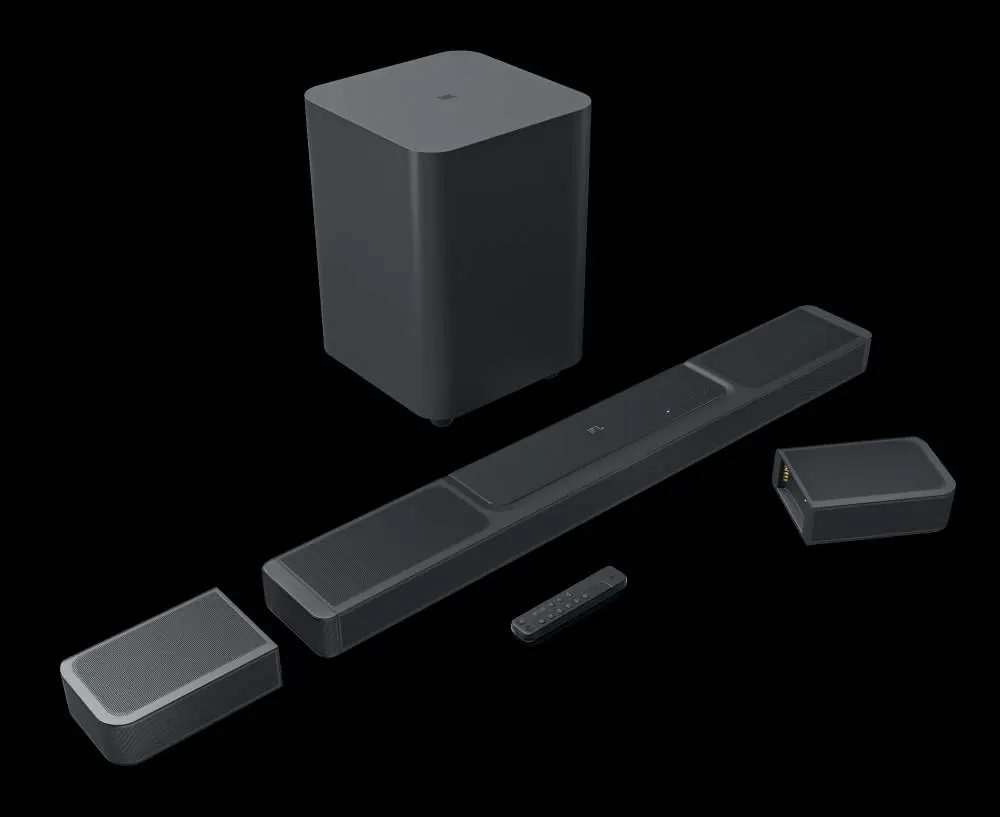
The JBL BAR 1300X is a 11.1.4 channel soundbar system featuring detachable wireless surround speakers and a subwoofer. This guide provides essential steps for installation, connection, and sound optimization.
Product Description
The system consists of the main soundbar, two detachable battery-powered surround speakers, and a subwoofer. The soundbar features HDMI (ARC/eARC), Optical, and Ethernet connectivity, along with Bluetooth and Wi-Fi capabilities for streaming.
Installation
The soundbar and detachable speakers can be placed on a table or mounted on a wall. Ensure the soundbar is placed on a flat, stable surface. For wall mounting, use the provided wall-mount brackets and template. Always ensure the wall can support the weight of the soundbar.




Connecting the Soundbar
HDMI (ARC/eARC) is the recommended connection for the best Dolby Atmos/DTS:X experience. Connect your TV to the soundbar's HDMI OUT (TV ARC/eARC) port. Use the HDMI IN ports to connect digital devices like Blu-ray players or game consoles.
Configuration
- Connecting Speakers: Connect the soundbar to power. The subwoofer and detachable speakers will connect automatically.
- Charging: Charge the detachable speakers by docking them to the soundbar or via USB-C. A full charge takes approximately 4 hours.
- Sound Calibration: Use the CALIBR button on the remote to optimize the 3D surround sound for your specific room environment.
Operation
Use the remote control to select sources (TV, Bluetooth, HDMI), adjust volume, bass levels, and surround sound effects. The JBL One app allows for Wi-Fi setup, audio calibration, and streaming service integration.
Troubleshooting
- No Sound: Check if the system is muted, the correct source is selected, or if the soundbar needs a factory reset.
- Bluetooth Issues: Ensure the device is within 10m and no obstacles are present. If connection fails, re-pair the device.
- Wi-Fi Issues: Ensure the network is active and the soundbar is on the same network as your mobile device.
Manufacturer information
JBL
Practical help
Common problems
Soundbar does not turn on
Check if the power cable is securely connected to the outlet and the soundbar.
No sound output
Ensure the system is not muted, the correct input source is selected, or perform a factory reset.
Bluetooth connection drops
Move the source device closer to the soundbar and remove any obstacles between them.
Dolby Atmos not working
Ensure your TV supports HDMI ARC/eARC and that the digital device is connected directly to the soundbar's HDMI IN port.
Before use
- Verify the local power voltage is compatible (100-240V AC).
- Charge the detachable speakers for 4 hours before first use.
- Ensure the soundbar is placed on a flat, stable surface.
- Download the JBL One app for initial Wi-Fi setup.
- Check that all HDMI cables are version 2.0 or higher.
Specs in practice
- 11.1.4 Channels
- The system configuration providing immersive 3D surround sound.
- Bluetooth 5.3
- The wireless standard used for connecting mobile devices to the soundbar or detachable speakers.
Images and diagrams
- The soundbar features a status indicator light that changes color based on system state (e.g., solid white for connected, flashing white for setup).
- Detachable speakers have a USB-C port for charging and a power button for independent Bluetooth use.
Model compatibility
- HDMI-CEC must be enabled on your TV for remote control integration.
- Dolby Atmos is supported via HDMI connections, not via Bluetooth or streaming apps directly.
- The USB port is for service only (except in US models).

Manual page author
David Miller
Documentation analyst
Organizes user manual content into clear summaries, with attention to model details, product context, and everyday usability.