Home Appliances / Rice Cookers
User Manual for Kangaroo KG 18DR8 Rice Cooker
Quick guide for the Kangaroo KG 18DR8 rice cooker. Learn how to use preset functions, select cooking modes, clean the device, and troubleshoot common issues.
Quick answers from the manual
Quick answer
- The Kangaroo KG 18DR8 is a multi-function rice cooker. To use, plug it in, add ingredients, select a menu using the 'Menu' button, and press 'Start'. It features a 1-24 hour preset timer. p. 2
Key actions
- Select cooking mode p. 2, 3
- Set preset timer p. 2
First start
- Clean all parts (inner pot, steam outlet, inner lid) with soft cloth and water before first use. p. 2
Problems and fixes
Rice undercooked
Adjust water/rice ratio, ensure pot is not oblique, check for debris.
p. 4Error codes
| Code | Meaning | Action | Pages |
|---|---|---|---|
| E1, E2, E3, E4 | Power Control plate have trouble | Send to 'Repair Service Centre' | p. 4 |
Technical specifications
| Parameter | Value | Meaning | Pages |
|---|---|---|---|
| Power | 860 W | Power consumption | p. 1 |
| Capacity | 1.8 L | Cooking capacity | p. 1 |
Where to find it in the PDF
- Specifications and Parts p. 1
- Using Way and Menus p. 2, 3
- Cleaning and Troubleshooting p. 4
- Warranty p. 5
Table of contents
Quick guide from the manual
The Kangaroo KG 18DR8 is a multi-function rice cooker. To operate, ensure the device is plugged into a compatible power outlet, clean the inner pot, and ensure it is properly seated on the heating plate. Select your desired cooking mode using the Menu button and press Start to begin. You can also use the Preset function to schedule cooking up to 24 hours in advance.
Product overview
The rice cooker consists of the following main components:
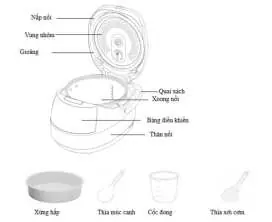
- Lid and Inner lid: The top cover assembly.
- Sealing ring: Ensures a tight seal during cooking.
- Inner pot: The removable container for cooking rice and other foods.
- Control panel: Used to select menus, set presets, and start cooking.
- Outer body: The main housing of the unit.
- Accessories: Steamer, soup spoon, rice cup, and rice spoon.
Using the rice cooker
Before using the rice cooker, ensure the voltage of the home socket matches the product requirements. Clean the inner pot, steam outlet, and inner lid with a soft cloth and water. Ensure there are no impurities at the bottom of the inner pot and rotate it to ensure it fits closely with the heating plate.
Preset function
To use the preset timer:
- Press MENU and choose the desired function.
- Press PRESET to enter preset status (default is 1-24 hours).
- If you need to adjust the cooking time, set the cooking time first, then set the preset time.
- Press START. The preset time represents the cook finish time.
Cooking modes
The device offers various cooking modes, including:
- Standard modes: Cook, Fast cook, Fine cook (with rice type selection), Claypot Rice, Porridge, Fried Rice, Soup.
- Specialty modes: Steam, Stew, Yogurt, Cake, Pasta, Pizza, OAT, Reheat.
Each mode has a default time and an adjustable range. After the cooking process is complete, the device automatically switches to the keep-warm function (except for specific modes like Yogurt).
Cleaning and maintenance
Proper maintenance extends the life of your rice cooker:
- Cleaning: Use hot water, detergent, and a sponge to clean the inner pot and aluminum cover. If food sticks, soak it before cleaning.
- Inner pot care: Use only plastic or wood spoons. Do not use metal utensils, do not cut food inside the pot, and do not use vinegar to avoid corrosion.
- Other parts: Use a wet cloth to clean the surface, inner lid, and power cord. Use a towel to clean the heating plate if water or rice residue is present.
- Safety: Always power off and cool down the rice cooker before cleaning.
Troubleshooting
If you encounter issues, refer to the following:
- Indicator unlights/Heating plate unheated: Check if the unit is plugged in and if there is power.
- Rice undercooked: Adjust the water/rice ratio, ensure the inner pot is not oblique, and check for debris between the pot and heating plate.
- Rice overcooked: Check if the inner pot is out of shape or oblique.
- Overflow: Reduce the amount of water used.
- LCD Error Codes (E1, E2, E3, E4): Indicates a power control plate issue; contact a repair service center.
Manufacturer information
Kangaroo Group
Practical help
Common problems
Indicator unlights / Heating plate unheated
Check if the power cord is plugged in and if there is power. If the 'Power control plate' is damaged, contact a repair service center.
Rice undercooked
Adjust the water/rice ratio, ensure the inner pot is not oblique, and check for debris between the inner pot and heating plate.
Rice overcooked
Check if the inner pot is out of shape or oblique. If the issue persists, contact a repair service center.
Overflow
Reduce the amount of water used.
Before use
- Check that the home socket voltage matches the product requirements.
- Clean the inner pot, steam outlet, and inner lid with a soft cloth and water.
- Ensure there are no impurities at the bottom of the inner pot.
- Rotate the inner pot to ensure it fits closely with the heating plate.
Specs in practice
- Rated Voltage
- 220V - 50Hz
Images and diagrams
- The diagram shows the lid, inner lid, sealing ring, handle, inner pot, control panel, and outer body.
- Accessories included: Steamer, soup spoon, rice cup, and rice spoon.
Model compatibility
- Use only plastic or wood rice spoons to protect the inner pot coating.
- Do not use vinegar in the inner pot to avoid corrosion.
- Do not use metal utensils or cut food inside the inner pot.

Manual page author
Emily Carter
User documentation editor
Prepares concise manual descriptions and highlights the most useful setup, operation, and maintenance information for readers.