Toys / Ride-on Toys
User Manual for Kidzone 060-ROT-32L Licensed Audi RS6 Ride-On Car
Quick guide for the Kidzone 060-ROT-32L Licensed Audi RS6 Ride-On Car. Includes assembly instructions, charging procedures, remote control pairing, and troubleshooting tips.
Table of contents
Manual images
Click an image to enlargeQuick guide from the manual
This Kidzone Licensed Audi RS6 Ride-On Car is designed for children aged 37-72 months with a maximum weight capacity of 66 lb (30 kg). Before first use, ensure the battery is fully charged (8-12 hours). The vehicle must be assembled by an adult. Always supervise children during use and ensure they wear protective equipment like a helmet.
Safety Instructions
Failure to follow safety instructions may result in serious injury or death. Key safety points include:
- Only for children aged 37-72 months.
- Maximum weight capacity is 66 lb / 30 kg.
- Operate only on flat, smooth surfaces. Avoid rain, snow, ice, or steep inclines.
- Do not use in the dark or near roadways/traffic.
- Ensure the seatbelt is fastened and the rider wears a helmet.
- Keep loose clothing and body parts away from moving parts.
- Do not bypass the fuse.
Assembly Instructions
Assembly must be performed by an adult. Tools required (not included): screwdriver.
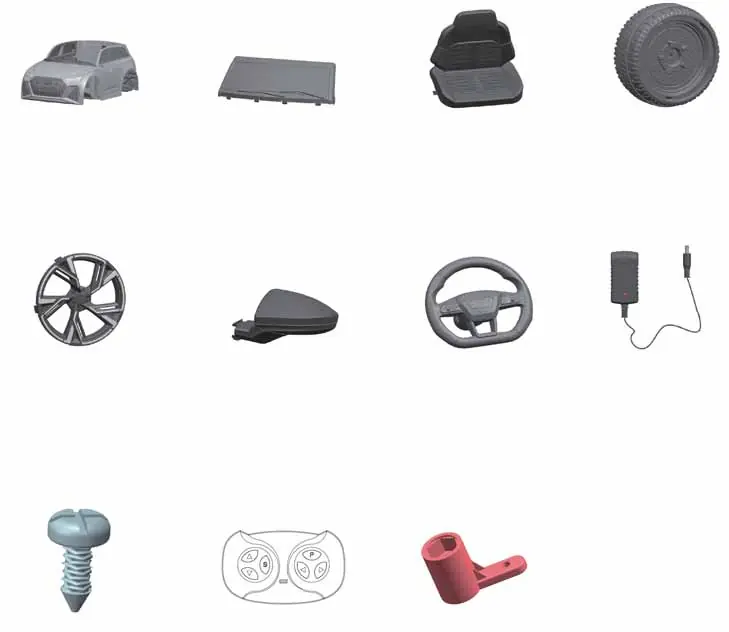
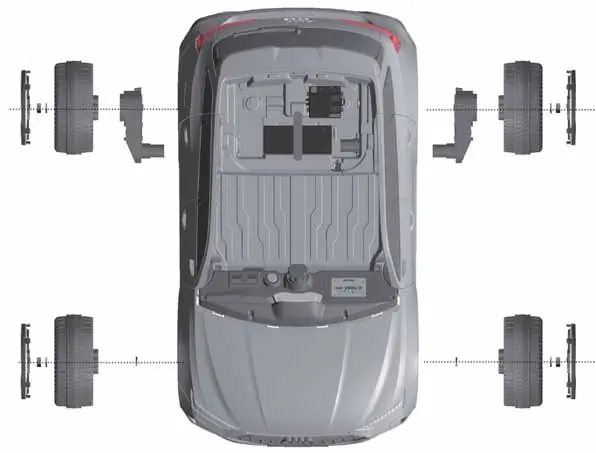
- Rear wheels: Connect motors to the rear axle, insert wheels, add washers, secure with M10 nuts, and cover with wheel caps.
- Front wheels: Place washer on axle, add wheel, add washer, secure with M10 nut, and cover with wheel cap.
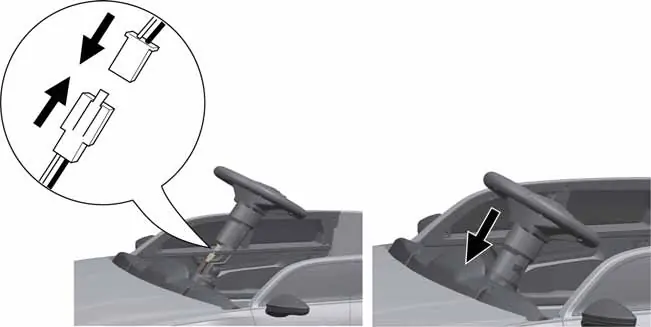
- Steering wheel: Connect the wire connector from the steering wheel to the steering column, then push the wheel until it clicks.
- Battery: Connect the battery wire connector to the vehicle's connector.
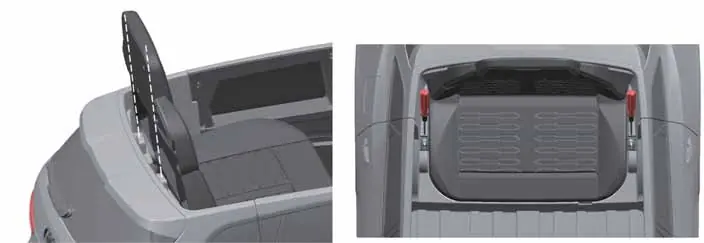
- Seat: Fit the groove on the seat to the tab on the vehicle body and secure with screws.
- Windshield: Fit tabs into the grooves until it clicks.
- Mirrors: Attach side mirrors to the vehicle body.
Operating the Vehicle
Use the following controls to operate the car:
- Power Button: Turns the vehicle ON or OFF.
- Forward/Reverse Switch: Selects the direction of travel. Do not change direction until the vehicle comes to a complete stop.
- Light Switch: Turns lights ON or OFF.
- Foot Pedal: Press to move the vehicle; release to slow and stop.
- Horn Button: Plays horn sound; also functions as a next track button when a flash drive is connected.
Media Player and Remote Control
The media player supports Bluetooth and flash drive playback. To connect via Bluetooth, press the Bluetooth button on the media player, then search for "Kidzone Ride-On" on your mobile device.
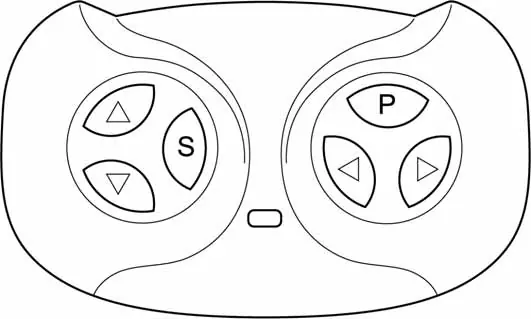
Remote Control:
- Must be paired before use. Insert batteries, hold forward and reverse buttons for 3 seconds until the indicator flashes, then turn on the vehicle.
- The remote overrides the foot pedal.
- Use the emergency brake button to stop the vehicle immediately.
- Use the speed button to toggle between high and low speeds.
Charging the Battery
Charge the battery for 8-12 hours before first use. Do not charge for more than 20 hours.
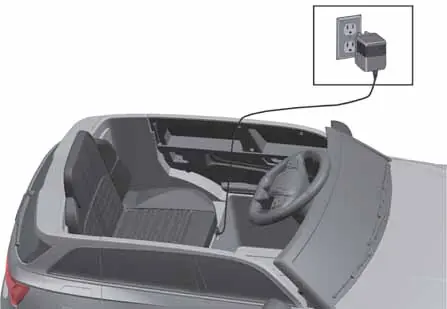
- Ensure the vehicle is OFF.
- Connect the charger to the charging port and plug into a wall outlet.
- The charger indicator turns red when charging and green when complete.
- Recharge the battery if the vehicle operates slowly.
- Charge at least once a month if the vehicle is not in regular use.
Care and Maintenance
- Regularly check for loose parts or cracked plastic.
- Clean with a cloth; do not use a hose or immerse in water.
- Use lightweight oil to lubricate moving parts.
- The vehicle features a 7A self-resetting thermal fuse. If the vehicle stops, turn it OFF for 20 seconds to reset.
Troubleshooting
If the vehicle does not move, check the battery connection, charge the battery, or wait for the thermal fuse to reset. If the vehicle runs slowly, check for overloading or an old battery. For grinding sounds or persistent issues, contact customer service.
Manufacturer information
Kidzone Toys
Practical help
Common problems
Vehicle does not move
Check battery connection, fully charge the battery, or wait for the thermal fuse to reset (turn off for 20 seconds).
Vehicle runs very slow
Ensure the user weight is under 66 lb (30 kg) and the battery is not old or damaged.
Battery does not charge
Verify the charger is firmly plugged into the power source and the charging port.
Vehicle needs a push to go forward
Check if battery connectors are firmly connected or contact customer service for motor issues.
Before use
- Charge the battery for 8-12 hours.
- Ensure all parts are assembled by an adult.
- Connect the battery wire connector.
- Verify the child is between 37-72 months old.
- Ensure the rider is wearing a helmet.
- Check that the vehicle is on a flat, safe surface.
Images and diagrams
- Assembly diagrams show wheel, motor, and axle installation.
- Wiring diagrams illustrate battery connection.
- Remote control diagram shows pairing and emergency brake buttons.
Model compatibility
- For children aged 37-72 months.
- Not for use on public roads or near traffic.

Manual page author
Michael Turner
Technical manual editor
Reviews PDF manuals for structure, safety notes, and practical product details so readers can find the right information quickly.