Toys / Ride-on Toys
User Manual for Kidzone 060-ROT-21L Licensed Bentley Bacalar Ride-On Car
Quick guide for the Kidzone 060-ROT-21L Licensed Bentley Bacalar Ride-On Car. Includes assembly instructions, charging procedures, remote control pairing, and troubleshooting tips.
Table of contents
Manual images
Click an image to enlargeQuick guide from the manual
The Kidzone 060-ROT-21L is a 12V ride-on toy designed for children aged 37-72 months with a maximum weight capacity of 66lb (30kg). Adult supervision is required at all times. The vehicle should be operated on flat, smooth surfaces and never on roadways, near motor vehicles, or near steep inclines/water. Always ensure the child wears a helmet and the seatbelt is fastened.
Assembly Instructions
Assembly must be performed by an adult. Keep children away during assembly due to small parts.
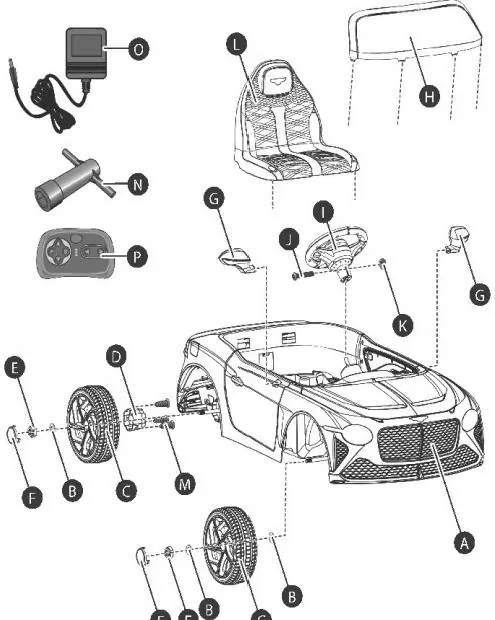
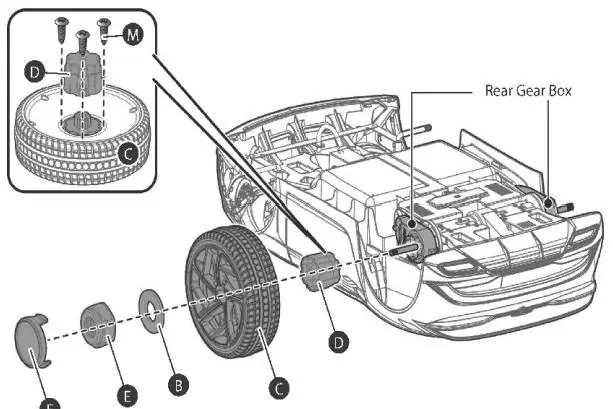
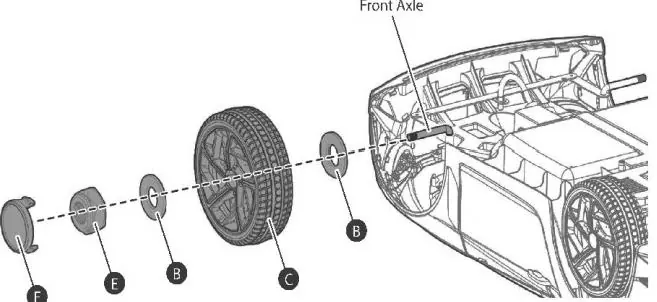
- Wheels: Attach the wheel hub to the wheel, secure with screws. Slide the wheel onto the axle, add washers, and secure with a lock nut. Put on the hubcap. Repeat for all wheels.
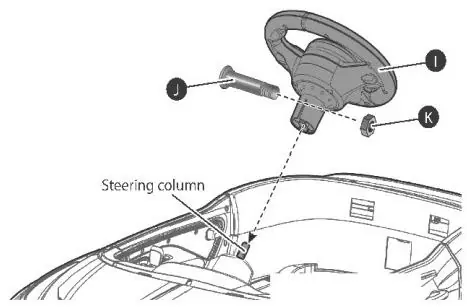
- Steering Wheel: Remove the screw from the steering wheel, insert 2x 1.5V AA batteries (not included), and replace the cover. Align the steering wheel with the steering column, insert the M5x30 machine screw, and tighten the nut.
- Seat and Battery: Connect the battery wires before installing the seat. Fit the seat tabs into the rear grooves and tighten the screws.
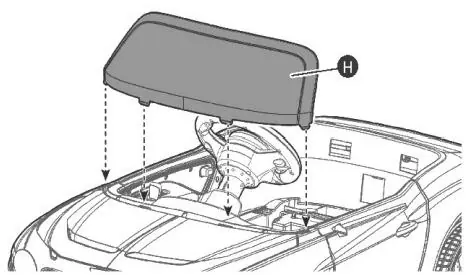
- Windshield: Fit the tabs into the grooves until it clicks into place.
- Side Mirrors: Attach to the side of the vehicle.
Charging the Battery
The battery must be charged by an adult. The vehicle is packed with the battery disconnected.
- Charging Time: 8-12 hours. Do not charge for more than 20 hours.
- Procedure: Connect the charger to the charging port or remove the battery to charge directly. Ensure the vehicle is OFF during charging.
- Indicator: The charger light turns red when charging and green when complete.
- Maintenance: Charge the battery at least once a month if not in use to maximize battery life. Do not let the battery drain completely.
Operating the Vehicle
The vehicle can be controlled via the foot pedal or the remote control.
- Remote Control: Requires 2x AAA 1.5V batteries. Pair by pressing the connection button for 3 seconds while the vehicle is off, then turn the vehicle on.
- Controls: Use the Forward/Reverse lever to change direction. Use the foot pedal to move and stop.
- Media Player: Features volume control, FM radio, Bluetooth, and ports for USB flash drives (up to 64GB) and 3.5mm AUX cables. The digital voltmeter displays battery power; recharge if under 12.5V.
Maintenance and Troubleshooting
Regularly check for loose parts or cracked plastic. Clean with a cloth; do not use a hose or immerse in water. Use non-wax furniture polish for plastic parts.
Troubleshooting:
- Vehicle won't move: Check battery connections, ensure the battery is charged, or wait 5-15 seconds for the thermal fuse to reset.
- Loud grinding/clicking: Indicates a damaged motor or gearbox; contact customer service.
- Battery not charging: Ensure the charger is firmly plugged into the power source and the charging port.
Manufacturer information
Kidzone Toys
Practical help
Common problems
Vehicle needs a push to go forward
Check if battery connectors are firmly connected.
Loud grinding or clicking sound
Motor or gear box may be damaged; contact customer service.
Battery does not charge
Ensure charger is firmly plugged into the power source and the charging port.
Vehicle does not move
Check for low battery, disconnected wires, or tripped fuse (wait 5-15 seconds).
Before use
- Ensure child is 37-72 months old.
- Verify user weight is under 66lb/30kg.
- Charge battery for 8-12 hours before first use.
- Connect the battery wires inside the vehicle.
- Ensure seatbelt is securely fastened.
- Check that all wheels and steering are properly tightened.
Specs in practice
- Charger output
- 12v 500 mA.
- Charging time
- 8-12 hours required for a full charge.
Images and diagrams
- Assembly diagrams illustrate the sequence of washers, lock nuts, and hubcaps for wheel installation.
- Remote control diagram identifies the connection button, speed selection, and directional controls.
- Media player diagram shows the layout of volume, track, and input ports (USB/AUX).
Model compatibility
- Use only the provided charger and battery.
- Flash drive for media player should not exceed 64 GB.
- Do not mix old and new batteries in the remote control.
- Do not mix alkaline, standard, or rechargeable batteries.

Manual page author
Emily Carter
User documentation editor
Prepares concise manual descriptions and highlights the most useful setup, operation, and maintenance information for readers.