Toys / Ride-on Toys
User Manual for Kidzone 060-ROT-11L Electric Ride-On Car
Quick guide for the Kidzone 060-ROT-11L electric ride-on car. Includes assembly instructions, charging procedures, remote control pairing, and troubleshooting tips.
Table of contents
Manual images
Click an image to enlargeQuick guide from the manual
This electric ride-on car is designed for children aged 37-72 months with a maximum weight capacity of 66 lbs (30 kg). The vehicle must be assembled by an adult. Before the first use, the battery must be charged for 8-12 hours. Always ensure the seat belt is fastened during operation and use the vehicle only in safe, well-lit areas away from roadways and water.
Assembly Instructions
The assembly process requires a screwdriver (not included) and takes approximately 40 minutes. Follow these steps:
- Rear Lights: Attach the rear lights to the vehicle body and secure with screws (Y).
- Rear Axle and Motor: Remove nuts and gaskets from the rear axle. Insert the rear wheel motor into the axle and slot (Z).
- Wheels: Remove nuts and gaskets from the front axle. Insert wheels onto both front and rear axles, secure with gaskets and nuts, and attach wheel covers (H).
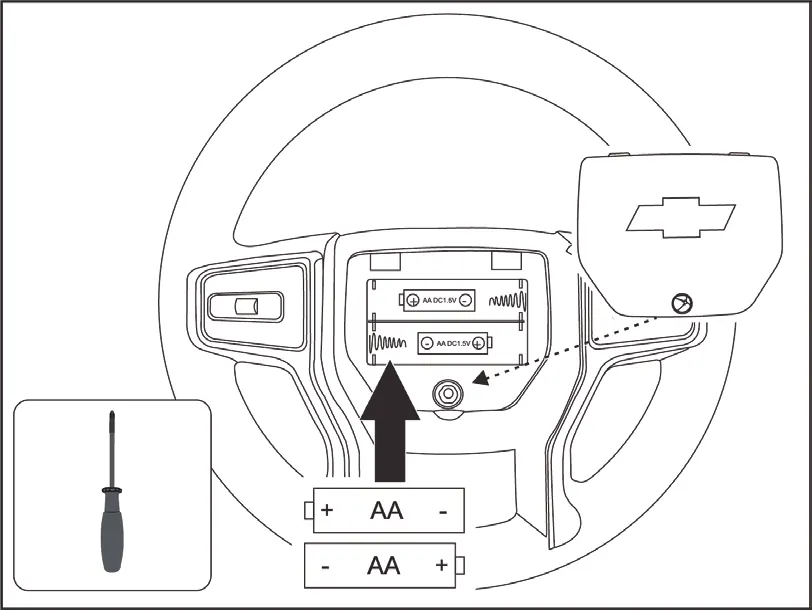
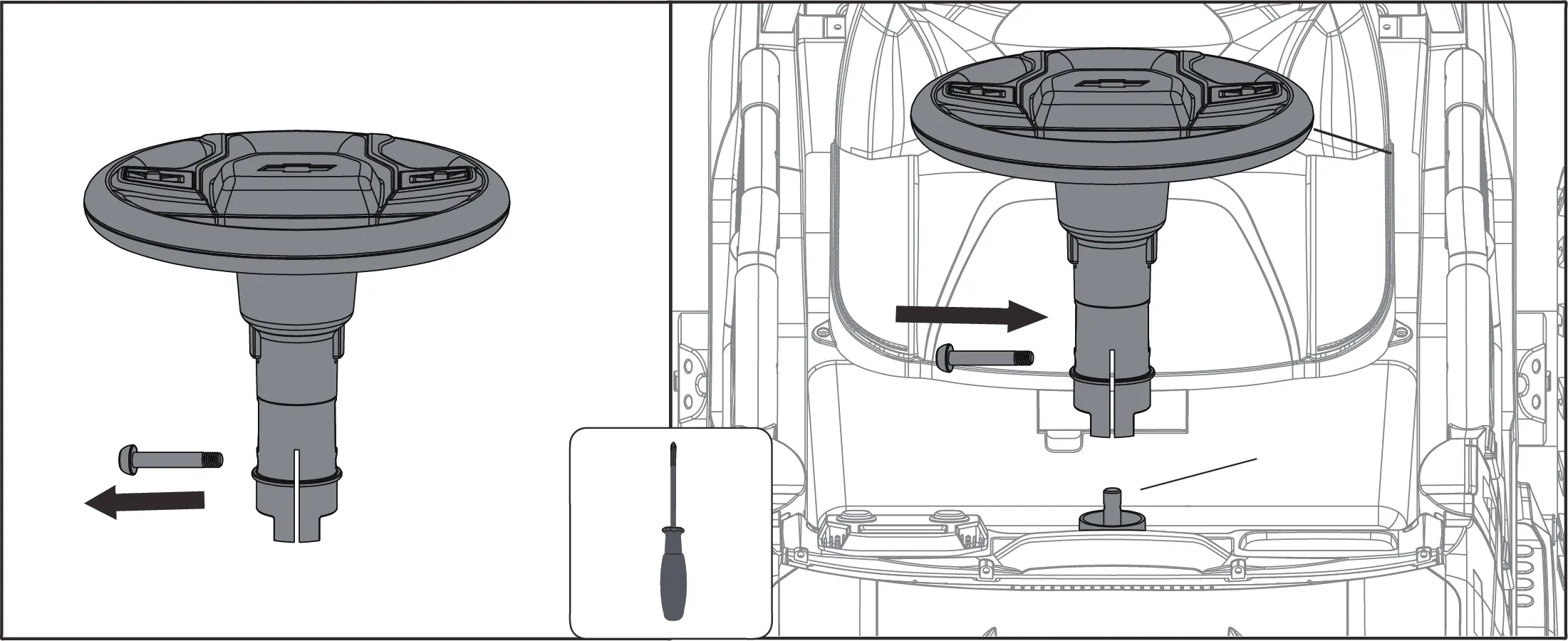
- Steering Wheel: Insert 2 AA batteries into the steering wheel. Remove the screw from the steering wheel, attach it to the steering column (7), and tighten the screw.
- Body Parts: Align side windows (K) and fasten with screws (Y). Insert the windshield (F) and rear-view mirrors (J).
- Seat and Backrest: Insert the seat (C) and backrest (D) into the vehicle body grooves and secure with screws (X).
Operating the Vehicle
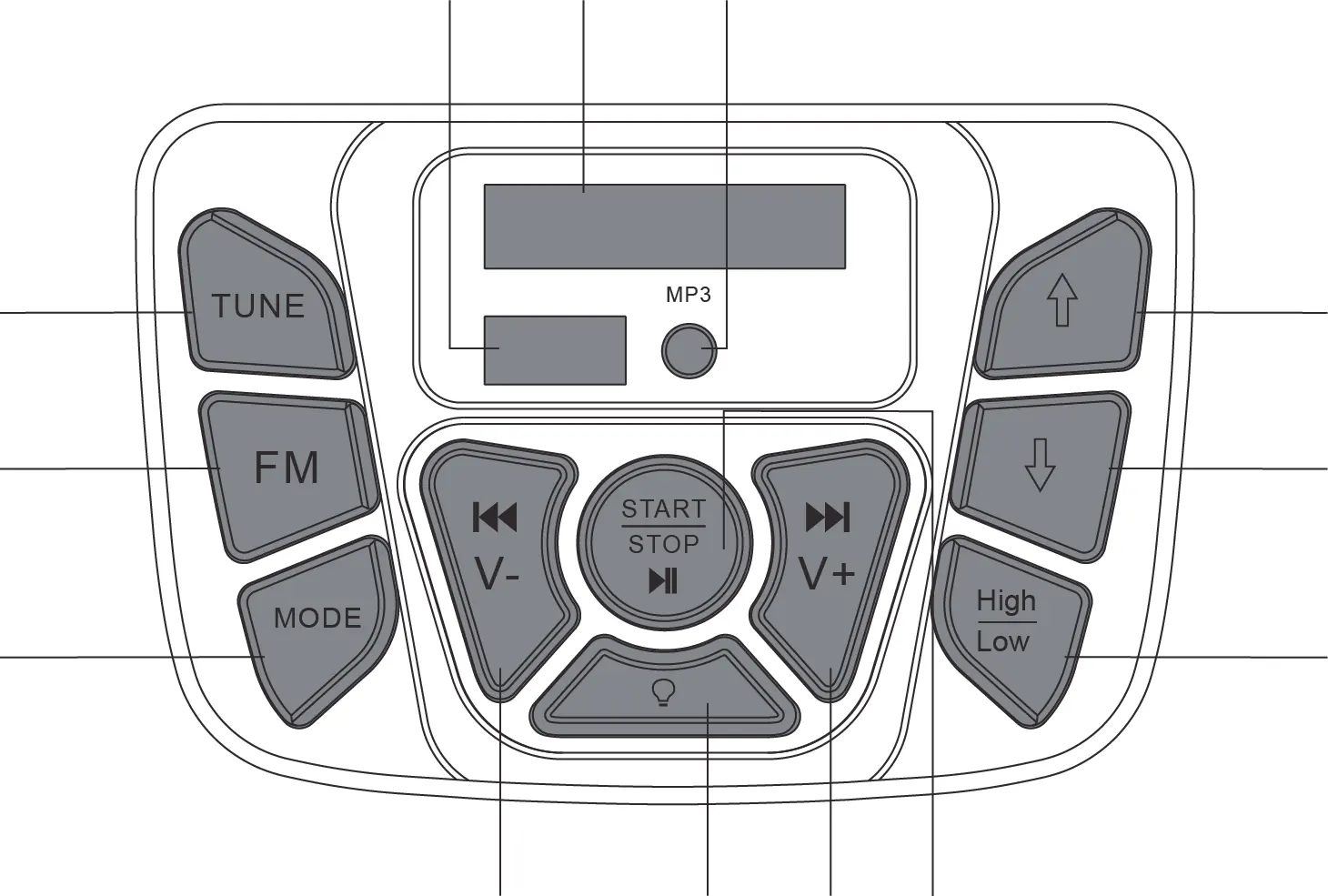
The vehicle is controlled via the control panel and foot pedal. Press the foot pedal to move the vehicle and release it to stop. The control panel allows you to manage the audio system, including FM radio, USB, AUX, and Bluetooth modes. Use the forward/reverse buttons to select direction and the high/low speed button to adjust velocity.
Remote Control Operation
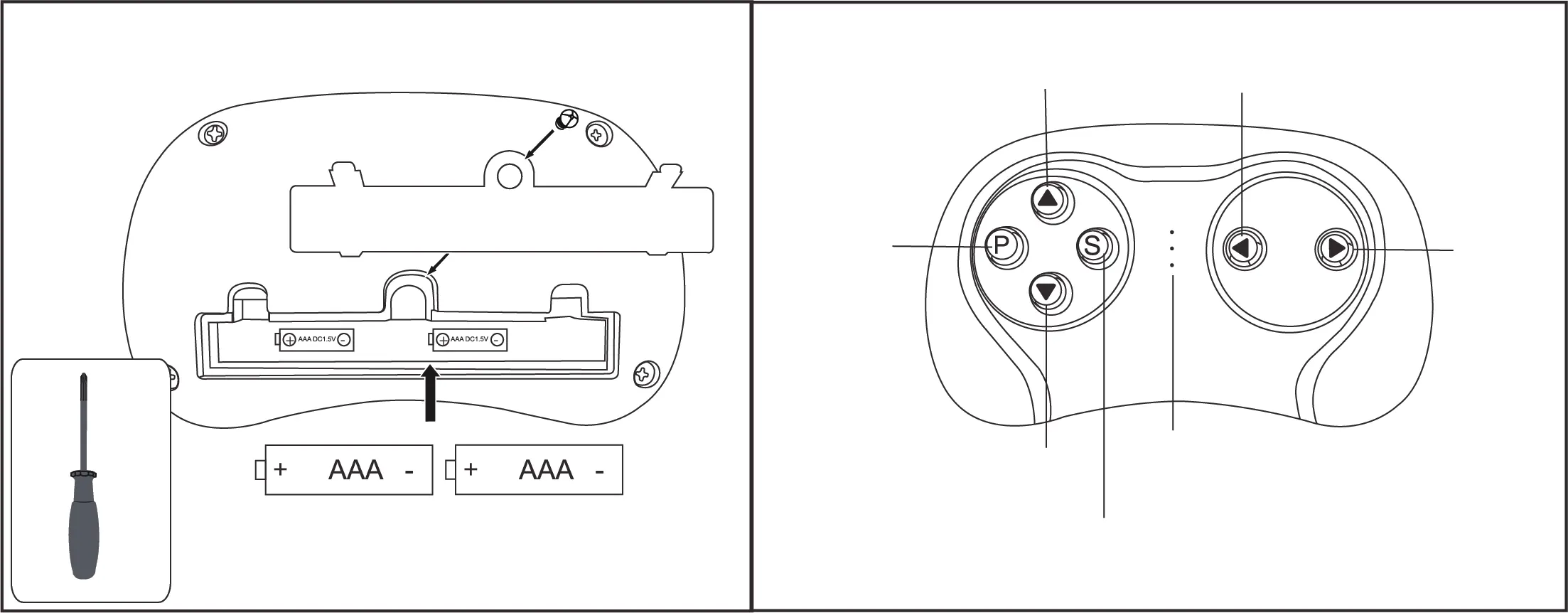
The remote control must be used by an adult. To pair: turn off the vehicle, insert batteries into the remote, and turn the vehicle back on. The remote control input overrides manual operation. If the remote is not used for a long period, it enters sleep mode; press any button to wake it.
Charging the Battery
The battery is not replaceable and must be charged by an adult. The vehicle must be turned OFF during charging. Connect the charger to the charging port. The first charge requires 8-12 hours. Do not charge for more than 20 hours to prevent damage. Charge the battery at least once a month even if the vehicle is not in use.
Care and Maintenance
Regularly check for loose parts and tighten if necessary. Clean the vehicle with a cloth and non-wax furniture polish. Do not use abrasive cleaners or wash with a hose. Keep the product away from heat and humidity. Occasionally lubricate moving parts with lightweight oil.
Troubleshooting
If the vehicle does not move, check the battery connection or wait 5-20 seconds for the fuse to reset. If the vehicle runs slowly, ensure the user weight is within the 66 lb limit and avoid harsh terrain. For persistent issues like grinding sounds or charging failures, contact customer service.
Manufacturer information
Kidzone Toys
Practical help
Common problems
Vehicle does not move
Check battery connections, ensure the battery is charged, or wait 5-20 seconds for the fuse to reset.
Battery does not last long
Ensure the battery is fully charged. If the battery is old, it may need replacement.
Vehicle runs very slow
Check if the vehicle is overloaded (max 66 lb / 30 kg) or being used in a harsh environment.
Battery does not charge
Check if the charger is firmly plugged into the power source and the charging port.
Before use
- Assemble the vehicle by an adult.
- Connect the battery.
- Charge the battery for 8-12 hours before the first use.
- Ensure the seat belt is securely fastened.
- Check for any missing or loose parts.
- Verify the user weight is under 66 lb (30 kg).
Specs in practice
- Operation Time
- 1-2 hours of continuous use.
Images and diagrams
- Control Panel: Features buttons for FM radio, mode selection (USB/AUX/Bluetooth), volume, speed, and lights.
- Remote Control: Includes directional buttons (Forward, Reverse, Left, Right), stop button, and speed selection.
- Assembly: Diagrams show the step-by-step installation of wheels, steering wheel, and seat components.
Model compatibility
- Only use the charging devices, transformer, and battery provided or recommended by the manufacturer.
- Remote control input always overrides manual control operation.
- The player only supports MP3 format files via the flash drive port.

Manual page author
Michael Turner
Technical manual editor
Reviews PDF manuals for structure, safety notes, and practical product details so readers can find the right information quickly.