Toys / Ride-on Toys
User Manual for Kidzone 060-ROT-06V2 Ride On Bumper Car
Quick guide for the Kidzone 060-ROT-06V2 12V Ride On Bumper Car. Includes assembly, battery charging, remote control pairing, operation instructions, and troubleshooting.
Table of contents
Manual images
Click an image to enlargeQuick Guide from the Manual
This document provides essential instructions for the Kidzone 060-ROT-06V2 Ride On Bumper Car. Key requirements include adult assembly, charging the battery for 8-12 hours before the first use, and ensuring the child wears a helmet and uses the seat belt. The vehicle is designed for children aged 18-72 months with a maximum weight of 66 lbs (30 kg). Do not operate on carpets or rugs to avoid friction hazards.
Safety Instructions
Always follow these safety precautions to prevent injury or damage:

- Adult supervision is required at all times.
- Do not use in roadways, near motor vehicles, steep inclines, steps, or swimming pools.
- The product is not intended for children under 18 months.
- Always wear shoes and a helmet.
- Do not modify the electrical system.
- If the vehicle gets stuck, stop operating immediately.
- Wait 10-15 seconds for the automatic cut-off to reset if the vehicle stops due to overload.
Parts and Features
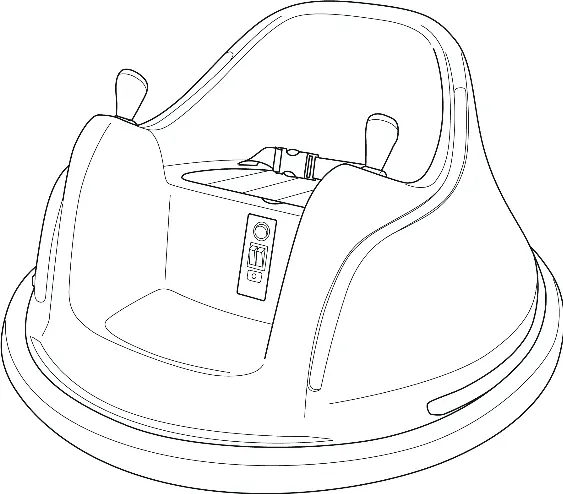
The vehicle consists of the main body, seat cover, seat belt, control sticks, power switch, light switch, speed switch, charging port, and remote control. Familiarize yourself with these components before operation.
Assembly and Battery Setup
The vehicle is shipped with the battery disconnected. To prepare for use:
- Unscrew and detach the seat cover.
- Connect the battery terminals: Red to Red, Black to Black.
- Reattach the seat cover and tighten the screws.
Charging the Battery
The battery must be charged by an adult only. Do not charge for more than 20 hours.
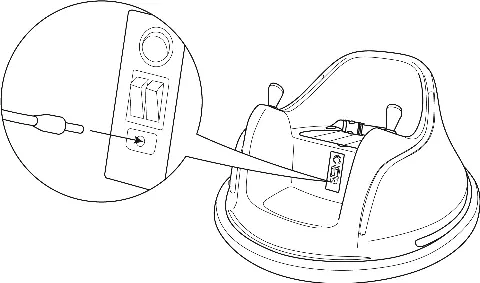
- Plug the charger into the charging port.
- The indicator turns red while charging and green when complete.
- Charge the battery at least once a month, even if the vehicle is not in use, to maximize battery life.
Operating the Vehicle
The vehicle can be controlled manually or via the remote control.
Manual Control
- Turn on the power switch to 'I'.
- Use the speed switch to select low ('--') or high ('=') speed.
- Push both control sticks forward to move forward, or backward to move backward.
- Push one stick forward and pull the other backward to spin the vehicle.
- Release both sticks to stop.
Remote Control
The remote control overrides manual control. To pair the remote:
- Insert batteries into the remote.
- Turn on the vehicle power.
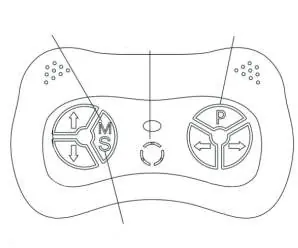
- Press the 'M' button for 2-4 seconds until the indicator changes to solid red.
Use the arrow buttons to move the vehicle. Press the 'P' button to enable the emergency brake.
Bluetooth Connection
To play music, turn on Bluetooth on your mobile device and select 'Kidzone Bumper Car'. You will hear a voice message confirming the connection.
Care and Maintenance
- Check the product regularly for loose parts or cracks.
- Keep away from heat and humidity; cover when not in use.
- Clean with a cloth and non-wax furniture polish.
- Do not wash with a hose or immerse in water.
- Use lightweight oil to lubricate moving parts occasionally.
Manufacturer information
Kidzone Toys
Practical help
Common problems
Vehicle does not move
Check battery connection, charge the battery, or wait 10-15 seconds for the automatic cut-off to reset if overloaded.
Vehicle runs very slow
Charge the battery, replace the battery if old, ensure the user weight is under 66 lbs, or avoid harsh environments.
Remote control not working
Ensure frequency is matched (hold M button for 2-4s), replace batteries, or check if the remote is in sleep mode (after 10s idle).
Battery does not charge
Ensure the charger is firmly plugged in, check for damaged connectors, or contact customer service if the charger is faulty.
Before use
- Charge the battery for 8-12 hours before the first use.
- Connect battery terminals (Red to Red, Black to Black).
- Ensure the seat belt is securely fastened.
- Check that the child is wearing a helmet.
- Inspect the vehicle for any loose parts or cracks.
- Ensure the operating area is flat and well-lit.
Specs in practice
- Charging Time
- 8 - 12 hours (Max 20 hours)
Images and diagrams
- Parts diagram identifies the vehicle body, control sticks, and switches.
- Remote control diagram shows speed selection, direction arrows, and emergency brake button.
- Battery connection diagram illustrates the terminal polarity.
Model compatibility
- Suitable for children aged 18-72 months.
- Do not operate on carpets or rugs (friction hazard).
- Remote control overrides manual control.

Manual page author
Michael Turner
Technical manual editor
Reviews PDF manuals for structure, safety notes, and practical product details so readers can find the right information quickly.