Toys / Ride-on Toys
User Manual for Kidzone 060-ROT-18L Licensed Toyota Tacoma Ride-On
Quick guide for the Kidzone 060-ROT-18L Licensed Toyota Tacoma Ride-On. Includes assembly steps, battery charging, remote control pairing, and troubleshooting tips.
Table of contents
Manual images
Click an image to enlargeQuick guide from the manual
This ride-on toy is designed for children aged 37-72 months with a maximum weight capacity of 66 lb (30 kg). The vehicle requires adult assembly and supervision at all times. Before first use, you must connect the battery and charge it for 8-12 hours. The vehicle does not have braking capabilities, so it should not be used near steep inclines, roads, or bodies of water.
Safety Warnings
- Age and Weight: Suitable for children 37-72 months old; max weight 66 lb (30 kg).
- Supervision: Adult supervision is required at all times. Never leave children unattended.
- Environment: Do not use on roadways, near motor vehicles, steep inclines, steps, or swimming pools. Use only on flat, hard surfaces.
- Electrical Safety: Do not modify the electrical system. Use only the supplied charger and battery.
- Operation: Always wear shoes. Do not allow more than one rider.
Assembly Instructions
The vehicle must be assembled by an adult. Key steps include:
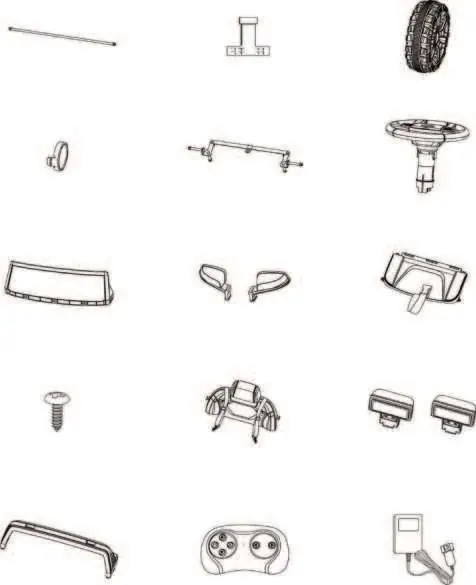
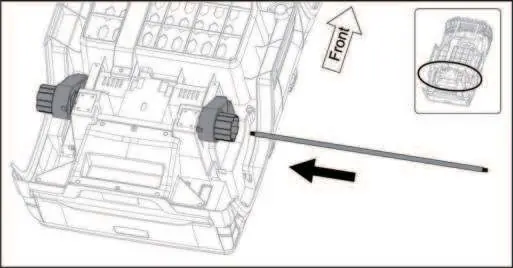
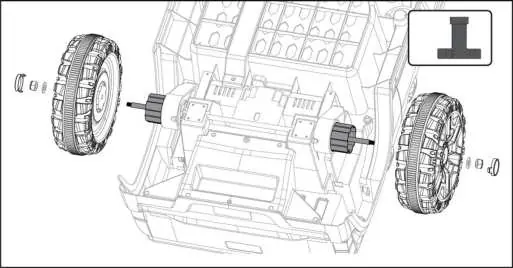
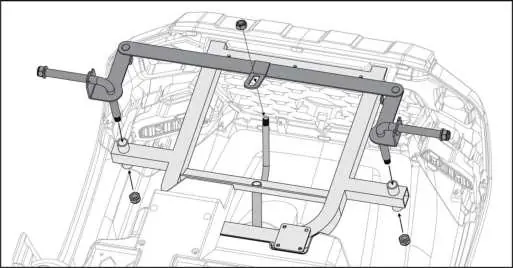
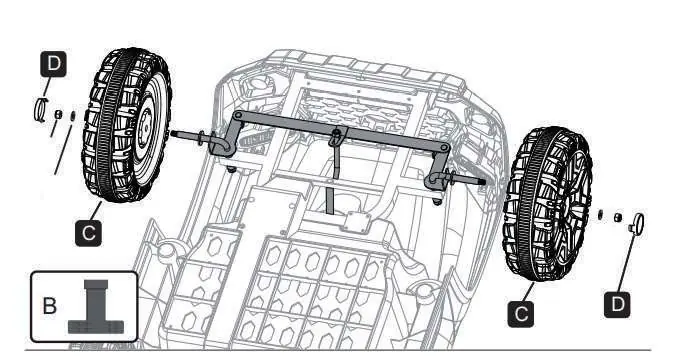
- Axles and Wheels: Install the rear and front axles, then secure the wheels using the provided washers and M8 nuts.
- Steering Wheel: Attach the steering wheel to the steering axle using the screw and nut.
- Body Components: Attach the wind deflector, rearview mirrors, seat, backrest, and rear lamp assembly to the car body using the provided screws.
- Battery Connection: Locate the terminal cover in front of the seat and connect the battery terminal to the car terminal.
Operating the Vehicle
The vehicle can be controlled via the foot pedal or the remote control.
- Foot Pedal: Step on the pedal to move forward or reverse. Release to slow down and stop.
- Control Panel: Includes buttons for power, light, directional controls, and a media player (FM radio, AUX, Bluetooth).
- Remote Control: Must be paired by turning off the car, inserting batteries into the remote, and turning the car back on. The remote overrides manual control.
Charging the Battery
The battery is not replaceable and must be charged by an adult.
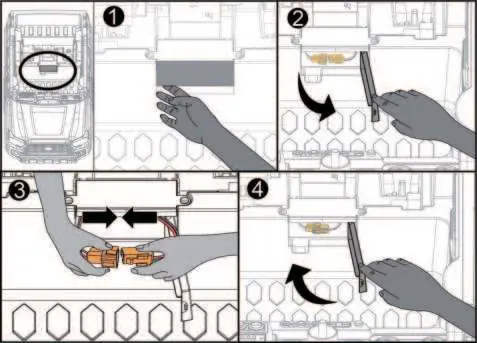
- Locate the terminal cover in front of the seat.
- Disconnect the battery terminal from the car.
- Connect the battery terminal to the charger and plug into a wall outlet.
- Charge Time: Average 8-12 hours. Do not charge for more than 20 hours to prevent overheating.
- Charge at least once a month if the vehicle is not in use.
Troubleshooting
- Vehicle does not move: Check battery connection, charge the battery, or wait 60 seconds for the fuse to reset automatically.
- Vehicle runs slow: Ensure the battery is fully charged, check for overload (max 30kg), or avoid harsh terrain.
- Battery does not charge: Check if the charger is firmly plugged in and the battery is connected to the car terminal.
Manufacturer information
Kidzone Toys
Practical help
Common problems
Vehicle does not move
Check battery connection, charge the battery, or wait 60 seconds for the fuse to reset.
Vehicle runs very slow
Fully charge the battery, ensure user weight is under 66 lb (30 kg), or avoid harsh environments.
Battery does not charge
Ensure the charger is firmly plugged into the power source and connected to the charging port.
Loud grinding or clicking sound
Contact customer service as this indicates a damaged motor or gear box.
Before use
- Assemble the vehicle by an adult
- Charge the battery for 8-12 hours
- Check all parts are secure and not loose
- Verify the child is between 37-72 months old
- Ensure the rider is under 66 lb (30 kg)
- Connect the battery terminal to the car terminal
Specs in practice
- Operation Time
- 40-60 minutes per full charge
Images and diagrams
- Parts list for identification
- Wheel and axle assembly steps
- Battery connection procedure
- Control panel button functions
- Remote control pairing and usage
Model compatibility
- For children 37-72 months
- Maximum weight capacity 66 lb (30 kg)
- Not for use on public roads or near traffic

Manual page author
Michael Turner
Technical manual editor
Reviews PDF manuals for structure, safety notes, and practical product details so readers can find the right information quickly.