Computers / Laptops
User Manual for LG gram Pro 16/17-inch Laptop
Comprehensive technical specifications and feature guide for the LG gram Pro 16/17-inch laptop series. Includes hardware details, port configurations, and system capabilities.
Quick answers from the manual
Quick answer
- The LG gram Pro 16/17-inch laptop is a high-performance business laptop featuring Intel Core Ultra processors, 16GB LPDDR5x RAM, and a durable magnesium alloy body. It supports Windows 11 Pro and includes versatile connectivity via Thunderbolt 4 and HDMI. p. 1, 2
Key actions
- Charge the device using the included 65W (2-Pole) AC adapter via the USB-C port. p. 2
- Use the Power Button with LED to turn the device on/off. p. 2
Technical specifications
| Parameter | Value | Meaning | Pages |
|---|---|---|---|
| Processor | Intel Core Ultra 7 / Ultra 5 | CPU options for the laptop series. | p. 2 |
| Memory | 16 GB (LPDDR5x Max 7467 MHz) | System RAM capacity and speed. | p. 2 |
| Battery | 77 Wh Li-Ion | Battery capacity. | p. 2 |
Where to find it in the PDF
- Product Overview and Features p. 1
- Technical Specifications Table p. 2
Table of contents
Quick Guide from the Manual
This document provides the technical specifications and feature overview for the 2024 LG gram Pro 16/17-inch laptop series. It is designed to help users understand the hardware capabilities, connectivity options, and physical dimensions of the device. The laptop is built with a magnesium alloy body, Intel Core Ultra processors, and is MIL-STD-810G compliant for durability.
Key Features
- Processor: Intel Core Ultra 7 or Ultra 5 options.
- Display: 16.0-inch or 17.0-inch WQXGA/WQXGA+ IPS or OLED panels with 16:10 aspect ratio.
- Memory & Storage: 16GB LPDDR5x RAM and Dual SSD (NVMe PCIe Gen 4) storage options.
- Graphics: Intel Arc Graphics.
- Durability: Tough MIL-STD-810G compliant magnesium alloy body.
- Battery: 77 Wh Li-Ion battery.
Technical Specifications
The LG gram Pro series comes in three primary configurations (17Z90SP-V.APB6U1, 16Z90SP-N.APB6U1, 16Z90SP-V.APB3U1). Key shared specifications include:
- Operating System: Windows 11 Pro (64bit).
- Wireless: Intel WiFi-6E AX211 (WiFi 6E, 2x2, BT Combo) and Bluetooth 5.3.
- Webcam: FHD Webcam + IR Camera with Dual Mic.
- Audio: HD Audio with Dolby Atmos and Stereo Speakers (3.0W x2, Smart AMP MAX 5W).
- Security: SSD Security and dTPM (reserve).
Connectivity and Ports
The laptop is equipped with a variety of ports to support professional workflows:
- USB Type A: USB 3.2 Gen2 (x2).
- USB Type C: USB 4 Gen3x2 (x2) with Power Delivery, Display Port, and Thunderbolt 4 support.
- HDMI: Supports 4K resolution at 60 Hz.
- Headphone Out: 4-Pole Headset (US type).
Software and Security
The device comes pre-installed with a suite of LG software tools to enhance productivity and security, including:
- LG Smart Assistant, LG Update & Recovery, and LG Quick Guide.
- LG Security Guard and LG PC Manuals.
- LG Glance by Mirametrix, Intel Unision, and Dolby Atmos.
- PCmover Professional and Intel Connectivity Performance Suite.
- Trial versions of McAfee Live Safe and Microsoft 365.
Dimensions and Weight
The LG gram Pro is designed for portability:
- Thickness: Ultra-thin at 0.51 inches.
- Weight: Extremely light, ranging from approximately 2.64 lbs to 2.86 lbs depending on the model.
Official resources from the manual
Manufacturer information
LG Electronics
Practical help
Common problems
Battery not charging
Ensure the provided 65W (2-Pole) AC adapter is securely connected to the USB-C port.
External display not detected
Verify the connection via HDMI or USB-C (Thunderbolt 4/Display Port). Ensure the cable supports the required bandwidth for 4K @ 60Hz.
Wireless connectivity issues
The device uses Intel WiFi-6E AX211. Ensure drivers are up to date via LG Update & Recovery.
Before use
- Verify the specific model number (17Z90SP-V.APB6U1, 16Z90SP-N.APB6U1, or 16Z90SP-V.APB3U1).
- Ensure the 65W AC adapter is available for initial charging.
- Check for Windows 11 Pro updates upon first boot.
- Familiarize yourself with the Power Button location (includes LED indicator).
Specs in practice
- Thunderbolt 4
- Versatile USB-C port supporting high-speed data transfer, power delivery, and external display output.
- MIL-STD-810G
- Military-grade durability standard indicating the laptop has been tested for toughness.
Images and diagrams
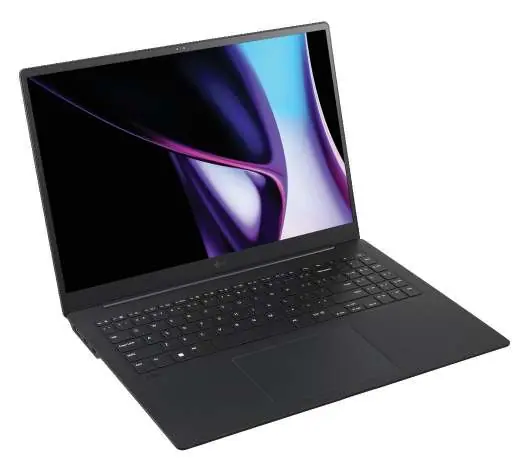
- The laptop features a full-size backlit keyboard with a numeric keypad.
- I/O ports are located on the sides, including USB-A, USB-C (Thunderbolt 4), and HDMI.
- The power button includes an integrated LED indicator.
Model compatibility
- Supports Windows 11 Pro.
- Compatible with 4K displays via HDMI or USB-C.
- Includes 30-day trial software for McAfee Live Safe and Microsoft 365.

Manual page author
David Miller
Documentation analyst
Organizes user manual content into clear summaries, with attention to model details, product context, and everyday usability.