Computers / Laptops
HP Envy 17-3070NR Battery Replacement Guide
A step-by-step guide for replacing the battery in your HP Envy 17-3070NR laptop. Includes tool requirements, safety precautions, and detailed instructions for removing the back cover and the battery unit.
Quick answers from the manual
Quick answer
- To replace the battery, power off the laptop, slide the release latch to remove the back cover, unscrew the six 3.7mm Phillips screws, disconnect the battery cable, remove the two 3.8mm Torx screws, and lift the battery out. p. 3, 4
Key actions
- Remove back cover p. 3
- Disconnect battery cable p. 4
- Remove battery p. 4
Where to find it in the PDF
- Introduction and Tools p. 2
- Back Cover Removal p. 3
- Battery Removal p. 4
Table of contents
Manual images
Click an image to enlargeQuick guide from the manual
This guide provides instructions for replacing the battery in an HP Envy 17-3070NR laptop. This procedure is recommended if the laptop is no longer holding a charge or requires frequent charging. Ensure the laptop is completely powered off before beginning.
Tools required
- T8 Torx screwdriver
- Phillips #2 screwdriver
Step 1: Back Cover
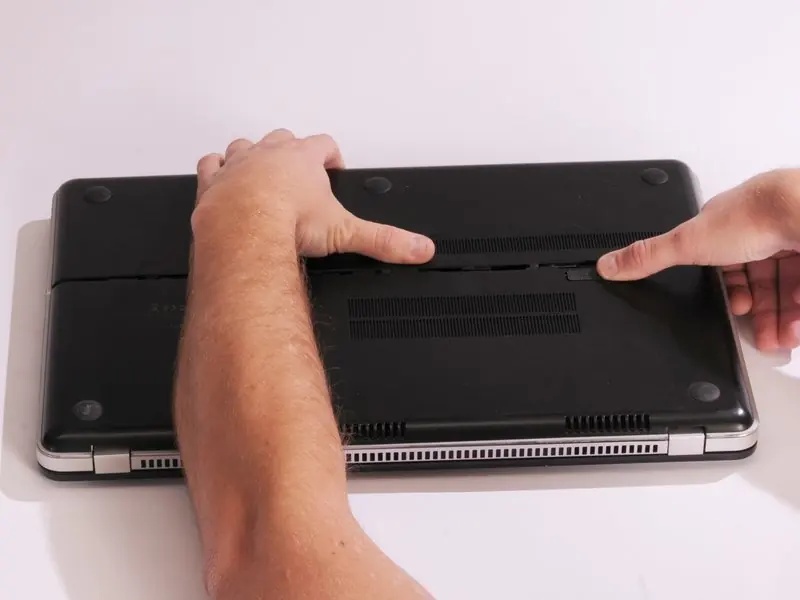
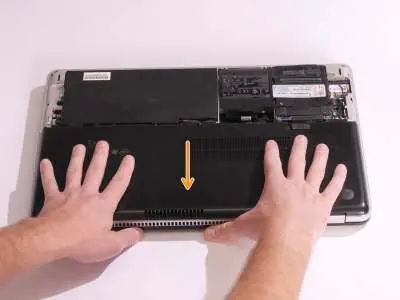
Before you begin, ensure the computer is completely powered off. Slide the release latch away from the nearest edge to unlock the back cover. Slide the back cover off of the computer.
Step 2: Internal screws
Once the back cover is removed, locate the six 3.7mm Phillips screws securing the internal assembly. Remove these screws. Slide the back cover until it clicks, then lift it straight off.
Step 3: Battery disconnection
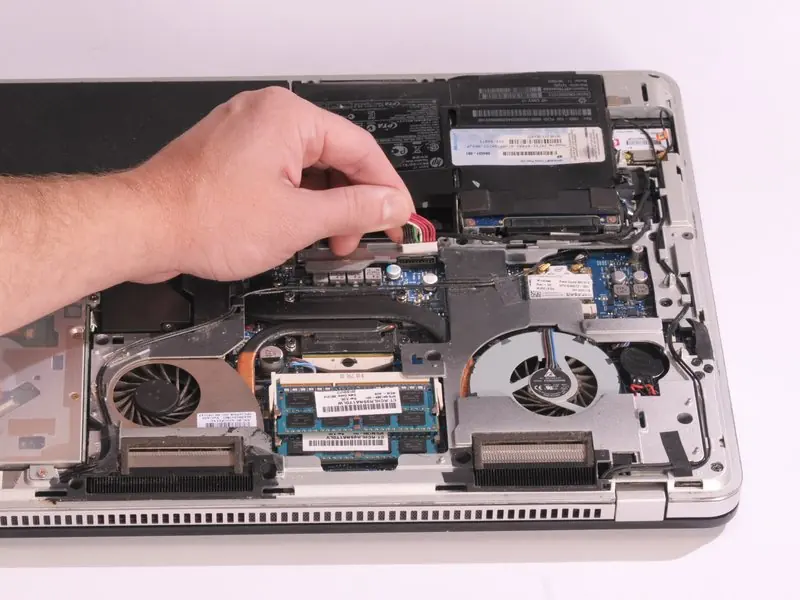
Locate the multi-colored battery cable connected to the main assembly. Disconnect the cable by gently pulling upward on it.
Step 4: Battery removal
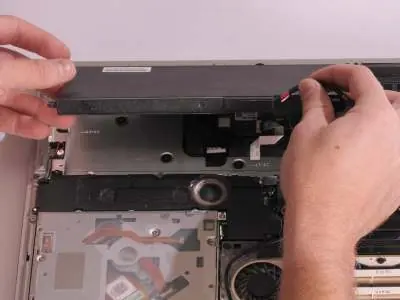
Remove the two 3.8mm Torx screws using a T8 Torx screwdriver. Remove the battery by pulling it straight out away from the computer. It is recommended to use the battery cable to carefully lift the battery off rather than prying it with tools.
Reassembly
To reassemble your device, follow the instructions in reverse order.
Manufacturer information
HP Inc.
Practical help
Common problems
Laptop is not holding a charge
The battery capacity has likely decreased over time due to charging cycles; replacement is recommended.
Difficulty removing the battery
Use the battery cable to carefully lift the battery off instead of using tools to pry it, which may cause damage.
Before use
- Ensure the laptop is completely powered off
- Prepare a T8 Torx screwdriver
- Prepare a Phillips #2 screwdriver
Specs in practice
- 3.7mm Phillips
- The size of the six screws securing the back cover.
Images and diagrams
- The guide provides visual steps for sliding the release latch, removing the back cover, unscrewing the internal components, and disconnecting the battery cable.
Model compatibility
- This guide is specifically for the HP Envy 17-3070NR model.

Manual page author
David Miller
Documentation analyst
Organizes user manual content into clear summaries, with attention to model details, product context, and everyday usability.