Power / Portable Power Stations
MOKiN 120W Foldable Solar Charger MO-SPO01
Quick guide for the MOKiN 120W Foldable Solar Charger (MO-SPO01). Learn how to position the panel for maximum efficiency, connect your devices, and maintain the unit for optimal performance.
Table of contents
Manual images
Click an image to enlargeQuick Start Guide
To achieve the best charging results, place the solar charger in direct sunlight between 9:00 AM and 5:00 PM. Ensure the panel is positioned vertically toward the sun and that there are no obstructions (such as shadows from trees or buildings) on the surface of the solar charger.
Product Overview
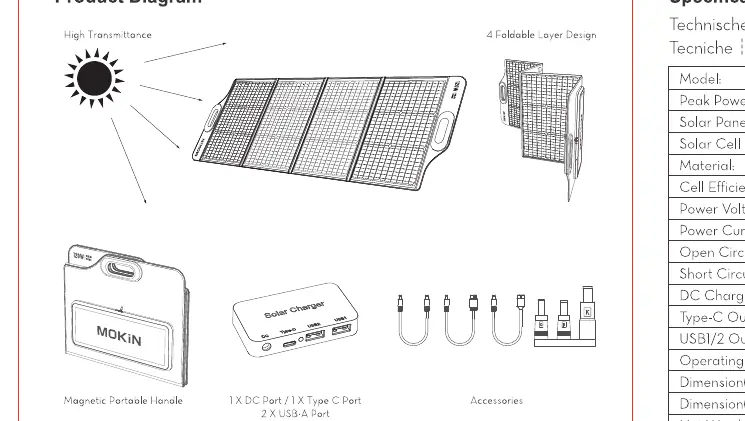
The MOKiN 120W Foldable Solar Charger features a 4-foldable design made with ETFE material and monocrystalline silicon cells. The unit includes a junction box with multiple output ports for charging various devices.
Technical Specifications
- Model: MO-SPO01
- Peak Power: 120W
- Cell Efficiency: Up to 22%-23%
- Power Voltage: 20V
- Power Current: 6A
- USB-C Output: 5V/3A, 9V/3A, 12V/3A, 15V/3A, 20V/3.25A (PD65W Max)
- USB-A Output: 5V/3A, 9V/2A, 12V/1.5A (18W Max per port)
- Operating Temperature: -10°C to 65°C
Charging Instructions
1. Unfold the solar charger and place it in direct sunlight.

2. Connect your device to the appropriate port (DC, USB-C, or USB-A) using the provided cables.
3. Ensure the connection is secure. The device should begin charging automatically.
Important Precautions
- Not Waterproof: The junction box is not waterproof. Keep it dry and do not submerge the unit in water.
- Handling: Do not crush, press, or place heavy objects on the solar charger.
- Connection Limits: Do not connect multiple solar panels in series or parallel.
- Operating Conditions: Performance is affected by sunlight intensity, angle, and obstructions.
Maintenance
To clean the solar panel, use a soft cloth to remove dust and dirt from the surface. Do not use abrasive cleaners or harsh chemicals.
Manufacturer information
MOKiN
Practical help
Common problems
The charger is not reaching 120W output.
Power output is affected by sunlight intensity, the angle of the panels, and obstructions. Ensure the panels are in direct, unobstructed sunlight.
Can I connect multiple panels in series or parallel?
No, these solar panels cannot be connected in series or parallel.
Before use
- Check the surface of the solar panel for dust or debris.
- Ensure the panel is placed in direct sunlight (9:00 AM - 5:00 PM).
- Verify that the device is connected properly using the provided cable.
- Ensure there are no obstructions casting shadows on the panels.
Specs in practice
- Peak Power (Pm) 120W
- The maximum power output under ideal laboratory conditions.
- USB-C Output
- Supports Power Delivery (PD) up to 65W for fast charging compatible laptops and devices.
- Operating Temperature
- The safe range for operation is -10°C to 65°C.
Images and diagrams
- The product diagram illustrates the 4-foldable design and the location of the junction box.
- The charging diagram shows the correct orientation of the panel toward the sun and the connection point for devices.
Model compatibility
- The junction box is not waterproof; keep it dry.
- Do not connect panels in series or parallel.

Manual page author
David Miller
Documentation analyst
Organizes user manual content into clear summaries, with attention to model details, product context, and everyday usability.