Electronics / USB Hubs & Docking
User Manual for MOKiN MO-PH003 Portable Power Station
Quick guide for the MOKiN MO-PH003 Portable Power Station. Learn how to charge, operate, and troubleshoot your 288Wh power station with this comprehensive manual.
Table of contents
Manual images
Click an image to enlargeQuick guide from the manual
The MOKiN MO-PH003 is a 288Wh portable power station designed for charging various electronic devices. Before first use, ensure the unit is fully charged. The device features multiple output ports, including AC, DC, USB-A, and USB-C. Note that the AC output supports devices under 300W. The unit is not waterproof and should not be used as a UPS.
Product Overview
The device includes the following ports and controls:
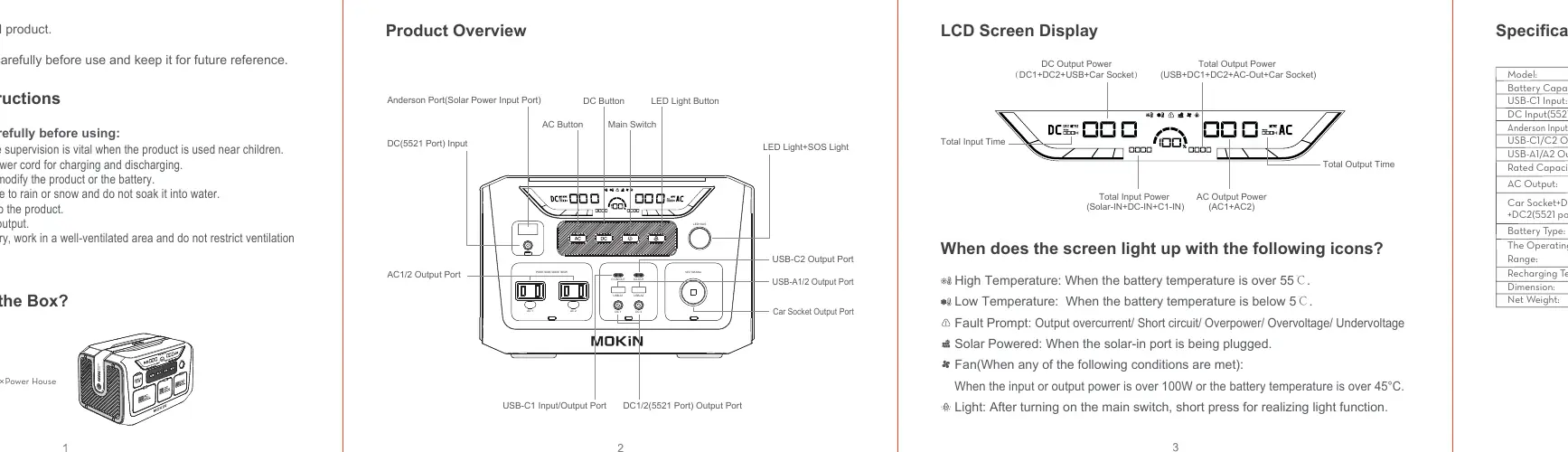
- Inputs: Anderson Port (Solar), DC (5521) Input, USB-C1 Input/Output.
- Outputs: AC1/2 Output, USB-C1/C2 Output, USB-A1/A2 Output, DC1/2 (5521) Output, Car Socket Output.
- Controls: Main Switch, AC Button, DC Button, LED Light Button.
How to Use
Follow these steps to operate the power station:
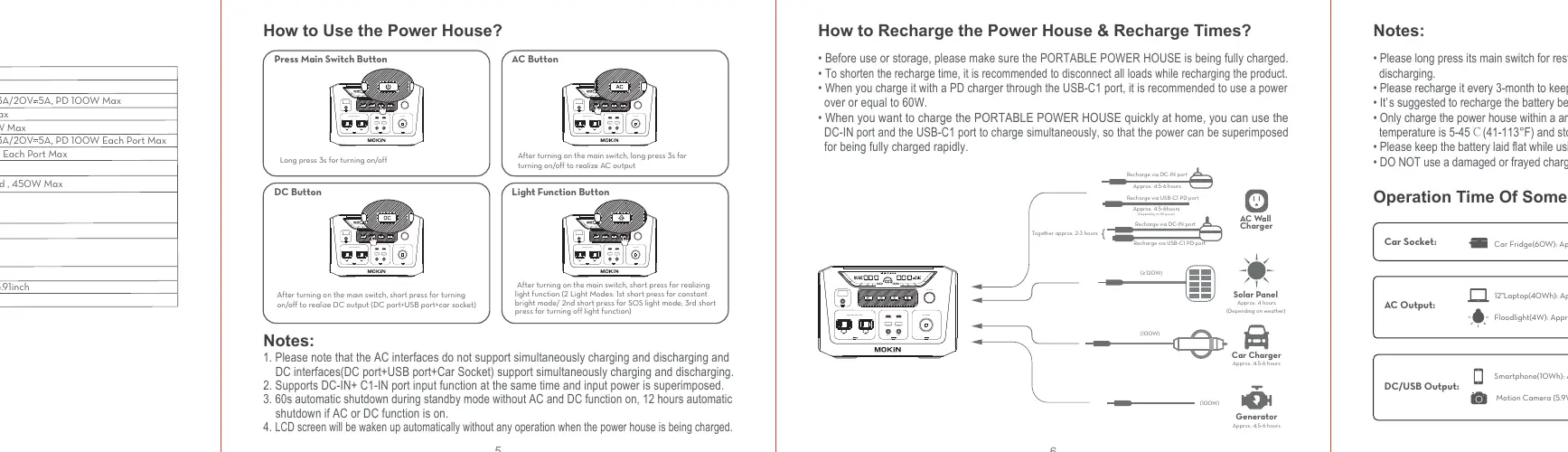
- Power On/Off: Long press the Main Switch for 3 seconds to turn the unit on or off.
- AC Output: After turning on the main switch, long press the AC Button for 3 seconds to enable/disable AC output.
- DC/USB Output: After turning on the main switch, short press the DC Button to enable/disable DC, USB, and Car Socket outputs.
- LED Light: After turning on the main switch, short press the LED Light Button to cycle through modes (Constant bright, SOS, Off).
Charging Methods
You can recharge the power station using several methods:
- DC-IN Port: Standard charging.
- USB-C1 PD Port: Supports PD charging (recommended 60W or higher).
- Solar Panel: Connect via Anderson port (MPPT controller built-in).
- Simultaneous Charging: You can use DC-IN and USB-C1 ports simultaneously for faster charging.
- Note: Disconnect loads while recharging to shorten recharge time.
Safety Instructions
- Do not disassemble, repair, or modify the product.
- Keep away from rain, snow, and water; the unit is not waterproof.
- Do not overload AC or DC outputs.
- Use in well-ventilated areas.
- Recharge every 3 months if not in use to keep battery above 50%.
- Operating temperature range: 5°C to 45°C (41°F to 113°F).
Troubleshooting
If the unit fails to power devices:
- Ensure the corresponding output port is turned on via its button.
- Check the battery level; recharge if low.
- Verify that the connected device specifications match the power station's output capabilities.
- If charging/discharging issues occur, long press the main switch to restart the unit.
Manufacturer information
MOKiN
Practical help
Common problems
Device not powering
Ensure the specific output port (AC/DC/USB) is turned on by pressing its button. Check battery level and ensure device power requirements are within 300W for AC.
Battery not lasting as expected
High power consumption devices generate internal heat, which reduces effective battery capacity.
Unit not waterproof
Keep the product away from moisture, rain, and water to prevent short-circuits, electric shock, or fire.
Cannot use as UPS
The unit does not support automatic switching; you must manually press buttons to activate outputs.
Before use
- Fully charge the unit before first use.
- Check battery level regularly.
- Ensure ambient temperature is between 5-45°C.
- Use compliant power cords.
- Keep the battery laid flat during use and storage.
Specs in practice
- Battery Capacity
- 288Wh (20000mAh/14.4V).
- USB-C1/C2 Output
- PD 100W Max per port.
- Operating Temperature
- 5°C to 45°C (41°F to 113°F).
Images and diagrams
- Main Switch: Long press 3s to turn on/off.
- AC Button: Long press 3s to turn on/off AC output.
- DC Button: Short press to turn on/off DC/USB/Car Socket output.
- LED Light Button: Short press to cycle modes (Constant/SOS/Off).
Model compatibility
- AC output supports devices under 300W.
- Not compatible with UPS functionality.
- Cannot be interconnected with other power stations.
- Only DC interfaces support simultaneous charging and discharging.

Manual page author
Emily Carter
User documentation editor
Prepares concise manual descriptions and highlights the most useful setup, operation, and maintenance information for readers.