Electronics / USB Hubs & Docking
Mokin UC3311 USB-C 12-in-1 Multifunctional Hub
Quick guide for the Mokin UC3311 USB-C 12-in-1 Multifunctional Hub. Learn about port specifications, data transfer speeds, and important monitor compatibility notes for macOS and Windows users.
Table of contents
Manual images
Click an image to enlargeQuick guide from the manual
The Mokin UC3311 is a 12-in-1 USB-C multifunctional hub designed to expand the connectivity of your computer. The most critical operational note is the monitor limitation for macOS users: macOS can only extend one external monitor, and any additional monitors will mirror the first. Windows users do not face this limitation.
Product Overview
The device features 13 distinct connection points:
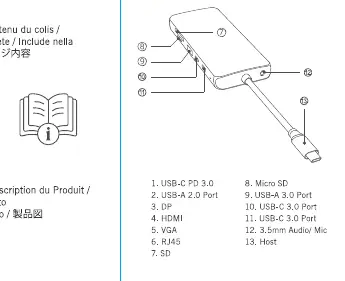
- 1. USB-C PD 3.0
- 2. USB-A 2.0 Port
- 3. DP (DisplayPort)
- 4. HDMI
- 5. VGA
- 6. RJ45 (Ethernet)
- 7. SD Card Slot
- 8. Micro SD Card Slot
- 9. USB-A 3.0 Port
- 10. USB-C 3.0 Port
- 11. USB-C 3.0 Port
- 12. 3.5mm Audio/Mic Jack
- 13. Host (USB-C cable)
Technical Specifications
The hub supports the following performance standards:
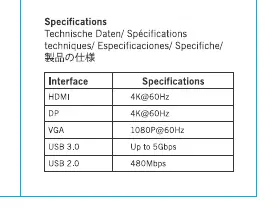
- Video Output: HDMI and DP support up to 4K@60Hz; VGA supports up to 1080P@60Hz.
- Data Transfer: USB 3.0 ports support up to 5Gbps; USB 2.0 supports 480Mbps.
- Network: RJ45 port supports up to 1000Mbps.
- Card Readers: SD/Micro SD read speeds are 10-40MB/s, and write speeds are 10-30MB/s.
- Power Delivery: USB-C PD 3.0 supports up to 100W input.
Compatibility and Limitations
Please note the following operating system limitations regarding external monitors:
- MacOS: Can only extend one external monitor. The second or third external monitor will mirror the first.
- Windows: Does not have the monitor mirroring limitation.
Manufacturer information
MOKiN
Practical help
Common problems
MacOS monitor extension limitation
MacOS can only extend one external monitor. Additional monitors will mirror the first. This is a system limitation, not a device fault.
Windows monitor extension
Windows does not have the monitor mirroring limitation found on MacOS.
Before use
- Ensure your host device supports USB-C Power Delivery if you intend to charge it through the hub.
- Verify your monitor resolution requirements against the hub's 4K@60Hz (HDMI/DP) and 1080P@60Hz (VGA) limits.
- Check if your host device supports the required data transfer speeds (5Gbps for USB 3.0).
Specs in practice
- USB-C PD 3.0
- Supports up to 100W power input for charging your host device.
Images and diagrams
- The hub features 13 connection points including video outputs (HDMI, DP, VGA), data ports (USB-A, USB-C), card readers (SD, Micro SD), and audio/network jacks.
Model compatibility
- MacOS users are limited to extending only one external monitor.
- Windows users do not have the monitor mirroring limitation.

Manual page author
Emily Carter
User documentation editor
Prepares concise manual descriptions and highlights the most useful setup, operation, and maintenance information for readers.