Mobile / Smartphones
User Manual for Motorola Edge 40 Neo
Quick start guide for the Motorola Edge 40 Neo. Learn how to insert your SIM card, power on the device, use the camera, and find important safety and regulatory information.
Table of contents
Manual images
Click an image to enlargeQuick guide from the manual
Before using your phone, it is essential to read the provided legal, safety, and regulatory information. Ensure you use the correct SIM card size and do not cut the SIM card. The device supports 5G connectivity, which requires a 5G service plan and network coverage; availability may vary by region.
Device Layout
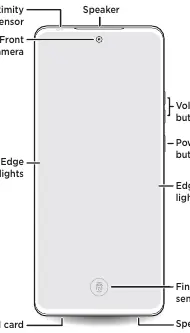
Front: The front of the device features a proximity sensor, front camera, speaker, volume buttons, power button, fingerprint sensor, and SIM card tray. Edge lights are located on the sides.
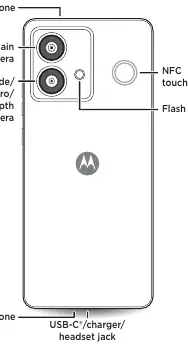
Back: The back includes the main camera, ultra-wide/macro/depth camera, flash, NFC touchpoint, and microphones. The bottom houses the USB-C/charger/headset jack.
SIM Card and Power
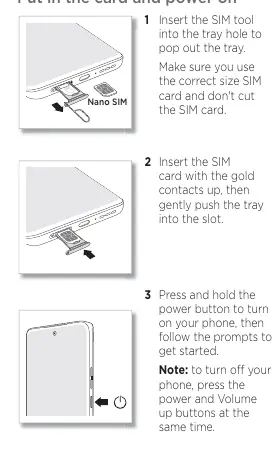
- Insert the SIM tool into the tray hole to pop out the tray.
- Insert the SIM card with the gold contacts facing up, then gently push the tray back into the slot.
- Press and hold the power button to turn on your phone.
Note: To turn off your phone, press and hold the power and volume up buttons simultaneously.
Safety and Maintenance
Water and Dust Resistance: The device is tested to IP68 standards, withstanding immersion in up to 1.5 meters of fresh water for up to 30 minutes. This resistance decreases with normal wear and is not designed for underwater operation. Do not expose to pressurized water or liquids other than fresh water.
Battery and Charging: Only use compatible Motorola chargers. Do not charge the phone in temperatures below -20°C or above 45°C. The battery should only be removed by a Motorola-approved service center.
Temperature Limits: Do not use the phone in temperatures below -20°C or above 45°C. Do not store or transport the phone in temperatures below -20°C or above 60°C.
Support and Legal
For help, swipe up from the Home screen and tap Settings > Help. You can also find software, user guides, and more at www.motorola.com/mymotoedge. For complete legal information, go to Settings > Legal information or visit www.motorola.com/device-legal.
Official resources from the manual
Manufacturer information
Motorola
Practical help
Common problems
Phone unresponsive
Press and hold the power button until the screen goes dark and the phone restarts.
Headset not connecting
Use a USB-C headset or a 3.5mm to USB-C adapter. Headset and adapter may be sold separately.
Touchscreen sensitivity issues
Do not use screen protectors thicker than 0.5mm as they may reduce touchscreen sensitivity.
Before use
- Read legal, safety, and regulatory information
- Ensure correct SIM card size
- Charge using a compatible Motorola charger
Images and diagrams
- Front view shows proximity sensor, front camera, speaker, volume buttons, power button, fingerprint sensor, and SIM tray.
- Back view shows main camera, ultra-wide/macro/depth camera, flash, NFC touchpoint, and USB-C port.
Model compatibility
- Compatible with USB-C headsets.
- Requires adapter for 3.5mm headsets.
- eSIM option available in addition to physical SIM.

Manual page author
Michael Turner
Technical manual editor
Reviews PDF manuals for structure, safety notes, and practical product details so readers can find the right information quickly.