Power / Wireless Chargers
User Manual for Motorola 120W Soundbar MT120-5-SB21
Quick guide for the Motorola 120W Soundbar (MT120-5-SB21). Learn how to connect via HDMI ARC, Optical, AUX, or Bluetooth, use the remote control, and troubleshoot common audio issues.
Table of contents
Manual images
Click an image to enlargeQuick Guide
The Motorola 120W Soundbar (MT120-5-SB21) is a compact audio system featuring 4 speakers, 1 subwoofer, and 2 bass air tubes. It supports multiple input methods including Bluetooth, HDMI(ARC), Optical, AUX, and USB media playback. This guide covers setup, operation, and troubleshooting.
Safety and Installation
- Place the product in a cool and dry place.
- Do not remove the cabinet cover; contact a service professional for repairs.
- If liquids or foreign objects enter the device, disconnect power immediately.
- Do not install the unit near rain, moisture, or other liquids.
Technical Specifications
- Peak Power: 120W
- Speaker Drivers: 2.25" speakers x 4 + 6.5" subwoofer x 1
- Frequency: 50Hz-18KHz
- Bluetooth: Version 5.0+EDR (Range up to 10m)
- Connections: USB 2.0, AUX (3.5mm), Optical, HDMI ARC, Wired subwoofer
- Power Supply: 110V-240V
Connections
Connect your devices to the soundbar using the ports located on the back of the unit:
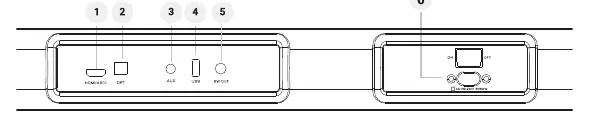
- HDMI(ARC): Connect to TV using an HDMI cable. Ensure HDMI ARC is selected as the TV's audio output.
- OPTICAL IN: Connect using a digital optical cable.
- AUX IN: Connect using a 3.5mm stereo jack cable.
- USB IN: Connect a flash drive (FAT32 format, max 64GB) for MP3/WAV playback.
- SW OUT: Connect the wired subwoofer.
- AC IN: Connect the provided power cord.
Operation
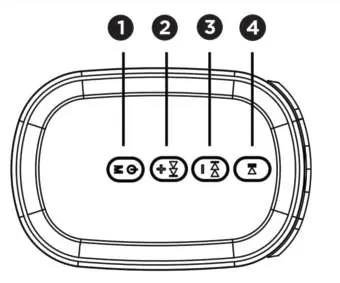
You can control the soundbar using the remote control or the control panel keys on the unit.
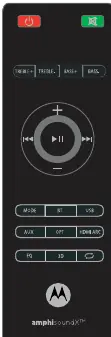
Remote Control
Use the remote to power on/off, adjust volume, change inputs (MODE, BT, USB, AUX, HDMI ARC, OPT), adjust EQ settings (Music, Movie, News), and control playback (Play/Pause, Previous/Next track).
Bluetooth Pairing
Press the BT button on the remote or cycle through inputs using the MODE button until 'bt' appears on the LED display. The display will flash while in pairing mode. Search for "MT120-5-SB21" on your device. The LED will stop flashing once paired.
Troubleshooting
- No sound: Check audio cable connections, ensure the correct input is selected on the remote, and verify the TV is muted if playing audio through the soundbar.
- Bluetooth connection issues: Restart the soundbar, ensure Bluetooth is enabled on your device, and ensure the soundbar is not connected to another device.
- Distorted sound: If playing TV audio through the soundbar, ensure the TV speakers are muted.
Manufacturer information
Motorola
Practical help
Common problems
No sound from the soundbar
Check audio cable connections, select the correct input on the remote, and ensure the TV is muted if using the soundbar as the primary output.
Device cannot connect via Bluetooth
Restart the soundbar, ensure Bluetooth is enabled on your device, and check if the soundbar is already connected to another device.
Distorted sound or echo
If playing audio from the TV through the soundbar, make sure the TV's internal speakers are muted.
Poor Bluetooth audio quality
Move the device closer to the soundbar and remove any obstacles between them.
Before use
- Verify package contents: Soundbar, Remote control, Power cord, AUX-in cable, Wall-mounting kits.
- Ensure the installation location is cool and dry.
- Check that your power supply is within 110V-240V.
- Prepare necessary cables (HDMI, Optical) as they may not be included in the box.
- Format USB drives to FAT32 if using for media playback.
Specs in practice
- Bluetooth 5.0+EDR
- Wireless connectivity standard with a range of up to 10 meters.
- USB Compatibility
- Supports FAT32 format flash drives up to 64GB for MP3/WAV playback.
Images and diagrams
- Control Panel: 1 (Pause/Play), 2 (Volume Up/Next Track), 3 (Volume Down/Previous Track), 4 (Power on/off).
- Connections: 1 (HDMI ARC), 2 (Optical), 3 (AUX), 4 (USB), 5 (Subwoofer Out), 6 (Power Input).
Model compatibility
- USB drives must be formatted in FAT32.
- Maximum USB drive size supported is 64GB.
- Bluetooth pairing requires the soundbar to be in BT mode (LED flashes).

Manual page author
Emily Carter
User documentation editor
Prepares concise manual descriptions and highlights the most useful setup, operation, and maintenance information for readers.