Mobile / Smartphones
User Guide for Motorola TurboPower 15W Wireless Charging Stand
Quick guide for the Motorola TurboPower 15W Wireless Charging Stand. Learn how to set up, use, understand LED light indicators, and maintain your device safely.
Table of contents
Manual images
Click an image to enlargeQuick Start Guide
To begin using your Motorola TurboPower 15W Wireless Charging Stand, follow these steps:

- Connect a Motorola-approved USB-C cable and charger to the wireless charging stand.
- Connect the other end of the cable to a power supply. For the best charging performance, it is recommended to use a Motorola 68W or 125W charger.
- Place your Qi-certified phone on the stand. You can position it in either portrait or landscape mode.
- Ensure your phone is centered on the stand for optimal charging efficiency.
Stand Light Indicators
The base of the stand features an LED light that indicates the current charging status:
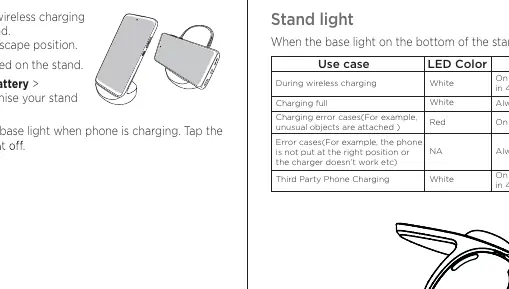
- White (Breathing, 1 circle/4s): During wireless charging.
- White (Always on): Charging full.
- Red (On and off, 2 circles/1s): Charging error (e.g., unusual objects attached).
- White (Breathing, 1 circle/4s, off after 30s): Third-party phone charging.
- Always off: Error case (e.g., phone not positioned correctly or charger malfunction).
Customization
You can customize your stand settings directly from your phone. Navigate to Settings > Battery > Wireless Charging Stand. From here, you can toggle the stand base light on or off while the phone is charging.
Care and Maintenance
To ensure the longevity of your charging stand, observe the following precautions:
- Cleaning: Use only a dry, soft cloth. Do not use alcohol or other cleaning solutions.
- Environment: Do not expose the stand to water, rain, extreme humidity, or sweat. It is not waterproof.
- Temperature: Do not use the stand in temperatures below -10°C (14°F) or above 40°C (104°F). Do not store or transport in temperatures below -20°C (-4°F) or above 60°C (140°F).
- Protection: Keep the stand away from dust, dirt, sand, and food. Avoid dropping the stand or exposing it to strong vibrations.
Safety and Legal Information
This product contains magnets. Keep the stand more than 20 cm (8 in.) away from medical devices like pacemakers, as well as credit cards, ID cards, and other magnetically encoded media. Do not place any objects (such as metallic items, protective cases, or NFC/RFID chips) between the phone and the stand, as this may cause overheating or charging failure. This device is intended for indoor use on flat surfaces only and is not suitable for use in vehicles.
Manufacturer information
Motorola
Practical help
Common problems
Phone is not charging or charging is inefficient.
Ensure the phone is centered on the stand. Remove any protective cases, metallic items, or magnetic supports between the phone and the stand.
LED light is red.
This indicates a charging error. Check for unusual objects attached to the phone or stand, or ensure the phone is positioned correctly.
Before use
- Use a Motorola-approved USB-C cable and charger.
- Ensure the surface is flat and indoors.
- Remove any magnetic supports, protective cases, or metallic items between the phone and the stand.
- Verify the phone is Qi-certified.
Specs in practice
- Operating Frequency
- 110kHz-205kHz
- Operating Temperature
- -10°C to 40°C (14°F to 104°F)
Images and diagrams
- The USB-C port is located at the base of the stand for power connection.
- The LED light is located at the bottom of the stand base.
Model compatibility
- Compatible with Qi-certified wireless charging phones.
- Not suitable for use in vehicles.

Manual page author
Michael Turner
Technical manual editor
Reviews PDF manuals for structure, safety notes, and practical product details so readers can find the right information quickly.