Power / Power Banks
User Manual for myCharge Jolt 2000d Power Bank
Quick guide for the myCharge Jolt 2000d power bank. Learn how to charge your devices, check battery levels, maintain the unit, and troubleshoot common charging issues.
Table of contents
Manual images
Click an image to enlargeQuick Guide
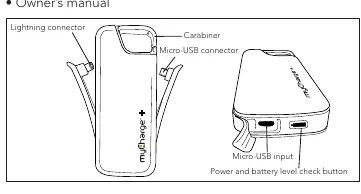
The myCharge Jolt 2000d is a portable power bank equipped with a built-in Apple Lightning connector and a Micro-USB connector. It features an automatic device detection system and a battery level check button.
Charging the Jolt 2000d
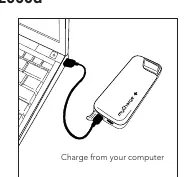
To charge the power bank, connect the included USB to Micro-USB cord to the Micro-USB input on the Jolt and plug the other end into a computer's USB port or a USB AC power adapter. A full charge takes approximately three hours via a USB AC adapter or five hours via a standard notebook USB port.
Charging Devices
The Jolt 2000d uses an automatic device detection system for the Micro-USB connector. Simply plug in your device to begin charging. When using the Apple Lightning connector, if the Jolt is not already turned on, press and hold the battery icon button for 3 seconds to start the charging process. You can charge up to two devices simultaneously.
Checking Battery Level
Press the battery level check button to see the remaining energy. The battery icon will illuminate in different colors:
- Solid Green: 71-100%
- Yellow: 41-70%
- Red: 11-40%
- Flashing Red: 0-10%
The LED will turn off automatically after 5 seconds.
Maintenance
To ensure the Jolt operates at full potential:
- Re-charge the unit every three months when not in use.
- Keep the device dry and away from moist or corrosive materials.
- Clean the surface with a dry cloth.
Troubleshooting
If your device is not charging, confirm that it is properly connected to the appropriate connector and that the Jolt has sufficient energy by pressing the battery icon button. If the icon is red, the unit needs to be recharged.
Manufacturer information
myCharge
Practical help
Common problems
Device is not charging
Ensure the device is properly connected to the correct cable and that the Jolt 2000d has sufficient battery charge (check the LED indicator).
Jolt 2000d is warm to the touch
It is normal for the unit to be warm while in use.
Before use
- Fully charge the Jolt 2000d before first use.
- Verify the device you are charging is compatible with the Lightning or Micro-USB connector.
- Ensure you have the included USB to Micro-USB cable for charging the power bank itself.
Specs in practice
- Battery Capacity
- 2000mAh Lithium Polymer battery.
Images and diagrams
- The device features a Lightning connector and a Micro-USB connector for charging external devices.
- The Micro-USB input is used to charge the power bank itself.
- The power and battery level check button is located on the side of the unit.

Manual page author
Emily Carter
User documentation editor
Prepares concise manual descriptions and highlights the most useful setup, operation, and maintenance information for readers.