Power / Power Banks
User Manual for Xiaomi 20000mAh Redmi 18W Fast Charge Power Bank
Quick guide for the Xiaomi 20000mAh Redmi 18W Fast Charge Power Bank (Model PB200LZM). Learn how to charge devices, use low-current mode, and understand safety precautions.
Quick answers from the manual
Quick answer
- The Xiaomi 20000mAh Redmi 18W Fast Charge Power Bank (PB200LZM) is a high-capacity portable charger. It supports 18W fast charging, features dual USB-A output ports, and includes a low-current mode for small devices. p. 1
Key actions
- Check battery level: Press the side button once. p. 1
- Enter low-current mode: Double-press the side button. p. 1
First start
- Fully charge the power bank before first use. p. 1
Problems and fixes
Power bank in protection mode (no LED response)
Connect an external charger to the power bank to restore operation.
p. 1Maintenance and reset
- If not used for a long time, keep the battery level between 25-50% and store in a cool, dry place. p. 1
Technical specifications
| Parameter | Value | Meaning | Pages |
|---|---|---|---|
| Capacity | 20000mAh | Total battery capacity | p. 1 |
| Max Output | 18W | Maximum power output | p. 1 |
Where to find it in the PDF
- Product Overview and Usage p. 1
- Technical Specifications p. 1, 2
Table of contents
Quick guide from the manual
The Xiaomi 20000mAh Redmi 18W Fast Charge Power Bank is designed for high-capacity portable charging. Before first use, ensure the device is fully charged. The power bank features an intelligent controller compatible with most mobile phones and small devices. It includes a low-current mode specifically for charging small accessories like Bluetooth headsets or fitness bands.
Product Overview
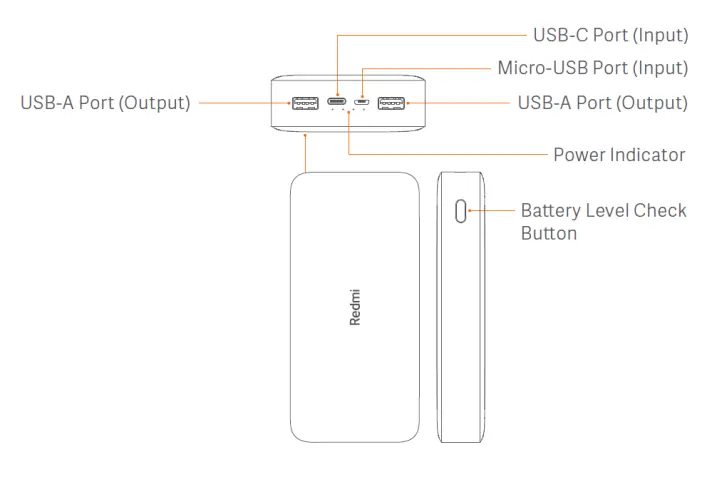
The device features two USB-A output ports and two input ports (Micro-USB and USB-C). A side button is provided to check the battery level; note that this is not a power on/off button. The power bank automatically detects charging and discharging.
Charging the Power Bank
To charge the power bank, use a compatible power adapter and a USB-C or Micro-USB cable. The 4 LED indicators will display the current battery level during the charging process.
Charging Devices
Connect your device to one of the USB-A output ports. The power bank supports fast charging up to 18W when using a single port. When charging two devices simultaneously, the total output is 18W.
Low-Current Mode
To charge small devices like Bluetooth headsets or fitness bands, double-press the battery level check button to enter low-current mode. The LED indicators will light up one by one. To exit this mode, press the button once. The device will also automatically exit this mode after two hours.
Safety Precautions
- Do not expose the power bank to temperatures above 60°C (140°F).
- Do not disassemble, crush, puncture, or short-circuit the product.
- Keep away from fire, heat sources, and direct sunlight in hot environments.
- Do not charge in poorly ventilated areas like pockets, closed bags, or on beds/sofas.
- Keep medical implants (e.g., pacemakers) at least 20cm away from the device.
- If the power bank becomes swollen, deformed, or leaks, stop using it immediately.
Technical Specifications
Model: PB200LZM. Battery type: Lithium-polymer. Capacity: 20000mAh (74Wh). Rated capacity: 12000mAh (5.1V/3.6A). Operating temperature: 5°C to 35°C. Dimensions: 154 × 73.6 × 27.3 mm.
Manufacturer information
Xiaomi Corporation
Practical help
Common problems
Power bank not charging devices
Ensure the cable is connected properly; try using a different USB cable.
Power bank not responding/no LED activity
The device may be in protection mode. Connect an external charger to reset it.
Device not charging at full speed
Ensure you are using a compatible charger and cable (Mi brand recommended).
Before use
- Fully charge the power bank before first use.
- Use a compatible USB charger and cable.
- Ensure the power bank is not covered by clothing or bedding during use.
- Keep the device away from heat sources.
Specs in practice
- Rated Capacity
- 12000mAh (5.1V/3.6A) - the actual usable capacity under specific conditions.
Images and diagrams
- The power bank has two USB-A output ports and two input ports (Micro-USB and USB-C).
- The side button is used to check the battery level and activate low-current mode.
Model compatibility
- Compatible with most mobile phones and small electronic devices.
- Keep medical implants at least 20cm away from the device.

Manual page author
David Miller
Documentation analyst
Organizes user manual content into clear summaries, with attention to model details, product context, and everyday usability.