Electronics / Projectors
Tzumi 2000mAh Power Bank User Manual
Quick guide for the Tzumi 2000mAh Power Bank. Learn how to charge the power bank, charge your devices, understand LED indicators, and follow safety guidelines.
Quick answers from the manual
Quick answer
- The Tzumi 2000mAh Power Bank is a portable charger. To charge the power bank, connect it to a 5V DC USB source using the provided cable. To charge your device, connect it to the power bank's USB port. p. 1
Key actions
- Charging the Power Bank p. 1
- Charging your Device p. 1
First start
- Charge the power bank for 2-4 hours before use. p. 1
Problems and fixes
LED light not on when charging device
Press the Power Button on the Power Bank.
p. 1Technical specifications
| Parameter | Value | Meaning | Pages |
|---|---|---|---|
| Capacity | 2000mAh | Lithium ion battery capacity | p. 1 |
| Input/Output | 5V/1A | Charging voltage and current | p. 1 |
Where to find it in the PDF
- User Manual p. 1
Table of contents
Quick guide from the manual
This manual provides instructions for the Tzumi 2000mAh Power Bank. It covers the charging process for the power bank itself, how to charge your mobile devices, and how to interpret the LED status lights. Always use the provided USB cable for optimal performance.
Specifications
- Battery: 2000mAh lithium ion
- Input: 5V/1A
- Output: 5V/1A
LED Light Indicators
- Solid Blue: Power Bank is charging your device.
- Flashing Blue: Power Bank needs to be charged.
- Flashing Red: Power Bank is being charged.
- Solid Red: Power Bank is done being charged.
- Flashing Red and Blue: Some models may display this while charging.
Charging the Power Bank
- Connect the provided USB charging cable to the Power Bank.
- Plug the other end into a computer or a USB powered supply of DC 5V.
- The LED light will flash red while charging and turn solid red when complete.
- Charging takes approximately 2-4 hours, depending on the current of your charging source.
Charging your Device
- Plug the USB end of the cable into the charged Power Bank.
- Connect the charging tip specific to your device into your device.
- The LED light will turn solid blue when charging begins.
- If the LED does not turn on, press the Power Button on the Power Bank.
- The Power Bank provides approximately 1 full smartphone charge, depending on your device's power needs.
Safety Precautions
- Do not use the device near any water source.
- Do not attempt to modify, try to repair, or disassemble the device.
- Do not use chemical detergents to clean the device; use a soft, dry cloth.
Manufacturer information
Tzumi
Practical help
Common problems
LED light does not turn on when charging a device
Press the Power Button on the Power Bank to ensure it is turned on.
Power Bank needs to be charged
Look for a Flashing Blue Light indicator.
Before use
- Ensure you have the provided Micro USB cable.
- Verify your charging source provides DC 5V.
- Charge the power bank for 2-4 hours before first use.
Specs in practice
- 5V/1A Output
- The power delivery speed for charging your connected device.
Images and diagrams
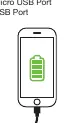
- The diagram illustrates the connection between the Power Bank and a mobile device using the provided USB cable.
Model compatibility
- Provides approximately 1 full smartphone charge depending on your device's power needs.

Manual page author
Michael Turner
Technical manual editor
Reviews PDF manuals for structure, safety notes, and practical product details so readers can find the right information quickly.