Power / Batteries & Chargers
User Guide for MyCharge 2-in-1 Charging Stand
Quick start guide for the MyCharge 2-in-1 Charging Stand. Learn how to adjust the shelf, set up wireless charging, use the USB-C port for secondary devices, and understand LED and audible indicators.
Quick answers from the manual
Quick answer
- The MyCharge 2-in-1 Charging Stand provides 15W wireless charging for phones and a 20W USB-C port for a second device. It features an adjustable shelf and audible/visual indicators for correct phone placement. p. 1
Key actions
- Adjusting the shelf p. 1
- Charging a second device p. 1
First start
- Open the stand, plug in the AC adaptor, and place your phone on the charging coil. p. 1
Problems and fixes
Charger says 'realign' or LED blinks
The phone is not centered over the charging coil. Reposition the phone.
p. 1Technical specifications
| Parameter | Value | Meaning | Pages |
|---|---|---|---|
| Wireless Charging | 15W | Power output for wireless charging coil. | p. 1 |
| USB-C Port | 20W | Power output for secondary wired charging. | p. 1 |
Where to find it in the PDF
- Quick Start Guide p. 1
Table of contents
Manual images
Click an image to enlargeQuick guide from the manual
The MyCharge 2-in-1 Charging Stand is designed to provide 15W wireless charging for your smartphone while offering a secondary 20W USB-C port for charging other devices. To begin, ensure the stand is opened from its flat position, connect the AC adaptor to a wall outlet, and plug the cable into the adaptor input on the stand.
System components
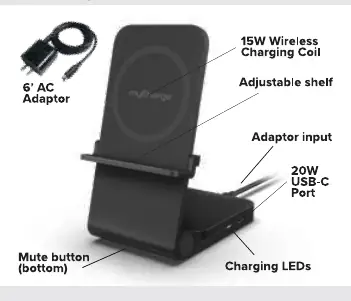
- 15W Wireless Charging Coil: The main surface for charging your phone.
- Adjustable shelf: Can be moved to accommodate different phone sizes.
- 20W USB-C Port: Located on the side for charging a second device (tablet, earbuds, headphones, etc.).
- Mute button: Located on the bottom of the unit to silence audible tones.
- Charging LEDs: Indicators for charging status.
Adjusting the shelf
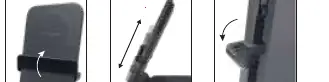
- Flip the shelf up to the unlocked position.
- Adjust the shelf up or down to the desired height for your device.
- Flip the shelf down to lock it in place.
Charging operation
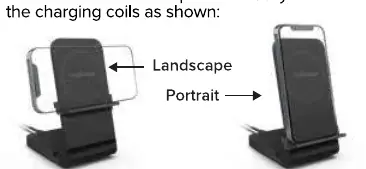
Wireless Charging: Place your phone directly over the charging coil. The stand supports both landscape and portrait orientations. Landscape is recommended for streaming services like Netflix, HBO Max, or Hulu, while portrait is suitable for texting, FaceTime, and other apps.
Charging a 2nd Device: You can charge a second device simultaneously using the 20W USB-C port. Use your own charging cable to connect your tablet, earbuds, or other devices to this port.
Indicators and settings
Audible tones: The charger provides feedback to help with placement:
- Up tone: Indicates your phone is properly placed and charging has initiated.
- Down tone: Indicates you have removed your phone from the charge.
- Realign: If the charger says "realign," your phone is not centered over the coil. Reposition the phone more accurately.
LED charging lights: When your phone is charging, the LED will appear for 10 seconds and then turn off to keep the room dark at night. If the LED blinks, the phone is not centered and is unable to charge.
Manufacturer information
myCharge
Practical help
Common problems
Charger says 'realign'
Your phone is not centered over the charging coil. Reposition the phone more accurately.
LED is blinking
The phone is not centered and is unable to charge. Adjust the phone position.
Before use
- Open the charging stand from the flat position.
- Connect the AC adaptor to a wall outlet.
- Insert the cable into the adaptor input on the stand.
- Adjust the shelf to the appropriate height for your device.
- Ensure the phone is centered directly over the charging coils.
Specs in practice
- 15W Wireless Charging Coil
- The primary wireless power output for your smartphone.
- 20W USB-C Port
- A secondary port for wired charging of tablets, earbuds, or other devices.
Images and diagrams
- The shelf mechanism allows for vertical adjustment by flipping it up, sliding it, and flipping it down to lock.
- The stand supports two orientations: Landscape (for streaming) and Portrait (for general apps).
Model compatibility
- Supports landscape charging for streaming services.
- Supports portrait charging for texting and apps.

Manual page author
David Miller
Documentation analyst
Organizes user manual content into clear summaries, with attention to model details, product context, and everyday usability.