Industrial / Electrical Supports
Installation Instructions for nVent HOFFMAN ABS Operator Adapter
Installation guide for the nVent HOFFMAN ABS Operator Adapter, designed for Allen-Bradley 1494V, 1494C, 140G, and 140U disconnect switches. Includes parts list, step-by-step mounting instructions, and adjustment procedures.
Table of contents
Quick guide from the manual
This document provides installation instructions for the nVent HOFFMAN ABS Operator Adapter. This adapter is designed for use with Allen-Bradley 1494V, 1494C, 140G, and 140U disconnect switches and circuit breakers mounted in Hoffman two-door floor-mounted enclosures (with cutout on right flange or centerpost) or one-through-six-door free-standing enclosures (with disconnect on the right flange).
Parts List
- Adapter Plate, Small: Item 1
- Plate Gasket: Item 2
- Slide Arm, Flat: Item 4
- Shoulder Collar (5/8 diameter): Item 5
- Door Catch: Item 11
- Hardware: Includes various screws, washers, and nuts (Items 3, 6-10, 12-14).
Installation Steps
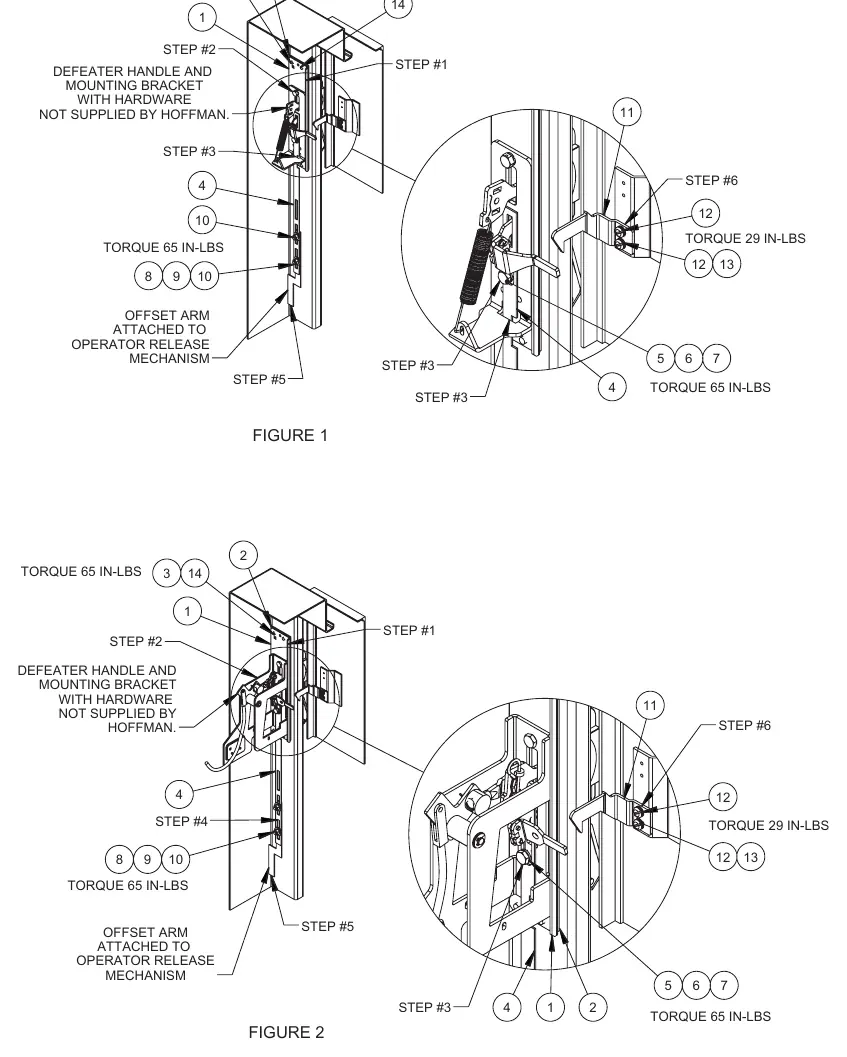
- Adapter Plate: Install the adapter plate (item 1) and gasket (item 2) inside the enclosure behind the rectangular opening. Secure with four screws (item 3) and nylon washers (item 14).
- Small Handle: Assemble the specific Allen-Bradley operating handle and spring bracket to the mounting plate installed in Step 1. Omit the cap screw and lockwasher that fit into the bottom hole of the operating handle.
- Slide Arm: Install the slide arm (item 4). Note: If mounting to a centerpost, cut 2.50 inches off the bottom of the slide arm. Attach the shoulder collar (item 5) and secure with the long cap screw (item 6) and lockwasher (item 7) into the bottom mounting hole of the operating handle.
- Operator Release Mechanism: Attach the bottom of the slide arm to the offset arm of the operator release mechanism using two flat washers (item 8), two lockwashers (item 9), and two hex nuts (item 10). Do not fully tighten until adjustments are made.
- Door Catch: Attach the door catch (item 11) to the tapped spacer on the door using the bottom set of mounting holes, two screws (item 12), and two lockwashers (item 13).
- Final Assembly: Drill and tap holes in the panel per Allen-Bradley instructions, install the panel, and mount the disconnect switch or circuit breaker.
Adjustment Procedures
The operator release mechanism is adjustable in two places:
- Roller Bracket: Check the factory-installed roller bracket. The door latch should hit the latch portion of the roller bracket when the door is closed. Adjust up or down if necessary.
- Slide Arm Length: The safety lock in the operating handle should release just before the master door is fully latched. Lengthen the slide arm if the safety lock releases too soon; shorten it if it releases too late.
Safety Warnings
Always check the function, fits, and clearances of all equipment both before and after installation to ensure it operates safely and meets all applicable codes and regulations. If the completed installation does not function properly, do not attempt to make alterations or operate the equipment. Contact Hoffman Customer Service at 763 422 2211 or http://hoffman.nvent.com/contact-us.
Official resources from the manual
Practical help
Common problems
Safety lock releases too soon
Lengthen the slide arm assembly.
Safety lock releases too late
Shorten the slide arm assembly.
Door catch prevents door from opening
Ensure the Allen-Bradley operating handle is in the 'ON' position.
Before use
- Verify enclosure type (two-door floor-mounted or free-standing).
- Ensure the disconnect switch is compatible (1494V, 1494C, 140G, or 140U).
- Check that all parts from the parts list are present.
- Verify the enclosure has the required cutout on the right flange or centerpost.
Specs in practice
- Torque 65 IN-LBS
- Required torque for mounting screws and slide arm assembly.
- Torque 29 IN-LBS
- Required torque for door catch mounting screws.
Images and diagrams
- Figure 1: Installation for 1494V and 140G Variable Depth.
- Figure 2: Installation for 1494C, 140G, and 140U Cable Control.
Model compatibility
- Compatible with Allen-Bradley Bulletins 1494V, 1494C, 140G, and 140U.
- Requires specific cutout on enclosure right flange or centerpost.

Manual page author
Emily Carter
User documentation editor
Prepares concise manual descriptions and highlights the most useful setup, operation, and maintenance information for readers.