Sports / Fitness
Oricom 08KBEAR Sleep Trainer Digital Clock User Guide
Comprehensive user guide for the Oricom 08KBEAR Sleep Trainer Digital Clock, covering setup, operation, maintenance, and troubleshooting.
Table of contents
Product Overview
The Oricom 08KBEAR is a specialized sleep trainer digital clock designed to help children establish healthy sleep routines. It features a friendly koala design with color-changing backlights to indicate daytime and nighttime, helping children understand when it is time to wake up or stay in bed.
Getting Started
Before first use, insert a paper clip or similar tool into the main switch hole to activate the device. The clock is powered by a built-in 3.7V 500mAh Lithium-ion battery. To ensure longevity, charge the device fully before initial use. When the battery level is low, the battery icon will appear on the display, and the backlight will automatically turn off to conserve power. If you plan to store the device for an extended period, it is recommended to charge it every two months.
Setting the Time and Sleep Schedule
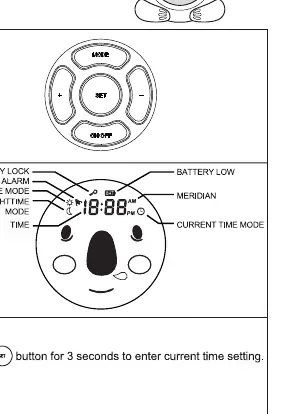
To set the current time, press the mode button until the current time mode icon is displayed, then hold the set button for three seconds. Use the plus and minus buttons to adjust hours and minutes, pressing set to confirm each step. The sleep trainer functionality relies on two key settings: the daytime (wake-up) time and the nighttime (sleep) time. By setting these, the clock will automatically switch between a sun icon with an orange backlight for daytime and a moon icon with a red backlight for nighttime. You can reset these to default settings by holding the plus and minus buttons for three seconds in their respective modes.
Operation and Features
The device offers several display modes, allowing you to toggle between the koala face only or the koala face combined with the digital time. You can adjust the backlight brightness using the plus and minus buttons, which offer seven levels of intensity. To prevent accidental changes to your settings, the clock includes a lock feature; simply hold the plus and minus buttons simultaneously for five seconds to lock or unlock the controls. If you ever need to return the device to its original factory settings, press and hold the mode, set, and on/off buttons simultaneously until the display shows CLr.
Safety and Maintenance
This product is not a toy and should be kept out of reach of children. It contains a lithium-ion battery, which must be handled with care to avoid fire hazards. Do not disassemble the product, as it contains no user-serviceable parts. Keep the clock away from water and moisture to prevent damage. When disposing of the unit, please follow local environmental regulations regarding the disposal of lithium-ion batteries.
Practical help
Common problems
Device settings changed accidentally
Use the lock function by holding the plus and minus buttons for 5 seconds.
Clock needs to be reset to factory defaults
Press and hold the mode, set, and on/off buttons simultaneously until CLr appears.
Battery icon appears on display
The battery is low; charge the device using a 5V 500mA USB power adaptor.
Before use
- Insert a paper clip into the main switch hole to activate the device.
- Ensure the device is fully charged before first use.
- Set the current time using the mode and set buttons.
- Configure the daytime (wake-up) time.
- Configure the nighttime (sleep) time.
- Verify the backlight color changes correctly at set times.
Images and diagrams
- The main switch is located on the back of the device for initial activation.
- The front panel features four buttons: Mode, Set, Plus, and Minus.
- The display shows icons for battery status, alarm, daytime/nighttime mode, and current time.
- The koala face display changes based on the active sleep mode.
Model compatibility
- Requires a standard USB power adaptor (5V 500mA) for charging.
- Not intended for use as a toy; keep out of reach of children.

Manual page author
Michael Turner
Technical manual editor
Reviews PDF manuals for structure, safety notes, and practical product details so readers can find the right information quickly.