Electronics / Monitors
User Manual for Philips 227E7QDSB LCD Monitor
Quick guide for the Philips 227E7QDSB LCD monitor. Learn about features like AH-IPS technology, MHL connectivity, EasySelect menu, and full technical specifications.
Quick answers from the manual
Quick answer
- The Philips 227E7QDSB is a 21.5-inch Full HD (1920x1080) LCD monitor featuring AH-IPS technology, MHL connectivity for mobile devices, and an EasySelect menu toggle key. p. 1, 2
Key actions
- Use the EasySelect Menu Toggle Key on the back of the monitor to adjust settings. p. 2
Problems and fixes
MHL device connection issues
Check with your MHL device vendor or FAQ; you may need a brand-specific cable.
p. 3Show 2 more answers Show less
Technical specifications
| Parameter | Value | Meaning | Pages |
|---|---|---|---|
| Resolution | 1920 x 1080 @ 60Hz | Optimum resolution | p. 3 |
| Power Consumption | 17.04 W (typ.) | On mode power usage | p. 3 |
| VESA Mount | 100x100mm | Wall mount compatibility | p. 3 |
Where to find it in the PDF
- Product Overview p. 1
- Features Highlights p. 2
- Specifications p. 3
Table of contents
Quick guide from the manual
The Philips 227E7QDSB is a 21.5-inch Full HD (1920x1080) LCD monitor designed for home and office use. This guide provides an overview of the monitor's key features, interface controls, and technical specifications to help you get the most out of your display.
Key Features and Technologies
- AH-IPS Technology: Provides extra-wide viewing angles of 178/178 degrees, ensuring consistent color accuracy and brightness from almost any angle.
- MHL Technology: Allows for direct connection of MHL-capable mobile phones and portable devices to the monitor. You can watch HD videos and simultaneously charge your mobile device.
- SmartContrast: Automatically analyzes displayed content and adjusts colors and backlight intensity to enhance contrast for digital images, videos, and games.
- SmartImage Lite: An exclusive technology that analyzes content on the screen and dynamically enhances contrast, color saturation, and sharpness based on the selected scenario.
- Flicker-free Technology: Regulates brightness to reduce screen flicker, helping to minimize eye fatigue.
Using the Monitor
The monitor features an EasySelect Menu Toggle Key located discreetly on the back of the device. This toggle allows for quick and easy navigation and adjustment of the On-Screen Display (OSD) menu settings.
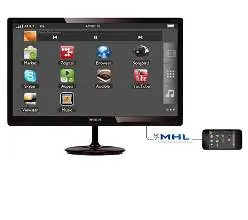
Technical Specifications
- Panel Size: 21.5 inch / 54.6 cm
- Optimum Resolution: 1920 x 1080 @ 60Hz
- Connectivity: VGA (Analog), DVI-D (digital, HDCP), MHL-HDMI (digital, HDCP)
- Audio: HDMI audio out
- VESA Mount: 100x100mm
- Power Supply: External, 100-240VAC, 50-60Hz
- Power Consumption: 17.04 W (typ.) in On mode
- Tilt: -5/20 degrees
Operating Conditions
- Temperature Range (Operation): 0°C to 40°C
- Temperature Range (Storage): -20°C to 60°C
- Relative Humidity: 20%-80%
- Altitude: Operation up to 12,000ft (3,658m)
Manufacturer information
Philips
Practical help
Common problems
MHL device not connecting or working correctly
Check with your MHL device FAQ or vendor for specific instructions. You may need to purchase a brand-specific MHL cable or adapter.
Before use
- Verify power source is 100-240VAC, 50-60Hz.
- Ensure you have the correct cables for your input source (VGA, DVI-D, or MHL-HDMI).
- If using MHL, ensure your mobile device is MHL-certified.
- Check VESA mount compatibility if wall mounting (100x100mm).
Show more Show less
Specs in practice
- SmartContrast
- Philips technology that dynamically enhances contrast for better image quality.
- SmartImage Lite
- Optimizes image settings (contrast, saturation, sharpness) based on the content scenario.
Images and diagrams
- The EasySelect Menu Toggle Key is located on the back of the monitor for OSD navigation.
Model compatibility
- Compatible with Mac OS X, Windows 8.1, 8, and 7.
- MHL functionality requires an optional MHL-certified mobile device and cable.

Manual page author
David Miller
Documentation analyst