Electronics / Monitors
Important Information Manual for Philips 242B1G00 Monitor
This important information manual for the Philips 242B1G00 monitor provides essential regulatory compliance details, warranty terms by region, service contact information, and safety guidelines, including specific instructions for UK plug...
Quick answers from the manual
Quick answer
- This document provides regulatory compliance information, warranty terms by region, service contact details, and safety instructions for the Philips 242B1G00 monitor. p. 1
Key actions
- Contact your local service center for repairs of internal components or display panels. p. 3
- Register your product for support. p. 1
Problems and fixes
Harmful interference with radio/TV reception
Reorient/relocate antenna, increase separation, or connect to a different circuit.
p. 18Show 1 more answers Show less
Where to find it in the PDF
- Regulatory Information p. 2, 11, 12, 13
- Warranty Statement p. 25, 26, 27, 28
- Service Contact Information p. 40, 41, 42, 43
Table of contents
Manual images
Click an image to enlargeImportant Information from the Manual
This document serves as an essential guide for the Philips 242B1G00 monitor, covering regulatory compliance, warranty terms, service contact information, and safety instructions. It is intended to be used alongside the main user manual for reference regarding legal and support-related matters.
Sustainability and Repairability
Philips is committed to extending the lifetime of IT products to reduce environmental impact. The monitor features specific components that are replaceable or repairable for up to 5 years after the point of sale:
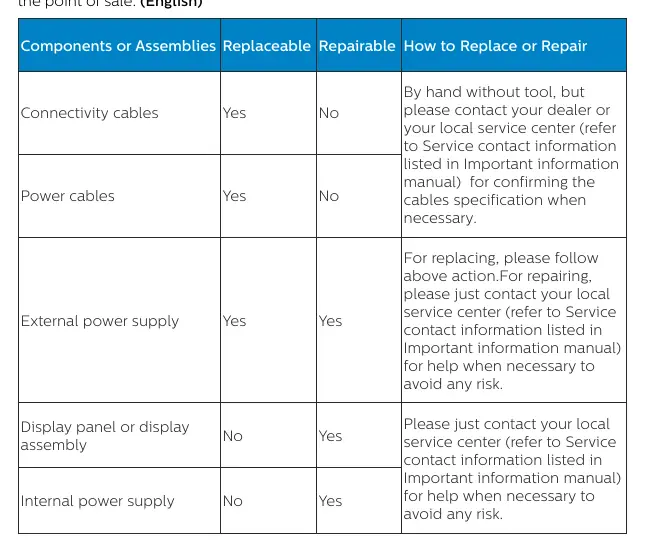

- Connectivity cables: Replaceable (by hand, no tools).
- Power cables: Replaceable (by hand, no tools).
- External power supply: Replaceable and repairable.
- Display panel/assembly: Repairable (contact service center).
- Internal power supply: Repairable (contact service center).
For repairs or replacements of internal components, please contact your local service center to avoid any risk.
Regulatory Compliance
The monitor complies with various international standards, including:
- CE Declaration of Conformity: Complies with directives regarding electromagnetic compatibility, low voltage, ErP, RoHS, and radio equipment.
- FCC Notice (U.S. Only): Tested to comply with Class B digital device limits.
- EPEAT: Evaluates environmental attributes of the product.
- TCO Certified: Meets sustainability criteria for IT products.
Warranty Information
Warranty periods vary significantly based on the region and the specific product category (e.g., C, E, B, M, S, X, P, V lines). Please refer to the warranty tables in the manual to identify the coverage period applicable to your specific model and region.
Service and Support
If you require service, please consult the contact information provided in the manual. The document lists dedicated hotlines and support centers for various regions, including Europe, North America, Asia, and others.
Safety and Installation
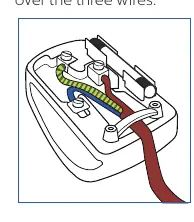
For users in the U.K., the monitor is supplied with an approved 13A plug. If the plug is not suitable for your socket, it must be replaced by a qualified professional. Ensure the mains lead is connected correctly: Blue to Neutral (N), Brown to Live (L), and Green & Yellow to Earth (E).
Manufacturer information
Philips
Practical help
Common problems
Radio or television interference
Reorient or relocate the receiving antenna, increase the separation between the equipment and receiver, or connect the equipment to an outlet on a different circuit.
Before use
- Ensure the power supply is easily accessible.
- Verify the warranty period for your specific region and product line.
- Check that the power cable is securely connected.
- For UK users, ensure the plug is correctly wired if replaced.
Show more Show less
Images and diagrams
- UK plug wiring diagram showing the correct connections for Live (Brown), Neutral (Blue), and Earth (Green & Yellow) wires.
Model compatibility
- Product meets ENERGY STAR energy efficiency specifications in default settings.
- Complies with TCO Certified sustainability standards.

Manual page author
Michael Turner
Technical manual editor