Electronics / Monitors
Important Information Manual for Philips 241V8L/27 LCD Monitor
Quick guide for the Philips 241V8L/27 LCD Monitor. Includes safety precautions, VESA mounting instructions, regulatory information, warranty details, and service contact information.
Quick answers from the manual
Quick answer
- This manual provides essential safety, regulatory, warranty, and maintenance information for the Philips 241V8L/27 LCD monitor. p. 1, 3, 58, 65
Key actions
- Secure the monitor to a wall or floor to prevent tipping. p. 58
- Connect the monitor to a grounded 3-pin outlet. p. 3
Technical specifications
| Parameter | Value | Meaning | Pages |
|---|---|---|---|
| VESA Mount | 75x75mm, 100x100mm, 200x200mm | Mounting interface compatibility | p. 5, 12, 16, 19 |
| Operating Temperature | 0-40°C (32-104°F) | Recommended operating temperature range | p. 3, 6, 8, 10 |
| Operating Humidity | 20-80% RH | Recommended operating humidity range | p. 3, 6, 8, 10 |
Show 1 more answers Show less
Where to find it in the PDF
- Safety Instructions p. 3, 4, 5, 6
- Prevent Tipping p. 58, 59
- Regulatory Information p. 65, 66, 67, 68
- Warranty Statement p. 79, 80, 81, 82
- Spare Parts Service p. 97, 98, 99, 100
- Service Contact Information p. 104, 105, 106, 107
Table of contents
Manual images
Click an image to enlargeImportant Information
This manual provides essential safety, regulatory, warranty, and maintenance information for the Philips 241V8L/27 LCD monitor. It is intended to ensure safe operation and longevity of the device.
Safety Precautions
- Operation: Operate the monitor only with the specified power supply. Using incorrect voltage may cause malfunction, fire, or electric shock. Keep ventilation holes clear to prevent overheating.
- Hearing Safety: Excessive sound pressure from earphones or headphones can cause hearing loss. Avoid listening at high volume levels for long periods.
- Battery Safety: For models with batteries, ensure correct replacement to avoid safety hazards. Keep coin/button cell batteries away from children; ingestion can cause severe internal burns and death.
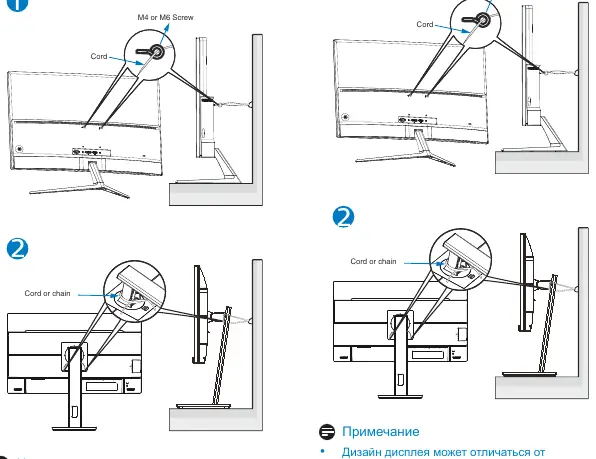
- Stability Hazard: The monitor may fall, causing serious injury or death. Secure the monitor to the floor or wall according to the provided installation instructions. Never place the monitor on unstable surfaces or tall furniture without proper anchoring.
Mounting
This monitor supports VESA-compliant mounting interfaces: 75mm x 75mm, 100mm x 100mm, and 200mm x 200mm. Use M4 or M6 screws for mounting. Always contact the manufacturer for wall-mount installation.
Maintenance
- Environment: Use the monitor in a location with a temperature range of 0-40°C (32-104°F) and humidity of 20-80% RH.
- Altitude: Suitable for operation at altitudes up to 5000m (16400 ft).
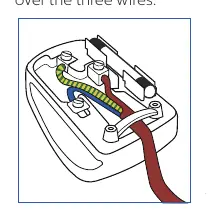
- Power: If the power cord has a 3-pin plug, connect it to a grounded 3-pin outlet. Do not disable the grounding pin.
Regulatory Information
The monitor complies with various international standards, including TCO Certified, EPEAT, Energy Star, CE, and FCC regulations. Refer to the specific sections in the manual for detailed declarations.
Warranty
Warranty periods vary by region and product category. Generally, LCD monitors have a warranty period of 24 to 36 months depending on the specific line (C, E, B, M, S, X, P, V). Please refer to the warranty table in the manual for your specific region.
Spare Parts Service
Spare parts are available for repair. For EPEAT-registered products, parts are available for at least 5 years after the point of sale or 2 years after the end of production. For non-EPEAT products, parts are available for at least 3 years after the point of sale or 1 year after the end of production.
Manufacturer information
Philips
Practical help
Common problems
Monitor instability
Secure the monitor to the floor or wall according to the provided installation instructions to prevent tipping.
Hearing damage
Avoid listening at high volume levels for long periods when using headphones or earphones.
Incorrect voltage
Operate the monitor only with the specified power supply to avoid malfunction, fire, or electric shock.
Before use
- Ensure the power outlet is near the equipment and easily accessible.
- Check that ventilation holes are not blocked.
- Verify the building's circuit breaker is rated 120/240V, 20A max.
- Ensure the monitor is placed on a stable surface.
- If using a 3-pin power cord, connect to a grounded outlet.
Show more Show less
Model compatibility
- Supports VESA-compliant mounting interfaces (75x75, 100x100, 200x200).
- USB Type-C port must be connected to equipment compliant with IEC 62368-1 or IEC 60950-1.

Manual page author
Emily Carter
User documentation editor