Power / Batteries & Chargers
User Manual for PISEN StandBy 120W Desktop Charger
Quick guide for the PISEN StandBy 120W Desktop Charger (TP-C119). Learn how to use wired and wireless charging features, safety precautions, and technical specifications.
Table of contents
Manual images
Click an image to enlargeQuick guide from the manual
The PISEN StandBy 120W Desktop Charger is a multi-port charging station designed to power multiple devices simultaneously using both wired and wireless methods. Ensure the device is placed on a stable surface and connected to a compatible power outlet before use.
Product Diagram
The charger features the following components:
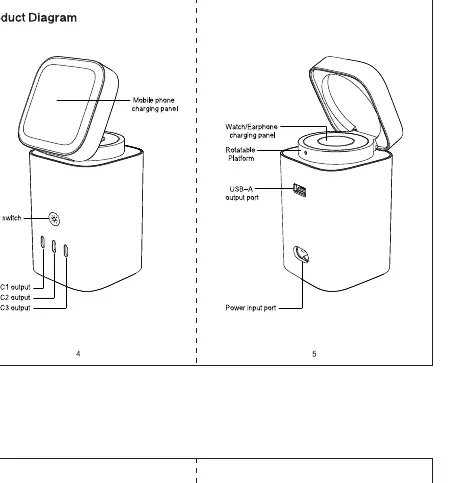
- Power Switch: Located on the side to control power.
- Type-C Outputs: Three ports for high-speed wired charging.
- Type-A Output: One port for standard wired charging.
- Wireless Charging Panels: Dedicated areas for charging phones and earbuds/smartwatches.
- Power Input: Located at the rear for the power cable.
Operating Instructions
Wired Charging
- Connect the charging station to a wall outlet using the provided power cable.
- Connect your device to the desired USB-C or USB-A port using a compatible charging cable.
Wireless Charging for Phones
- Connect the charging station to a power source.
- Place your phone on the wireless charging panel. The device will start charging automatically.
- The wireless charging panel can be adjusted for multi-angle positioning and 360-degree rotation, allowing it to double as a phone stand.
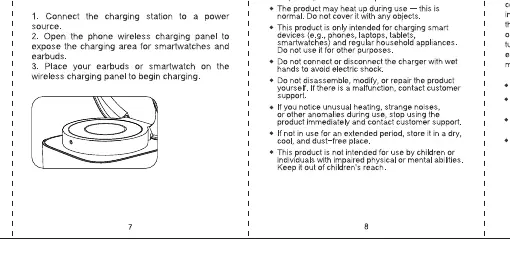
Wireless Charging for Earbuds/Smartwatches
- Connect the charging station to a power source.
- Open the wireless charging panel for earbuds/smartwatches.
- Place your earbuds or smartwatch on the designated wireless charging panel to begin charging.
Safety Warnings
- Do not use the product on carpets, near heaters, or in direct sunlight.
- Do not puncture or pierce the product.
- Keep the product away from fire, water, and high-humidity environments.
- Do not connect or disconnect the charger with wet hands to avoid electric shock.
- Do not disassemble, modify, or repair the product yourself.
- If you notice unusual heating, strange noises, or other anomalies during use, stop using the product immediately and contact customer support.
- Keep out of reach of children.
Technical Specifications
- Model: TP-C119
- Input: 100-240V~ 50/60Hz 2.5A Max
- Total Output: 120W (varies based on port usage combinations)
Manufacturer information
Guangdong Pisen Electronics Co., Ltd.
Practical help
Common problems
Device not charging
Ensure the power cable is securely connected to the wall outlet and the charger. Verify that the device is correctly aligned with the wireless charging panel.
Unusual heating or noise
Stop using the product immediately, disconnect it from the power source, and contact customer support.
Before use
- Ensure the power outlet is compatible with the input voltage (100-240V).
- Place the charger on a stable, flat surface away from heat sources.
- Use compatible charging cables for wired connections.
- Ensure the device is positioned correctly on the wireless charging pads.
Images and diagrams
- The diagram identifies the power switch, three USB-C ports, one USB-A port, and the two distinct wireless charging areas (one for phones, one for earbuds/watches).
- The wireless charging panel for phones is adjustable for angle and rotation.
Model compatibility
- Wireless charging is intended for compatible smartphones, earbuds, and smartwatches.

Manual page author
Michael Turner
Technical manual editor
Reviews PDF manuals for structure, safety notes, and practical product details so readers can find the right information quickly.