Power / Solar Chargers
User Manual for AUKEY Omnia II Mix 140W USB Charger
Quick guide for the AUKEY Omnia II Mix 140W USB charger. Learn how to use the 140W power adapter, understand port output combinations, and follow safety precautions for optimal charging.
Table of contents
Quick guide from the manual
The AUKEY Omnia II Mix 140W is a high-power charger designed for laptops, tablets, and mobile devices. It features three ports (two USB-C and one USB-A) and supports various fast-charging protocols including PD3.1 and PPS. To achieve maximum power, ensure you are using the correct cable and port configuration for your device.
Using your product
To use the charger, simply plug it into a compatible wall outlet (100-240V). Connect your device to the appropriate port using a certified charging cable. For maximum power output (140W) from a single port, connect your device to one of the USB-C ports using a compatible cable, such as a USB-C to MagSafe 3 cable for 2021 MacBook Pro models.
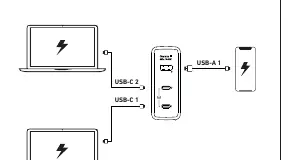
Charging protocols and output
The charger supports multiple protocols including FCP, SCP, QC3.0, Apple 2.4A, Samsung 5V 2A, PD3.0, PD3.1, and PPS. Output power varies based on the number of devices connected:
- Single Port: USB-C 1 or 2 can provide up to 140W. USB-A provides up to 22.5W.
- Dual Ports: USB-C1 + USB-C2 provides 65W + 65W. USB-C1/C2 + USB-A provides 100W + 22.5W.
- Three Ports: USB-C1 + USB-C2 + USB-A provides 65W + 45W + 18W.
Compatibility
The charger is compatible with a wide range of devices, including:
- Laptops: MacBook Pro (16", 14", 13"), MacBook Air, Dell XPS/Inspiron, HP Elite, Google Pixelbook, Microsoft Surface Book 2, ThinkPad, Huawei Matebook series.
- Tablets: iPad Pro, iPad Air, iPad mini, Galaxy Tab S7/S6/A7.
- Mobile: iPhone 14 series, iPhone 13 series, iPhone 12 series, iPhone SE (2nd gen), iPhone 11 series, iPhone XS/XR/X/8, Samsung Galaxy S22/S21/S20/S10/S9/S8/Note series, Google Pixel, Sony Xperia, LG G7/V30+.
Product care and precautions
- Keep the charger away from liquids and extreme heat.
- Do not disassemble or modify the device, as this may lead to fire or electric shock.
- It is normal for the device to heat up slightly during charging. If it becomes too hot to operate, stop charging immediately.
- Dispose of the product according to local government regulations.
Support
For questions, support, or warranty claims, please contact the seller directly. You can also visit www.aukey.com or email [email protected] for further assistance.
Official resources from the manual
Manufacturer information
AUKEY
Practical help
Common problems
Device not charging at maximum speed
Ensure you are using a certified cable (e.g., Apple USB-C to Lightning) and that the device is connected to the correct USB-C port.
Charger is hot to the touch
Slight heating is normal during operation. If it becomes excessively hot, stop charging immediately.
Charger not working
Verify that the plug is securely inserted into the wall outlet and that the outlet is providing power.
Before use
- Check that your wall outlet provides 100-240V.
- Use a certified cable compatible with your device.
- Verify your device supports USB Power Delivery (PD) for fast charging.
- Ensure the charger is not covered or placed in an extremely hot environment.
Specs in practice
- PPS (Programmable Power Supply)
- Allows the charger to dynamically adjust voltage and current for more efficient charging.
- USB-C1 + USB-C2
- When two USB-C devices are connected, the power is split to 65W each.
Images and diagrams
- The charger features two USB-C ports and one USB-A port.
- USB-C ports are recommended for high-power devices like laptops.
- The plug type may vary depending on the region.
Model compatibility
- Supports fast charging for iPhone 8 and later with certified Apple USB-C to Lightning cables.
- Compatible with a wide range of laptops, tablets, and smartphones.

Manual page author
Michael Turner
Technical manual editor
Reviews PDF manuals for structure, safety notes, and practical product details so readers can find the right information quickly.