Home Appliances / Small Kitchen Appliances
User Manual for Princess Oven with Pizza Carousel
Quick guide for the Princess Oven with Pizza Carousel. Learn how to use heating modes, set the rotisserie, clean the device, and operate the pizza carousel safely.
Quick answers from the manual
Quick answer
- The Princess Oven with Pizza Carousel is a household appliance for baking and roasting. It features multiple heating modes, including rotisserie and pizza functions. p. 1
Key actions
- Select heating mode using the heating position control knob. p. 1
- Clean the interior with a mild detergent or dedicated oven cleaner. p. 1
First start
- Remove stickers, wash loose parts, and place on a stable surface with 30cm clearance. p. 1
Show 3 more answers Show less
Problems and fixes
Smoke or smell during first use
This is normal; ensure the area is well-ventilated.
p. 1Technical specifications
| Parameter | Value | Meaning | Pages |
|---|---|---|---|
| Power | 2400W | Power consumption | p. 1 |
Where to find it in the PDF
- Instruction manual p. 1
Table of contents
Quick guide from the manual
The Princess Oven with Pizza Carousel is designed for household use. It features multiple heating modes, including rotisserie and pizza functions. Always ensure the device is placed on a stable, level surface with at least 30 cm of free space around it. The exterior surfaces become hot during operation; always use the handle to open the glass door.
Parts description
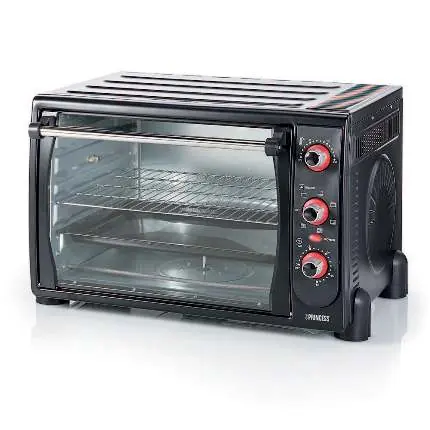
- Glass door
- Temperature control button
- Heating position button
- Time control button
- Indicator light
- Grid
- Baking tray
- Handle
- Rotisserie
- Pizza tray set
Before first use
- Remove all stickers, protective foil, or plastic from the device.
- Wash all loose parts in warm soapy water, rinse, and dry thoroughly. These parts are dishwasher safe.
- Ensure the local voltage matches the device voltage (220-240V~ 50/60Hz).
- Place the unit on a flat, stable surface with 30 cm of clearance.
- Note: The oven may emit some smell and smoke during the first use; this is normal. Use in a well-ventilated area.
Operation
Place the grid, baking tray, rotisserie, or pizza tray in the oven. Use the temperature control knob to set the desired temperature. Select the heating mode using the heating position control knob, and set the time using the time control knob. The indicator light will illuminate and turn off when the set time is reached.
Heating positions
- 1: OFF
- 2: Upper heating
- 3: Lower heating
- 4: Upper and lower heating
- 5: Upper and lower heating with rotisserie
- 6: Upper and lower heating with convection and pizza
- 7: Upper and lower heating with convection and rotisserie
Cleaning and maintenance
Always unplug the device and let it cool down before cleaning. Wash all parts in warm soapy water, rinse, and dry thoroughly. The exterior can be cleaned with a damp cloth. The interior can be cleaned with a mild detergent or dedicated oven cleaner. Never immerse the device in water or other liquids. Do not place the device in the dishwasher.
Safety
- Keep the appliance and its cord out of reach of children under 8 years.
- Do not leave the appliance unattended while connected to the supply.
- The appliance is not intended to be operated by an external timer or remote-control system.
- Surface is liable to get hot during use.
Practical help
Common problems
Food burning
Check food regularly and do not leave it in the oven for too long.
Smoke or smell during first use
This is normal; ensure the area is well-ventilated.
Before use
- Remove all stickers and protective foil.
- Wash loose parts in warm soapy water.
- Place on a flat, stable surface with 30cm clearance.
- Ensure local voltage matches device (220-240V).
Show more Show less
Images and diagrams
- Heating position knob controls the elements used.
- Pizza tray rotates when pizza function is selected.
Model compatibility
- Not suitable for outdoor installation.
- Do not use with external timers or remote control systems.

Manual page author
Emily Carter
User documentation editor