Home Appliances / Cooktops Hobs
User Manual for Bosch Oven HBA 23B1.0 S
Comprehensive user guide for the Bosch HBA 23B1.0 S oven. Includes setup, operating instructions, cooking modes, cleaning, maintenance, and troubleshooting tips.
PDF source: LT · summary: English
Quick answers from the manual
Quick answer
- The Bosch HBA 23B1.0 S is an electric oven. To start, set the clock, then select the heating mode and temperature using the rotary knobs. p. 7, 13
Key actions
- Set the clock p. 13
- Clean the oven p. 24
First start
- Heat the empty oven p. 14
Show 3 more answers Show less
Problems and fixes
Oven does not heat
Check the fuse box and power supply.
p. 32Error codes
| Code | Meaning | Action | Pages |
|---|---|---|---|
| E011 | Button stuck or pressed too long | Press the clock button. If it persists, contact service. | p. 33 |
Where to find it in the PDF
- Controls p. 7
- Cleaning p. 24
Table of contents
Manual images
Click an image to enlargeQuick guide from the manual
This guide provides essential information for operating your Bosch HBA 23B1.0 S oven. Before first use, ensure the clock is set and the oven is heated while empty to remove manufacturing residues. Always follow safety guidelines, keep children away from the appliance, and never use high-pressure cleaners for maintenance.
Safety instructions
- Hot surfaces: Never touch the interior of the oven or heating elements while in use. Keep children at a safe distance.
- Fire hazard: Do not store flammable items in the oven. If smoke appears, keep the door closed, switch off the appliance, and disconnect the power.
- Electrical safety: Ensure the power cable does not touch hot oven doors. Repairs must be performed by qualified technicians.
- Cleaning: Do not use abrasive cleaning agents, alcohol-based cleaners, or high-pressure steam cleaners.
Control panel
The control panel features two rotary knobs and a central display with buttons:
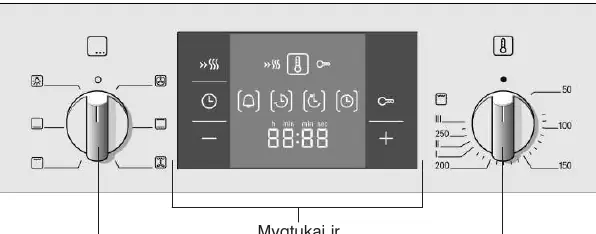
- Function selector (left knob): Used to select the heating mode (e.g., 3D hot air, grill, top/bottom heat).
- Temperature selector (right knob): Used to set the temperature or grill setting.
- Buttons: Used for setting the clock, timer, duration, end time, and child lock.
First use
Before using the oven for the first time, you must set the current time. Connect the oven to power; the display will show four zeros. Use the buttons to set the time. To remove the "new oven" smell, heat the empty oven for one hour at 240°C using the top/bottom heating mode.
Operating the oven
To start cooking, select the desired heating mode with the function selector and the temperature with the temperature selector. The oven will begin heating. You can use the timer functions to set a cooking duration or an end time, after which the oven will switch off automatically.
Cleaning and maintenance
- Self-cleaning back wall: The back wall is coated with self-cleaning enamel that absorbs grease splashes during operation.
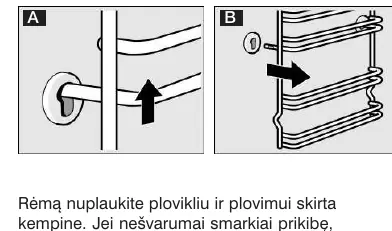
- Rack supports: The side racks can be removed for cleaning. Lift them up and pull them out.
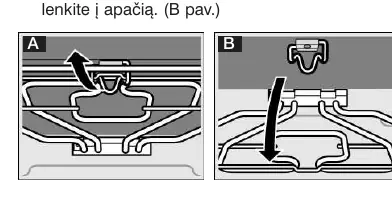
- Grill element: The grill element can be lowered for easier cleaning of the oven ceiling.
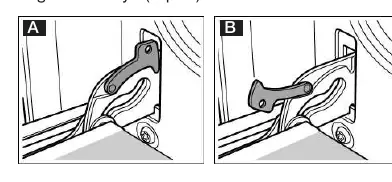
- Oven door: The door can be removed for thorough cleaning. Follow the specific instructions for detaching the hinges.
Troubleshooting
If the oven does not work, check the fuse box and the power supply. If an error code like E011 appears, press the clock button. If the problem persists, contact customer service.
Manufacturer information
Bosch
Practical help
Common problems
Oven does not work
Check the fuses in the fuse box and ensure the power supply is active.
Error code E011
Press the clock button. If the error persists, contact customer service.
Oven does not heat
Rotate the knobs a few times to ensure they are not stuck with dust.
Before use
- Unpack the appliance and inspect for transport damage.
- Set the current time on the display.
- Heat the empty oven for 1 hour at 240°C to remove manufacturing odors.
- Clean all accessories with hot soapy water.
Show more Show less
Specs in practice
- Self-cleaning back wall
- Absorbs grease splashes during operation to keep the oven cleaner.
Images and diagrams
- Control panel: Left knob for function, right knob for temperature.
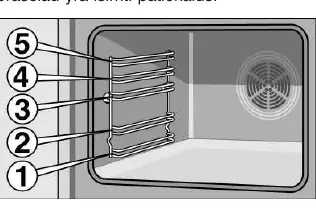
- Rack levels: 5 levels available for accessories.
Model compatibility
- Use only original accessories or those recommended by Bosch.
- Always insert accessories correctly into the rack levels.

Manual page author
Michael Turner
Technical manual editor